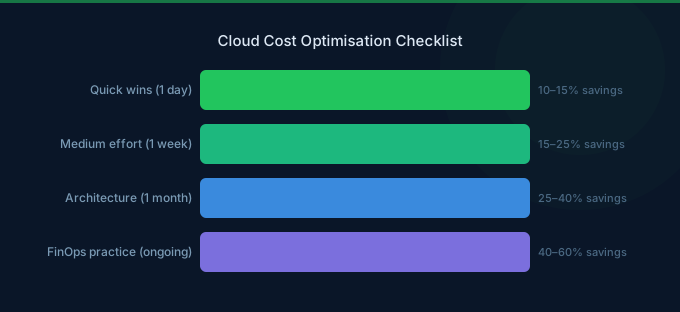
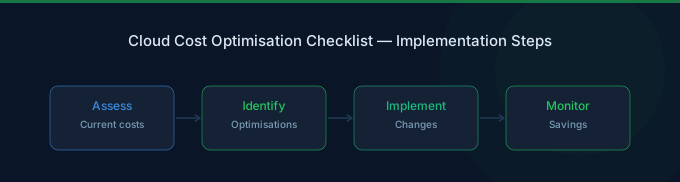
This isn't a theory guide — it's a checklist. Use AWS Cost Management tools to track your progress. Thirty specific actions organized by effort level, each with expected savings and how to do it. Start with the quick wins (15 minutes each), then work through the medium and strategic items.
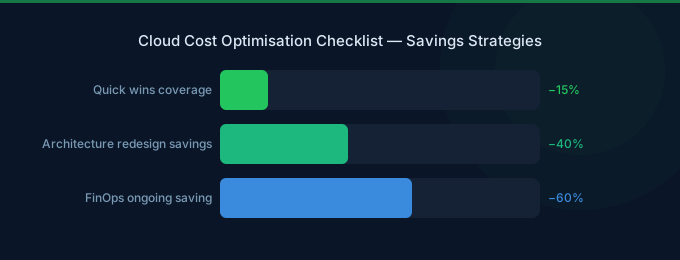
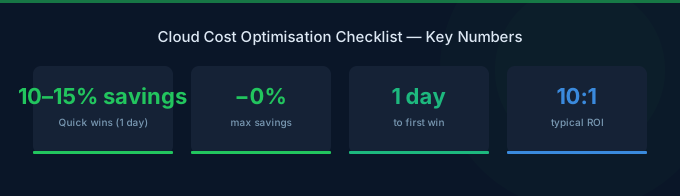
Most organizations implementing this full checklist reduce their AWS bill by 30-50%.
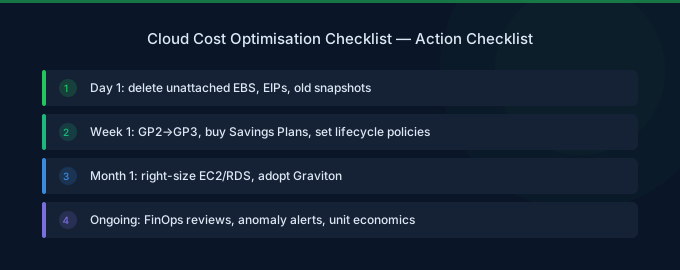
TL;DR: Quick wins (under 15 min each): delete unattached EBS volumes, stop idle instances, enable S3 Intelligent-Tiering. Medium effort (under 1 day): migrate gp2 to gp3, switch to Graviton, implement Savings Plans. Strategic (under 1 week): set up tagging, deploy Spot for stateless workloads, implement auto-scaling. Each action below includes the expected savings impact.
Quick Wins (15 Minutes Each)
These require no architecture changes, no approvals, and deliver immediate savings.
1. Delete Unattached EBS Volumes
Savings: $80/TB/month | Check: Cost Explorer → EBS → filter "Unattached"
Volumes persist after EC2 termination. Snapshot them first, then delete. A forgotten 500GB gp3 volume costs $40/month doing nothing.
2. Release Unused Elastic IPs
Savings: $3.65/IP/month | Check: EC2 → Elastic IPs → filter unassociated
AWS charges for Elastic IPs not attached to running instances. Small per-IP, but they accumulate.
3. Delete Old EBS Snapshots
Savings: $0.05/GB/month | Check: EC2 → Snapshots → sort by age
Snapshots from terminated instances serve no purpose. Delete snapshots older than your recovery requirements.
4. Stop Idle RDS Instances
Savings: 100% of instance cost | Check: CloudWatch → RDS → DatabaseConnections = 0
Dev/staging RDS instances running 24/7 with zero connections. Stop them or use Aurora Serverless v2 for dev.
5. Enable S3 Intelligent-Tiering
Savings: 40-70% on infrequently accessed data | Check: S3 → Bucket → Management → Lifecycle
For buckets with unpredictable access patterns, Intelligent-Tiering automatically moves objects to cheaper tiers. No retrieval fees, $0.0025/1K objects monitoring fee.
6. Delete Unused Load Balancers
Savings: $22/month per ALB | Check: EC2 → Load Balancers → check target health
ALBs with no healthy targets or zero request count are wasting money.
7. Review and Delete Old AMIs
Savings: $0.05/GB/month per AMI snapshot | Check: EC2 → AMIs → sort by creation date
Each AMI has associated EBS snapshots. Old AMIs from months ago still incur snapshot storage charges.
8. Set Up AWS Budget Alerts
Savings: Prevents future waste | Check: Billing → Budgets
Set a budget at your current spend + 10%. Get email alerts when trending over. This prevents bill shock and catches runaway costs early.
9. Turn Off Dev/Test Resources After Hours
Savings: 65% on dev/test compute | Check: Instance Scheduler or manual stop
Dev instances running 24/7 but used only 8 hours/day, 5 days/week. Schedule start/stop with AWS Instance Scheduler or Lambda.
10. Delete CloudWatch Log Groups with No Retention
Savings: $0.03/GB/month | Check: CloudWatch → Log Groups → Retention = Never Expire
Log groups set to "Never Expire" accumulate indefinitely. Set retention to 30 days for most, 90 days for compliance-required logs.
Medium Effort (Half-Day Each)
These require some testing but no major architecture changes.
11. Migrate All gp2 EBS Volumes to gp3
Savings: 20% on EBS | Method: EC2 → Volumes → Modify → Change to gp3
Zero downtime, no detach required. Every gp2 volume should be gp3 — better performance, lower price. No reason to stay on gp2.
12. Switch to Graviton Instances
Savings: 20% on compute | Method: Change instance family (m7i → m7g)
Most Linux workloads run on Graviton without changes. Start with dev/test, then production. Covers EC2, RDS, ElastiCache, Lambda.
13. Purchase Compute Savings Plans
Savings: 30-40% on committed compute | Method: Cost Explorer → Savings Plans → Recommendations
Start conservative: commit to 50-60% of your baseline On-Demand spend. 1-year No Upfront for flexibility. Covers EC2, Fargate, Lambda.
14. Right-Size EC2 Instances
Savings: 15-25% on over-provisioned compute | Check: Compute Optimizer → EC2 Recommendations
Most instances run at 10-30% CPU. Downsize from xlarge to large, or large to medium. Test in staging first.
15. Enable S3 Lifecycle Policies
Savings: 40-80% on aging data | Method: S3 → Management → Lifecycle Rules
Move objects to S3 Infrequent Access after 30 days, Glacier after 90 days, Deep Archive after 180 days. Adjust based on actual access patterns.
16. Deploy VPC Endpoints for S3 and DynamoDB
Savings: Eliminates NAT Gateway data processing | Method: VPC → Endpoints → Create
Gateway Endpoints for S3 and DynamoDB are free. Saves $0.045/GB that would otherwise flow through NAT Gateway.
17. Review and Consolidate NAT Gateways
Savings: $32/month per eliminated gateway | Check: VPC → NAT Gateways
Do you need one per AZ? For non-production VPCs, a single NAT Gateway is usually sufficient.
18. Enable RDS Reserved Instances
Savings: 30-60% on database compute | Method: RDS → Reserved Instances → Purchase
For production databases that run 24/7, Reserved Instances provide significant savings. 1-year No Upfront saves ~30%.
19. Use Aurora Serverless v2 for Variable Workloads
Savings: 40-60% vs provisioned for bursty DBs | Method: Modify RDS instance to Aurora Serverless v2
Dev databases and applications with variable query patterns benefit from pay-per-ACU pricing instead of running a provisioned instance 24/7.
20. Implement Tagging Strategy
Savings: Enables all future optimization | Method: Tag Policy in AWS Organizations
Tag every resource with: Team, Environment, Project, CostCenter. This is the foundation for accountability — you can't optimize what you can't attribute.
Strategic Changes (1-5 Days Each)
These require planning and cross-team coordination but deliver the largest sustained savings.
21. Implement Spot Instances for Stateless Workloads
Savings: 60-90% on eligible compute | Method: EC2 Spot, Karpenter, or Spot Fleet
Web servers, workers, batch jobs, CI/CD runners — any workload that can handle interruption. Use Spot with fallback to On-Demand.
22. Set Up Auto-Scaling Based on Demand
Savings: 20-40% by eliminating over-provisioning | Method: Target Tracking scaling policies
Scale compute based on actual demand instead of provisioning for peak. Use CPU/request-count target tracking for predictable scaling.
23. Containerize and Consolidate Workloads
Savings: 30-50% through better resource utilization | Method: Migrate to ECS or EKS
Multiple small EC2 instances each running one app waste capacity. Containers pack multiple workloads onto fewer, larger instances.
24. Move to Serverless Where Appropriate
Savings: Variable, significant for bursty workloads | Method: Lambda, API Gateway, DynamoDB, SQS
Workloads with less than 30% utilization often cost less as serverless. The break-even depends on request patterns.
25. Implement Cross-Account Cost Allocation
Savings: Enables organizational optimization | Method: AWS Organizations + CUR
Consolidated billing across accounts reveals duplicate resources, inconsistent pricing, and optimization opportunities invisible at the individual account level.
26. Review Data Transfer Architecture
Savings: 30-50% on transfer costs | Check: CUR → Data Transfer line items
Use CloudFront instead of direct S3 egress (cheaper and faster). Keep traffic within AZ when possible. Use VPC peering instead of Transit Gateway for simple connections.
27. Implement Automated Resource Cleanup
Savings: Prevents ongoing waste | Method: Lambda + CloudWatch Events
Auto-delete untagged resources after 7 days, stop idle instances, remove expired snapshots. Prevents the waste that this checklist manually addresses.
28. Optimize Lambda Functions
Savings: 20-40% on Lambda | Method: Power Tuning, ARM64, right-size memory
Use AWS Lambda Power Tuning to find optimal memory. Switch to ARM64 (20% cheaper). Set appropriate timeouts to avoid runaway executions.
29. Negotiate Enterprise Discount Program (EDP)
Savings: 5-15% on total AWS spend | Eligibility: $500K+/year spend
For large organizations, AWS offers volume discounts through EDPs. Requires annual commitment but provides bill-wide discounts.
30. Set Up FinOps Practice
Savings: Sustains all other optimizations | Method: Weekly reviews, team dashboards, accountability
Without ongoing practice, optimizations drift. Follow FinOps best practices: set up weekly cost reviews, team-level dashboards, and make cost a standard metric alongside latency and uptime.
Priority Matrix
| Priority | Actions | Expected Total Savings |
|---|---|---|
| Week 1 (Quick Wins) | Items 1-10 | 10-15% |
| Week 2-3 (Medium) | Items 11-20 | Additional 15-25% |
| Month 2-3 (Strategic) | Items 21-30 | Additional 10-20% |
| Combined | All 30 items | 30-50% total |
Related Guides
- What Is FinOps?
- Cloud Rightsizing Guide
- Cloud Tagging Strategy Guide
- AWS EC2 Cost Optimization Guide
- AWS S3 Cost Optimization: 10 Storage Strategies
Frequently Asked Questions
How often should I review this checklist?
Run through the quick wins (items 1-10) monthly to catch new waste. Review medium-effort items quarterly, and reassess strategic changes semi-annually. Set up automated alerts for items like unattached volumes and idle instances so you catch them between reviews.
Which checklist items have the biggest impact?
Three items deliver the most savings for most organizations: Compute Savings Plans (item 13, 30-40% on committed compute), Spot Instances for stateless workloads (item 21, 60-90% on eligible compute), and rightsizing EC2 instances (item 14, 15-25% on over-provisioned compute). Start with these if you need to prioritize.
Can I automate these optimizations?
Yes, many items can be automated. Use AWS Instance Scheduler for stopping dev resources (item 9), Lambda functions for snapshot cleanup (item 27), and S3 lifecycle policies for storage tiering (item 15). Items like Savings Plans purchases and architecture changes still require human judgment and approval.
Start Optimizing Today
Print this checklist. Work through it top to bottom. The quick wins alone can save hundreds per month, and the full checklist typically cuts AWS bills by 30-50%.
- Start with items 1-10 today — 15 minutes each, immediate savings
- Schedule items 11-20 this week — half-day efforts with significant returns
- Plan items 21-30 this month — strategic changes that compound over time
Lower Your Cloud Costs with Wring
Wring helps you access AWS credits and volume discounts to reduce your cloud bill. Through group buying power, Wring negotiates better per-unit rates across all AWS services.