Rightsizing is the practice of matching cloud resources to actual workload requirements. It's the most impactful cost optimization after eliminating idle resources — and 52% of cloud instances need it. The average EC2 instance runs at 15-25% CPU utilization, meaning most organizations are paying for 3-4x more compute than they use.
The challenge isn't identifying over-provisioned resources (AWS Compute Optimizer does that automatically). It's building the confidence and process to actually downsize them without breaking production.
TL;DR: Rightsizing saves 25-40% on over-provisioned resources. Start with AWS Compute Optimizer recommendations (free, risk-rated). Downsize one tier at a time. Focus on the top 20 most expensive instances first — they represent 80% of the savings. Use the 14-day observation → staging test → production rollout pattern. Cover EC2, RDS, EKS pods, and Lambda for maximum impact.
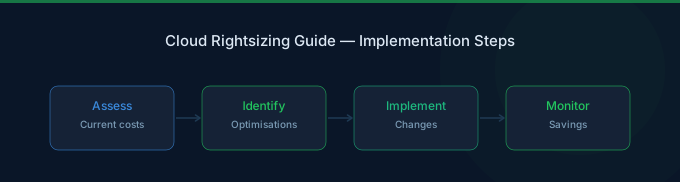
The Rightsizing Process
Step 1: Identify Over-Provisioned Resources
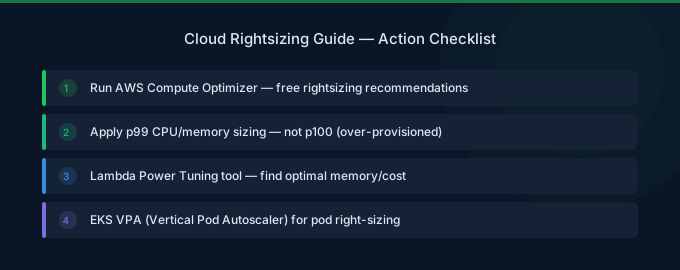
AWS Compute Optimizer provides recommendations for EC2, EBS, Lambda, and ECS. Enable it (free, 2 minutes) and wait 14 days for data collection.
For each resource, Compute Optimizer provides:
- Current instance type and utilization
- Recommended instance type
- Estimated monthly savings
- Performance risk rating (Low, Medium, High)
CloudWatch metrics via AWS Cost Explorer for manual analysis:
- EC2: CPUUtilization, NetworkIn/Out, DiskReadOps
- RDS: CPUUtilization, FreeableMemory, DatabaseConnections
- EKS: Pod CPU/memory requests vs actual usage
Step 2: Prioritize by Impact
Sort recommendations by monthly savings. The top 20 instances typically represent 80% of total rightsizing savings.
| Priority | Risk Rating | Action |
|---|---|---|
| 1 | Low risk, high savings | Implement immediately |
| 2 | Low risk, medium savings | Schedule for this week |
| 3 | Medium risk, high savings | Test in staging first |
| 4 | Medium risk, medium savings | Include in monthly review |
| 5 | High risk | Investigate further before acting |
Step 3: Downsize Safely
The one-tier-at-a-time rule: Never skip sizes. Go from xlarge → large, not xlarge → small. This limits blast radius and makes it easy to revert.
The 14-day observation period: After downsizing, monitor for 14 days. This captures weekly patterns and any less-frequent workload spikes.
Revert criteria: If CPU sustained above 80%, memory pressure events occur, or application latency exceeds SLA, revert to the previous size.
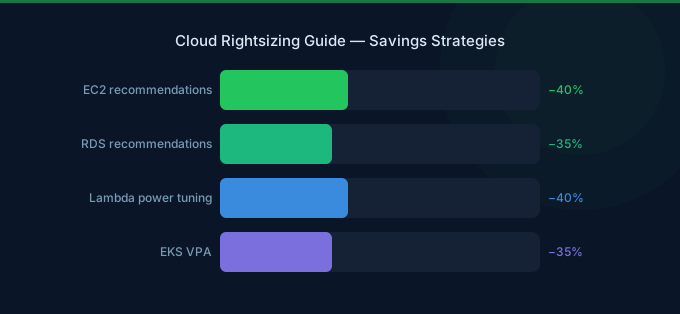
Rightsizing by Service
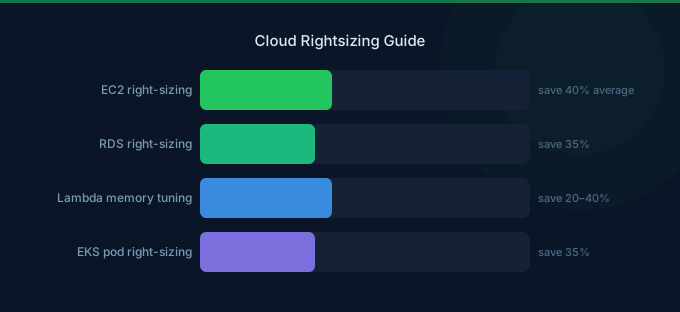
EC2 Rightsizing
| Signal | Threshold | Recommendation |
|---|---|---|
| CPU under 20% average (14 days) | Over-provisioned | Downsize one tier |
| CPU under 5% average (14 days) | Idle | Consider terminating |
| Memory under 40% used | Over-provisioned | Smaller instance family |
| Network under 10% of capacity | Over-provisioned | May not need enhanced networking |
Also consider instance family changes:
- General purpose (m-family) when workload is balanced
- Compute optimized (c-family) when CPU-bound
- Memory optimized (r-family) when memory-bound
RDS Rightsizing
Database rightsizing is higher risk. Approach conservatively:
- Monitor CPUUtilization, FreeableMemory, and DatabaseConnections for 30 days
- Test the smaller instance in a staging environment with production-like queries
- Schedule the production change during a low-traffic maintenance window
- Have a rollback plan (modify back to original size)
EKS Pod Rightsizing
Pod resource requests are the foundation of Kubernetes costs. Use VPA (Vertical Pod Autoscaler) in recommendation mode:
- Deploy VPA with
updateMode: "Off"(recommendation only) - Collect 14 days of recommendations
- Review and apply recommendations for the largest deployments first
- Set requests to P95 of actual usage, limits to 2-3x requests
Lambda Rightsizing
Lambda memory determines both cost and CPU allocation. Use Power Tuning:
- Deploy AWS Lambda Power Tuning
- Test each function at 10+ memory configurations
- Choose the cost-optimal setting (not always the smallest)
- For I/O-bound functions: less memory is cheaper
- For CPU-bound functions: more memory can be cheaper (faster execution)
Common Rightsizing Mistakes
1. Rightsizing Based on Average Only
Average CPU of 20% might hide spikes to 95%. Always check P99 utilization, not just averages. If peaks are brief (under 5 minutes), the instance can handle them with burst capacity. If peaks are sustained, size for the peak.
2. Ignoring Memory
EC2 basic monitoring doesn't include memory metrics. Install the CloudWatch agent to track memory utilization. AWS provides rightsizing guidance in the Cost Management documentation. An instance with 25% CPU but 90% memory usage should not be downsized — it needs that memory.
3. Rightsizing Before Commitment Optimization
If you rightsize instances and then buy Savings Plans, you'll commit at the lower rate. But if you buy Savings Plans first and then rightsize, you might over-commit. Rightsize first, then purchase commitments.
4. One-Time Effort Instead of Continuous
Workloads change. An instance rightsized today may be over-provisioned again in 6 months as usage patterns shift. Schedule quarterly rightsizing reviews.
Related Guides
- AWS EC2 Cost Optimization Guide
- Cloud Cost Optimization Checklist
- Cloud Unit Economics: Costs to Business Outcomes
- What Is FinOps? Cloud Cost Management Guide
Frequently Asked Questions
How much can rightsizing save?
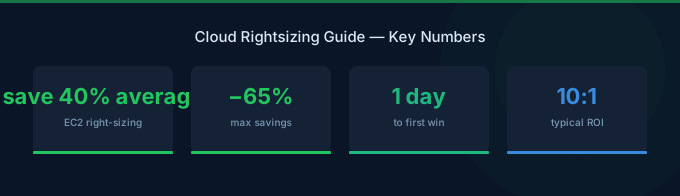
Typically 25-40% on over-provisioned resources. Since over 50% of instances are over-provisioned, this translates to 12-20% of total compute spend. Combined with Graviton migration (additional 20%), the savings can reach 30-50%.
Is rightsizing risky?
Low risk when done properly: use Compute Optimizer's risk-rated recommendations, downsize one tier at a time, monitor for 14 days, and have a revert plan. Start with dev/staging environments to build confidence before touching production.
How often should I rightsize?
Review quarterly at minimum. Workload patterns change with product releases, seasonal traffic, and team growth. Set a recurring quarterly calendar event to review Compute Optimizer recommendations and CloudWatch utilization trends.
Should I rightsize or auto-scale?
Both. Rightsize the base instance type to match normal load, then auto-scale to handle peaks. Rightsizing without auto-scaling means you're still sized for peak. Auto-scaling without rightsizing means you're scaling from an over-provisioned baseline.
Start Rightsizing Today
Rightsizing is the highest-confidence cost optimization: you're matching resources to measured utilization, not making architectural changes.
- Enable Compute Optimizer — Free, automatic recommendations (2 minutes)
- Prioritize by savings — Focus on the top 20 most expensive instances
- Start with Low Risk — Implement low-risk recommendations immediately
- Downsize one tier at a time — xlarge → large, not xlarge → medium
- Schedule quarterly reviews — Rightsizing is continuous, not one-time
Lower Your Cloud Costs with Wring
Wring helps you access AWS credits and volume discounts to reduce your cloud bill. Through group buying power, Wring negotiates better per-unit rates across all AWS services.