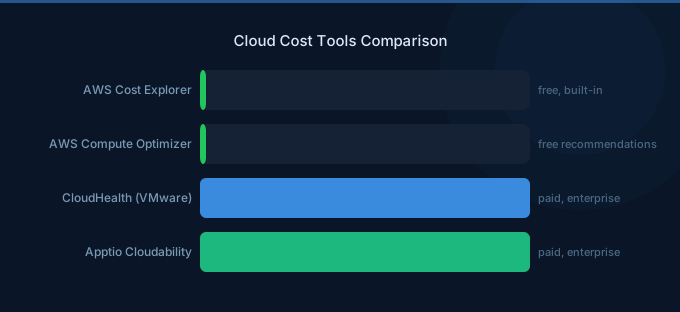
The cloud cost optimization tools market has three tiers: free native AWS cost management tools that provide visibility and basic recommendations, third-party platforms that add automation and multi-account intelligence, and open-source tools that cover specific niches like Kubernetes cost allocation.
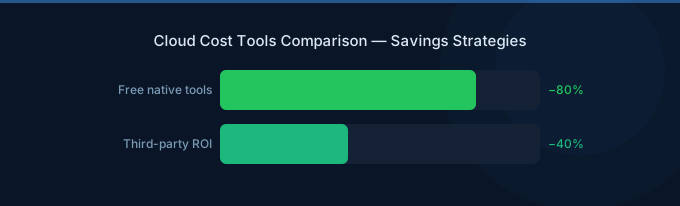
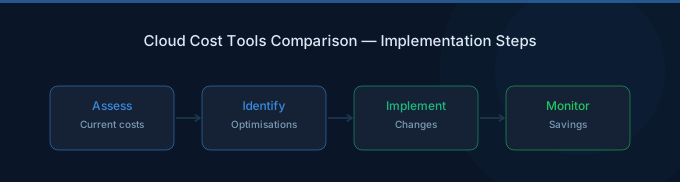
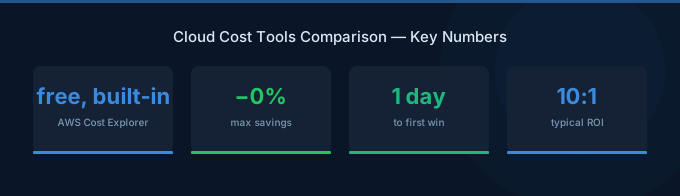
Most organizations should start with native AWS tools — they're free and cover 70-80% of what you need. Graduate to third-party platforms when you need automation, advanced analytics, or when managing costs across multiple accounts and teams becomes the bottleneck.
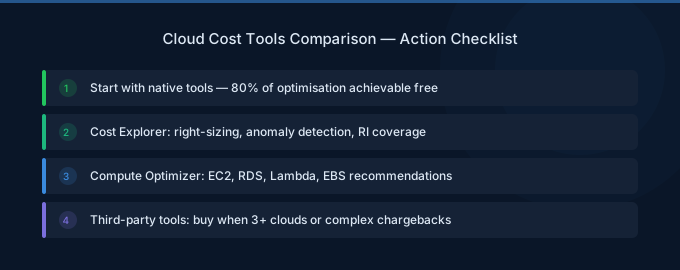
TL;DR: Start with free AWS tools: Cost Explorer for visibility, Budgets for alerts, Compute Optimizer for rightsizing, and Cost Anomaly Detection for spike alerts. These cover 70-80% of cost optimization needs. Third-party platforms add value when you need: automated implementation, Kubernetes cost allocation, team-level showback, or multi-cloud support. Open-source tools (OpenCost, Kubecost Community) are best for Kubernetes-specific cost tracking.
Tool Categories Overview
Native AWS Tools (Free)
These tools are built into every AWS account and should be your starting point regardless of spend level.
AWS Cost Explorer
What it does: AWS Cost Explorer lets you visualize, filter, and analyze your AWS spending by service, account, tag, region, instance type, and more. Supports custom date ranges and forecasting.
Key features:
- Monthly and daily cost trends
- Filter by 15+ dimensions (service, region, tag, etc.)
- 12-month forecast based on historical patterns
- Savings Plans and RI coverage reports
- Right-sizing recommendations for EC2
Limitations: No automation. No team-level dashboards. Custom reports require manual setup. Historical data limited to 12 months.
Setup time: 5 minutes. Available immediately in every AWS account.
AWS Budgets
What it does: Set cost thresholds and get alerts when actual or forecasted spend exceeds them. Supports cost, usage, RI coverage, and Savings Plans budgets.
Key features:
- Email and SNS alerts at configurable thresholds (80%, 100%, etc.)
- Forecasted alerts before you actually overspend
- Budget actions for automated responses (restrict IAM, stop EC2)
- Tag-based budgets for team-level tracking
Limitations: First 2 budgets free, then $0.02/budget/day. No root-cause analysis — you know you're overspending but not why.
Setup time: 10 minutes. Set budget at current spend + 10%.
AWS Compute Optimizer
What it does: Analyzes EC2, EBS, Lambda, and ECS usage patterns and recommends right-sizing changes with projected savings.
Key features:
- Instance type recommendations based on CloudWatch metrics
- EBS volume type and size recommendations
- Lambda memory optimization
- Risk-rated recommendations (low/medium/high performance risk)
Limitations: Requires 14+ days of CloudWatch data. Only covers compute resources (not databases, networking, etc.). Recommendations must be implemented manually.
Setup time: 2 minutes. Enable in the console.
AWS Cost Anomaly Detection
What it does: Uses machine learning to detect unusual cost spikes and alert you before they become big problems.
Key features:
- ML-powered anomaly detection per service, account, or tag
- Root cause analysis for detected anomalies
- Email or SNS alerts
- Customizable sensitivity thresholds
Limitations: Can be noisy for highly variable workloads. No automated remediation.
Setup time: 5 minutes.
AWS Trusted Advisor
What it does: Checks your AWS environment against best practices across cost, performance, security, fault tolerance, and service limits.
Key cost checks:
- Idle EC2 instances (low CPU utilization)
- Unassociated Elastic IPs
- Underutilized EBS volumes
- Idle RDS instances
- RI optimization recommendations
Limitations: Full checks require Business or Enterprise Support plan ($100+/month). Basic tier only shows limited checks.
Third-Party FinOps Platforms
Third-party FinOps platforms add automation, multi-account intelligence, and team-level cost management that native tools lack. They make sense when you're spending $50K+/month and managing costs across multiple teams or accounts.
What Third-Party Platforms Add
| Capability | Native AWS | Third-Party Platform |
|---|---|---|
| Cost visibility | Basic filtering | Custom dashboards, team views |
| Recommendations | Manual list | Prioritized, with dollar amounts |
| Implementation | Manual | One-click or automated |
| Team allocation | Tag-based only | Full showback/chargeback |
| Commitment management | Basic coverage report | Portfolio optimization |
| Anomaly detection | ML-based alerts | Root cause + remediation |
| Kubernetes costs | None | Pod/namespace allocation |
| Reporting | Static reports | Scheduled, customizable |
| Waste detection | Basic (Trusted Advisor) | Comprehensive scanning |
Key Evaluation Criteria
When evaluating third-party platforms, focus on:
-
Data source integration — Does it read AWS Cost and Usage Reports (CUR) directly? CUR provides the most granular billing data. Platforms using only CloudWatch or Cost Explorer API miss important details.
-
Recommendation quality — Are recommendations actionable and risk-rated? Do they include projected savings in dollars? Can you implement them with one click?
-
Kubernetes support — If you run EKS, does the platform provide pod-level and namespace-level cost allocation? Many platforms only show node-level costs.
-
Commitment optimization — Does it manage Savings Plans and Reserved Instance portfolios? Can it recommend optimal commitment levels and handle purchases?
-
Team-level reporting — Can each team see their own costs? Can you set per-team budgets with automated alerts?
-
Pricing model — Percentage of savings (aligned incentives but expensive at scale), percentage of spend (predictable but not aligned), or flat fee (cheapest at scale but less support)?
Open Source Tools
Open-source tools are best as supplements to native AWS tools, especially for Kubernetes cost allocation.
OpenCost
What it does: CNCF project for Kubernetes cost monitoring. Allocates cluster costs to namespaces, deployments, and pods based on resource requests and usage.
Best for: Teams that need namespace-level cost visibility without paying for a commercial platform.
Limitations: Kubernetes only. No AWS service cost integration. No commitment optimization. Requires self-hosting.
Kubecost Community Edition
What it does: Similar to OpenCost but with additional features like savings recommendations, cost alerts, and cluster efficiency scores.
Best for: Teams wanting Kubernetes cost optimization with a guided experience. Community edition is free for a single cluster.
Limitations: Multi-cluster support requires paid enterprise tier. No native AWS service cost integration.
Infracost
What it does: Shows cloud cost estimates for Terraform changes before they're applied. Integrates into CI/CD pipelines and pull requests.
Best for: Preventing cost surprises before infrastructure changes go live. Shows cost impact in every PR.
Limitations: IaC cost estimation only — doesn't monitor running infrastructure. Terraform/OpenTofu only.
Cloud Custodian
What it does: Policy-as-code engine for cloud resource management. Define rules to detect and remediate cost waste automatically.
Best for: Engineering teams that want to automate waste cleanup with custom policies (delete untagged resources, stop idle instances, etc.).
Limitations: Requires policy writing (YAML DSL). No cost visualization or dashboards. Steep learning curve.
Feature Comparison Matrix
| Feature | AWS Native (Free) | Third-Party Platform | Open Source |
|---|---|---|---|
| Cost visibility | Good | Excellent | Limited (K8s only) |
| Rightsizing recommendations | EC2/EBS/Lambda only | All services | K8s pods only |
| Automated implementation | No | Yes (most platforms) | Policy-based only |
| Kubernetes allocation | No | Yes | Yes (primary focus) |
| Team showback | Tag-based only | Full dashboards | Basic |
| Commitment management | Basic reports | Portfolio optimization | No |
| Anomaly detection | ML-based | ML + root cause | No |
| IaC cost estimation | No | Some platforms | Infracost |
| Multi-account | Organizations only | Full support | Limited |
| Setup time | Minutes | Days to weeks | Hours to days |
| Ongoing cost | Free | $500-$10K+/month | Free + hosting |
How to Choose: Decision Framework
Spend Under $10K/Month
Use: Native AWS tools only.
At this spend level, native tools cover everything you need. Set up Cost Explorer, Budgets (2 free), Cost Anomaly Detection, and Compute Optimizer. A third-party platform's minimum fee would represent too large a percentage of your total spend to justify.
Spend $10K-$50K/Month
Use: Native AWS tools + open source for Kubernetes.
You need better visibility and probably Kubernetes cost allocation. Deploy OpenCost or Kubecost Community for K8s costs. Use native AWS tools for everything else. Consider a third-party platform only if you have 5+ teams needing separate cost views.
Spend $50K-$200K/Month
Use: Third-party platform + native AWS tools.
At this scale, the automation and multi-account capabilities of a third-party platform save more than they cost. Commitment optimization alone (better Savings Plans coverage) typically pays for the platform several times over. Look for platforms with CUR integration and Kubernetes support.
Spend Over $200K/Month
Use: Third-party platform + dedicated FinOps practice.
You need a full FinOps platform with advanced features: commitment portfolio management, team-level chargeback, custom reporting, and API integrations. The platform should integrate with your internal tooling and support executive-level reporting.
Related Guides
- What Is FinOps? Cloud Cost Management Guide
- Cloud Cost Optimization Checklist
- Cloud Tagging Strategy: Cost Management Foundation
- AWS EC2 Cost Optimization Guide
Frequently Asked Questions
What AWS cost tools are free?
AWS Cost Explorer, Cost Anomaly Detection, Compute Optimizer, and Budgets (first 2) are free. Trusted Advisor's full cost checks require Business Support ($100/month minimum). The Cost and Usage Report (CUR) is free to generate but requires S3 storage for the data.
Do I need a third-party cost optimization tool?
Not until you're spending $50K+/month or managing costs across 5+ teams. Below that, native AWS tools cover 70-80% of optimization opportunities. The remaining 20% usually doesn't justify the cost and setup effort of a third-party platform.
What's the best open source Kubernetes cost tool?
OpenCost (CNCF project) for basic namespace cost allocation. Kubecost Community for additional features like savings recommendations and efficiency scores. Both are free for single clusters and integrate with Prometheus for metrics.
How much do third-party FinOps platforms cost?
Pricing models vary: some charge a percentage of identified savings (typically 15-25%), others charge a percentage of managed spend (1-3%), and some offer flat monthly fees ($500-$10K+). The right model depends on your spend level and how much you want aligned incentives.
Start With Free, Graduate as You Grow
The best cost optimization tool is the one you actually use. Start with native AWS tools — they're free, immediate, and cover the fundamentals:
- Enable Cost Explorer — See where money goes (5 minutes)
- Set up AWS Budgets — Get alerts before overspending (10 minutes)
- Enable Compute Optimizer — Get rightsizing recommendations (2 minutes)
- Enable Cost Anomaly Detection — Catch unexpected spikes (5 minutes)
- Graduate to a platform when ready — When team-level cost management and automation become the bottleneck
Lower Your Cloud Costs with Wring
Wring helps you access AWS credits and volume discounts to reduce your cloud bill. Through group buying power, Wring negotiates better per-unit rates across all AWS services.