FinOps is the operating model that makes cloud spending visible, accountable, and optimizable. It brings together engineering, finance, and business teams to make data-driven decisions about cloud costs — without slowing down innovation.
The name combines "Finance" and "DevOps," but FinOps isn't a finance function. It's a cultural practice. The same way DevOps broke down walls between development and operations, FinOps breaks down walls between engineers who spend money and finance teams who track it.
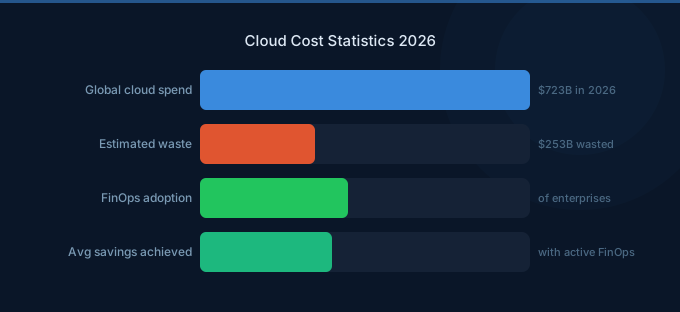
Here's why it matters: organizations waste roughly 27% of their cloud spend. That's not a technology problem — it's an organizational one. Engineers don't see the costs they create. Finance can't interpret the bills they receive. Leadership approves budgets they can't verify. FinOps solves this by creating shared accountability with real-time visibility.
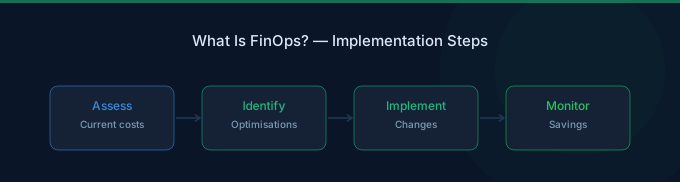
TL;DR: FinOps is the practice of bringing financial accountability to cloud spending through collaboration between engineering, finance, and business teams. It follows three lifecycle phases — Inform, Optimize, Operate — and helps organizations reduce cloud waste by 30-40% while maintaining the speed benefits of cloud. FinOps isn't about spending less; it's about spending smarter.
Why FinOps Exists
Cloud computing changed the economics of IT. In the data center era, infrastructure was a capital expense — you bought servers, depreciated them over 3-5 years, and the costs were predictable. Cloud flipped this to an operational expense where any engineer with an AWS console can spin up resources that cost thousands per month.
This shift created three problems that FinOps solves:
1. Decentralized Spending
In traditional IT, a procurement team controlled infrastructure purchases. In the cloud, every developer is a buyer. A single terraform apply can provision $50,000/month of infrastructure. Without FinOps, nobody tracks whether that spend delivers value.
2. Complex, Opaque Billing
An AWS bill isn't like a phone bill. A mid-size company's Cost and Usage Report can contain millions of line items across hundreds of services, each with different pricing dimensions (per-hour, per-request, per-GB, per-IOPS). Without FinOps practices, finance teams can't tell where the money goes.
3. The Speed vs. Cost Tradeoff
Engineering teams are measured on shipping speed. They'll provision the biggest instance available to avoid performance debugging. Without cost visibility, there's no feedback loop. FinOps creates that feedback loop without gatekeeping deployments.
The FinOps Framework
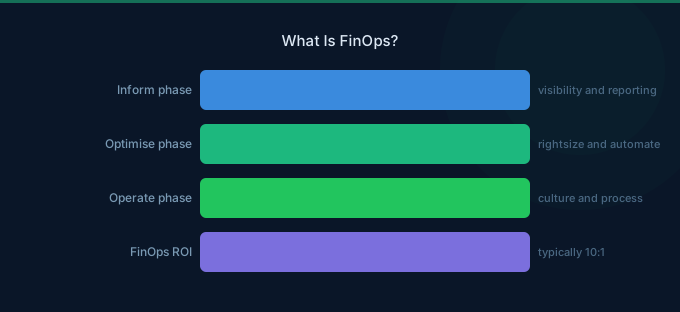
The FinOps Foundation (part of the Linux Foundation) defines a framework with three lifecycle phases. These aren't sequential stages — mature organizations run all three simultaneously.
Phase 1: Inform
You can't optimize what you can't see. The Inform phase creates visibility into who spends what, where, and why.
Key activities:
- Cost allocation and tagging — Every resource gets tagged with owner, team, environment, and project. Untagged resources become the first target for cleanup.
- Showback and chargeback — Teams see their actual cloud costs. Showback means visibility (informational). Chargeback means the costs hit their budget (accountability).
- Dashboards and reporting — Real-time cost dashboards accessible to engineers, not just finance. AWS Cost Explorer is the baseline; tools like Wring help reduce the underlying costs through credits and group buying discounts.
- Anomaly detection — Automated alerts when spending spikes unexpectedly. A $500/day spike on a weekend caught early saves thousands.
AWS tools for Inform: Cost Explorer, Cost and Usage Report (CUR), AWS Budgets, Cost Anomaly Detection, Resource Groups & Tag Editor.
Phase 2: Optimize
With visibility established, teams reduce costs through two levers: rate optimization (pay less per unit) and usage optimization (use fewer units).
Rate optimization:
- Savings Plans and Reserved Instances — Commit to baseline usage for 1-3 years, save 30-72%. Compute Savings Plans are the most flexible option.
- Spot Instances — Use spare EC2 capacity at 60-90% discount for fault-tolerant workloads.
- Enterprise Discount Programs — AWS offers volume discounts through EDPs for large commitments.
Usage optimization:
- Rightsizing — Match instance sizes to actual utilization. Most instances run at 10-30% CPU utilization.
- Storage tiering — Move infrequently accessed data to cheaper tiers (S3 IA, Glacier, EBS sc1).
- Waste elimination — Delete idle resources: unattached EBS volumes, unused Elastic IPs, orphaned snapshots, stopped instances with attached storage.
- Architecture optimization — Serverless for bursty workloads, Graviton for steady-state, containerization for density.
Phase 3: Operate
Optimization isn't a one-time project — it's a continuous practice. The Operate phase builds governance and automation to sustain savings.
Key activities:
- Policy automation — Auto-stop dev instances after hours, auto-delete untagged resources after 7 days, auto-rightsize based on CloudWatch metrics.
- Commitment management — Continuously evaluate and adjust Savings Plans coverage. AWS Cost Explorer Recommendations helps, and platforms like Wring can further reduce costs through AWS credits and volume discounts.
- Cost-aware engineering culture — Include cost as an architecture review criterion. Engineers should know the cost of their services the same way they know latency and error rates.
- Regular optimization reviews — Weekly cost reviews at the team level, monthly at the organization level. Catch drift before it compounds.
The FinOps Team Structure
FinOps isn't a one-person job — it's a cross-functional practice. The team structure depends on your organization's size and cloud spend.
Small Organizations (under $100K/month)
You don't need a dedicated FinOps team. Assign a FinOps champion — typically a senior engineer or engineering manager who spends 4-8 hours/month on cost optimization. They own tagging compliance, review the monthly bill, and flag waste.
Mid-Size Organizations ($100K-$1M/month)
Hire a dedicated FinOps practitioner (or small team of 1-3). This person bridges engineering and finance, owns the optimization roadmap, and manages commitment purchases. They report to engineering leadership, not finance — this is critical for credibility with engineers.
Large Organizations (over $1M/month)
Build a FinOps Center of Excellence (CoE) with:
| Role | Responsibility |
|---|---|
| FinOps Lead | Strategy, stakeholder management, roadmap |
| Cloud Analyst | Cost analysis, reporting, anomaly investigation |
| Cloud Engineer | Automation, tooling, rightsizing implementation |
| Finance Partner | Budgeting, forecasting, chargeback management |
The CoE doesn't optimize directly — they enable and educate teams to optimize their own spend. Think of them as coaches, not gatekeepers.
FinOps Maturity Model
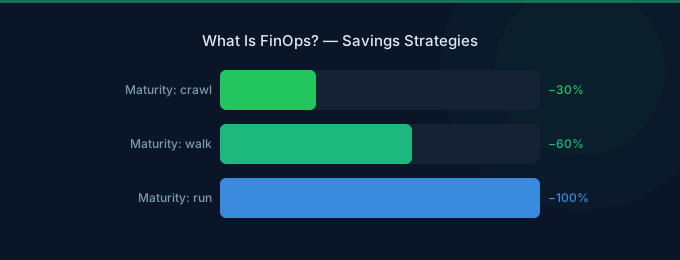
The FinOps Foundation framework defines three maturity stages. Most organizations start at Crawl and take 12-18 months to reach Run.
Crawl (Months 0-3)
Start here. Focus on basic visibility:
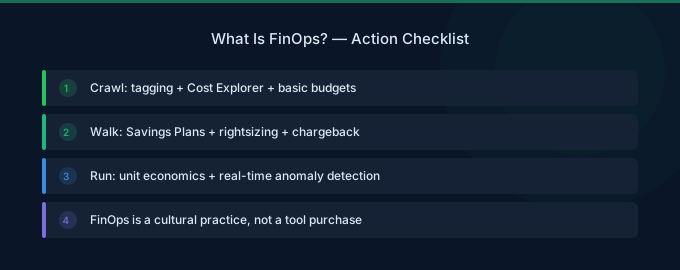
- Enable AWS Cost Explorer and set up AWS Budgets
- Implement a basic tagging strategy (owner, environment, project)
- Set up weekly cost review meetings
- Identify the top 3 cost drivers
Walk (Months 3-9)
Build accountability and start optimizing:
- Deploy team-level cost dashboards
- Purchase initial Savings Plans (start with 50-60% of baseline)
- Implement automated tagging enforcement
- Begin rightsizing program (start with dev/test environments)
- Set up chargeback or showback model
Run (Months 9-18+)
Automate and embed in culture:
- Automated rightsizing recommendations and implementation
- Continuous Savings Plans coverage management
- Cost as a first-class metric in CI/CD pipelines
- Proactive architecture reviews for cost efficiency
- AI-powered anomaly detection and auto-remediation
Key FinOps Metrics
You manage what you measure. These are the metrics that matter:
| Metric | What It Measures | Target |
|---|---|---|
| Effective savings rate | Discount achieved vs on-demand pricing | Over 30% |
| Coverage ratio | % of eligible spend covered by commitments | 70-80% |
| Utilization rate | % of committed resources actually used | Over 95% |
| Tagging compliance | % of resources properly tagged | Over 90% |
| Waste percentage | Idle/unused resources as % of total spend | Under 5% |
| Unit economics | Cost per transaction, per user, per API call | Decreasing trend |
| Forecast accuracy | Actual vs predicted monthly spend | Within 5% |
The most important metric: unit economics. Total cloud spend going up isn't bad if revenue is growing faster. Cost per customer served going down is what matters.
FinOps on AWS: Practical Implementation
AWS provides the richest set of native cost management tools of any cloud provider. Here's how to implement FinOps using AWS services:
Visibility Layer
| Tool | Purpose | Cost |
|---|---|---|
| Cost Explorer | Interactive cost analysis, 13-month history | Free |
| Cost and Usage Report (CUR) | Detailed billing data to S3 | Free (storage costs apply) |
| AWS Budgets | Budget tracking and alerts | First 2 budgets free, then $0.02/day |
| Cost Anomaly Detection | ML-powered spending anomaly alerts | Free |
| Application Cost Profiler | Per-tenant cost allocation | Free |
Optimization Layer
| Tool | Purpose | Savings Potential |
|---|---|---|
| Compute Optimizer | EC2, EBS, Lambda rightsizing | 15-25% on compute |
| Savings Plans | Commitment discounts for compute | 30-72% |
| S3 Intelligent-Tiering | Automatic storage class transitions | 40-70% on storage |
| Trusted Advisor | Cost optimization checks | Varies |
Governance Layer
| Tool | Purpose |
|---|---|
| AWS Organizations | Multi-account management, consolidated billing |
| Service Control Policies | Prevent launching expensive instance types |
| Tag Policies | Enforce consistent tagging across accounts |
| AWS Config | Track configuration compliance |
Where AWS Tools Fall Short
AWS native tools are good for basics but have real limitations:
- No cross-account Savings Plans optimization — AWS recommends at the payer level, but doesn't account for usage patterns across linked accounts
- Rightsizing recommendations lag — Compute Optimizer uses 14 days of data; real optimization needs longer baselines
- No automated implementation — AWS tells you what to do but doesn't do it for you
- Limited cost allocation for shared services — EKS, shared databases, and networking costs are hard to split
This is where Wring fills the gap — providing AWS credits and group buying volume discounts that lower your per-unit costs across all AWS services.
Common FinOps Mistakes
1. Starting with Tools Instead of Culture
Buying a FinOps tool before establishing basic practices is like buying a gym membership and expecting to get fit. Start with weekly cost reviews, basic tagging, and team accountability. Tools amplify good practices — they don't replace them.
2. Centralizing All Optimization
If the FinOps team does all the optimization, you create a bottleneck. The goal is to make every team cost-aware and self-optimizing. The FinOps team should coach and enable, not gatekeep.
3. Optimizing Too Aggressively
Over-committing to Savings Plans, under-sizing instances, and eliminating all slack creates brittleness. Leave 20-25% uncommitted for flexibility. Rightsize to the 95th percentile, not the average.
4. Ignoring Unit Economics
Celebrating reduced total spend while revenue is growing means you're probably under-investing. Track cost per customer, cost per transaction, cost per API call. These metrics tell you whether efficiency is improving.
5. Not Involving Engineering Leadership
FinOps without engineering buy-in is just cost policing. Engineering leaders need to champion cost efficiency as a quality metric — the same way they champion performance and reliability.
FinOps vs. Traditional IT Cost Management
| Dimension | Traditional IT | FinOps |
|---|---|---|
| Spending model | CapEx, annual budgets | OpEx, variable, real-time |
| Who buys | Central procurement | Every engineer |
| Visibility | Quarterly reports | Real-time dashboards |
| Optimization | Annual hardware refresh | Continuous, automated |
| Accountability | IT department | Distributed to teams |
| Decision speed | Weeks to months | Hours to days |
| Governance | Approval gates | Guardrails and policies |
The fundamental shift: in traditional IT, spending was a procurement decision. In cloud, spending is an engineering decision. FinOps puts the right information in front of the right people so those engineering decisions account for cost.
The Future of FinOps: 2026 and Beyond
AI-Powered FinOps (Autonomous Optimization)
AI agents are starting to handle routine FinOps tasks: rightsizing recommendations, commitment management, anomaly response. Within 2-3 years, expect autonomous FinOps agents that continuously optimize without human intervention for routine decisions — while flagging architectural decisions for human review.
GPU and AI Cost Management
AI/ML workloads are becoming the largest cloud cost category for many organizations. FinOps practices need to extend to GPU instance pricing, inference costs, model training budgets, and AI service consumption (Bedrock, SageMaker). This is where the next wave of cloud waste will accumulate.
FOCUS Specification
The FinOps Open Cost and Usage Specification (FOCUS) standardizes cloud billing data across providers. AWS already supports FOCUS-formatted CUR exports. This makes multi-cloud FinOps dramatically easier and enables vendor-neutral tooling.
Sustainability as a FinOps Pillar
Cloud cost optimization and carbon reduction share the same lever: using fewer resources. Expect FinOps teams to track carbon alongside cost, using tools like AWS Customer Carbon Footprint Tool. Efficient cloud usage becomes both a financial and environmental win.
Related Guides
- FinOps for Startups: Cloud Costs Without a Team
- FinOps for AI: The Fastest-Growing Cloud Cost
- Cloud Cost Optimization Checklist
- Cloud Cost Optimization Tools: AWS vs Third-Party
- Cloud Tagging Strategy: Cost Management Foundation
Frequently Asked Questions
What does a FinOps practitioner do?
A FinOps practitioner bridges engineering and finance to optimize cloud spending. Day-to-day activities include analyzing cost trends, managing Savings Plans and Reserved Instances, enforcing tagging standards, running optimization reviews with engineering teams, building cost dashboards, and educating teams on cost-efficient architecture patterns. They don't gatekeep spending — they create visibility and accountability.
How much can FinOps save?
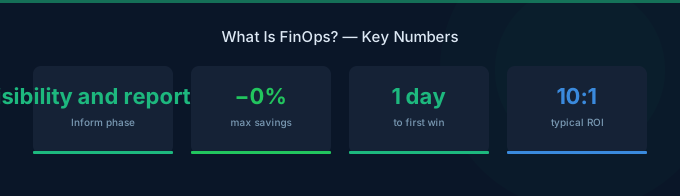
Organizations typically reduce cloud waste by 30-40% in the first year of structured FinOps practices. The breakdown: 15-25% from rightsizing and waste elimination, 10-15% from commitment-based discounts (Savings Plans, Reserved Instances), and 5-10% from architectural optimization. The exact savings depend on how much waste exists — organizations with no prior cost management often see 40-50% reduction.
Do I need a FinOps team?
It depends on your cloud spend. Under $50K/month, a part-time FinOps champion (an engineer spending 4-8 hours/month) is sufficient. At $100K-$500K/month, a dedicated FinOps practitioner pays for themselves many times over. Above $500K/month, a FinOps team of 2-4 people is standard. The rule of thumb: a good FinOps practitioner saves 10-20x their salary.
What's the difference between FinOps and cloud cost optimization?
Cloud cost optimization is a subset of FinOps. Optimization focuses on the technical work: rightsizing, commitment purchases, waste elimination. FinOps is the broader operating model that includes organizational change, cultural practices, cross-team collaboration, governance, and continuous improvement. You can do cost optimization without FinOps, but FinOps without cost optimization doesn't deliver results.
How do I start FinOps at my company?
Start small: (1) Enable AWS Cost Explorer and review the bill. (2) Implement basic tagging (owner, environment, project). (3) Set up AWS Budgets with alerts. (4) Run a weekly 30-minute cost review with engineering leads. (5) Identify and fix the top 3 waste categories. This takes one afternoon to set up and delivers measurable savings within the first month.
Start Your FinOps Journey
FinOps isn't a tool purchase or a one-time audit. It's an organizational capability that compounds over time. The companies that get cloud economics right don't just save money — they move faster because they understand the cost of every decision.
The path forward is clear:
- Get visibility first — You can't optimize what you can't see. Start with AWS Cost Explorer and basic tagging.
- Build accountability — Teams that see their costs naturally optimize them. Implement showback or chargeback.
- Automate the routine — Use Savings Plans for predictable baselines, Spot for burst capacity, and automation for governance.
- Measure unit economics — Total spend is vanity. Cost per customer is sanity.
- Make it cultural — Cost efficiency should be as valued as code quality and system reliability.
The best time to start FinOps was when you first moved to cloud. The second best time is today.
Lower Your Cloud Costs with Wring
Wring helps you access AWS credits and volume discounts to reduce your cloud bill. Through group buying power, Wring negotiates better per-unit rates across all AWS services.