
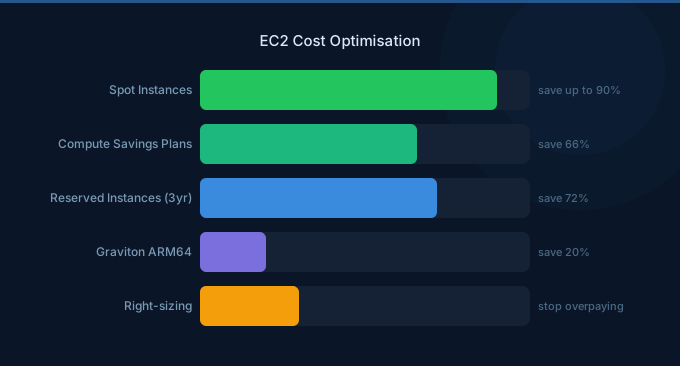
EC2 accounts for 30-40% of the average AWS bill — making it the single most impactful service to optimize. The good news: EC2 has more optimization levers than any other AWS service. Rightsizing, Graviton, Spot, Savings Plans, auto-scaling, and scheduling can each deliver 15-40% savings independently. Combined, they typically reduce EC2 spend by 40-60%.
TL;DR: The 12 strategies in order of effort-to-impact ratio: (1) Graviton migration (20% off, minimal effort). (2) Delete idle instances (100% off, immediate). (3) Rightsize over-provisioned (25-50% per instance). (4) Schedule dev/test (65% off non-production). (5) Savings Plans at 50% of baseline (30-40% off). (6) Spot for stateless workloads (60-90% off). (7) Auto-scale to demand. (8) Optimize EBS volumes. (9) Use latest generation instances. (10) Review AMIs and snapshots. (11) Implement Compute Optimizer recommendations. (12) Tag everything for accountability.
Strategy 1: Migrate to Graviton (20% Savings)
Effort: Low | Impact: 20% on compute | Risk: Low
Graviton (ARM64) instances cost 20% less than Intel equivalents with comparable or better performance. Most Linux workloads run without modification.
| Intel Instance | Graviton Equivalent | Monthly Savings |
|---|---|---|
| m7i.large ($100/mo) | m7g.large ($80/mo) | $20 (20%) |
| c7i.xlarge ($172/mo) | c7g.xlarge ($138/mo) | $34 (20%) |
| r7i.2xlarge ($427/mo) | r7g.2xlarge ($342/mo) | $85 (20%) |
How: Change instance family in the console or infrastructure code (m7i → m7g). Test in dev first. Schedule a maintenance window for production. Most containers and Linux applications work immediately on ARM64.
Strategy 2: Terminate Idle Instances (100% Savings)
Effort: Very Low | Impact: Varies | Risk: None (for truly idle)
Check for instances with consistently low CPU (under 5%) and minimal network traffic. Common culprits: old development environments, decommissioned services, forgotten POCs.
How: Compute Optimizer → EC2 Recommendations → filter for "Idle" classification. CloudWatch → EC2 → CPUUtilization → filter for under 5% over 14 days.
Strategy 3: Rightsize Over-Provisioned Instances (25-50%)
Effort: Medium | Impact: 25-50% per instance | Risk: Low-Medium
The average EC2 instance runs at 15-25% CPU utilization. Downsizing one tier (xlarge → large) cuts the cost in half.
How: AWS Compute Optimizer provides specific recommendations with risk ratings. Start with "Low Risk" recommendations. Downsize one tier at a time, monitor for 2 weeks.
Strategy 4: Schedule Dev/Test Environments (65% Savings)
Effort: Low | Impact: 65% on non-production | Risk: None
Dev instances used 8 hours/day, 5 days/week should only run during those hours. That's 35% utilization — 65% savings.
How: AWS Instance Scheduler, EventBridge rules with Lambda, or simple cron-based start/stop scripts. Tag instances with schedule:business-hours and automate.
Strategy 5: Implement Savings Plans (30-40% Savings)
Effort: Low | Impact: 30-40% on committed compute | Risk: Low
Commit to 50-60% of your steady-state On-Demand spend. Compute Savings Plans cover EC2, Fargate, and Lambda across any region or instance family.
How: Cost Explorer → Savings Plans → Recommendations. Start with 1-year No Upfront for maximum flexibility. Commit conservatively — you can always add more later.
Strategy 6: Use Spot Instances (60-90% Savings)
Effort: Medium | Impact: 60-90% on eligible compute | Risk: Medium
Stateless workloads (web servers behind ALB, queue workers, batch jobs, CI/CD) can run on Spot for 60-90% savings. The key: handle interruptions gracefully.
How: For auto-scaling groups, add Spot instance types to a mixed instances policy. For EKS, use Karpenter with Spot NodePools. For batch, use AWS Batch with Spot. Diversify across 10+ instance types and multiple AZs.
Strategy 7: Implement Auto-Scaling (20-40% Savings)
Effort: Medium | Impact: 20-40% | Risk: Low
Instead of provisioning for peak load, scale instances up and down with demand. Target tracking policies are the simplest approach.
How: Set up target tracking auto-scaling with CPU target of 60-70%. Configure scale-in cooldown of 300 seconds to prevent flapping. Use predictive scaling for workloads with predictable daily patterns.
Strategy 8: Optimize EBS Volumes (20% on Storage)
Effort: Low | Impact: 20% on EBS | Risk: Very Low
Every gp2 volume should be gp3 (20% cheaper, better baseline performance). No detach or downtime required.
How: EC2 → Volumes → Modify → Change type to gp3. Also review volume sizes — many are provisioned larger than needed. Delete unattached volumes (snapshot first if unsure).
Strategy 9: Use Latest Generation Instances (5-15% Savings)
Effort: Low | Impact: 5-15% | Risk: Low
Each new instance generation is 5-15% cheaper for the same performance. Running m5 when m7g is available wastes money.
| Old Generation | Current Generation | Price Improvement |
|---|---|---|
| m5.large | m7g.large | ~35% cheaper |
| c5.xlarge | c7g.xlarge | ~30% cheaper |
| r5.2xlarge | r7g.2xlarge | ~30% cheaper |
Strategy 10: Clean Up AMIs and Snapshots
Effort: Very Low | Impact: $5-50/month | Risk: None
Old AMIs have associated EBS snapshots that cost $0.05/GB/month. Months of accumulated snapshots from terminated instances add up silently.
How: EC2 → AMIs → Deregister old AMIs. EC2 → Snapshots → Delete orphaned snapshots. Keep only snapshots needed for recovery.
Strategy 11: Follow Compute Optimizer Recommendations
Effort: Low | Impact: Varies | Risk: Rated per recommendation
AWS Compute Optimizer analyzes 14 days of CloudWatch data and provides specific, risk-rated rightsizing recommendations. It's free and often identifies opportunities missed by manual review.
How: Enable Compute Optimizer. Review recommendations weekly. Implement "Low Risk" recommendations immediately. Evaluate "Medium Risk" in staging first.
Strategy 12: Tag for Accountability
Effort: Medium | Impact: Enables all other optimizations | Risk: None
You can't optimize what you can't attribute. Tag every instance with team, environment, project, and cost center. This enables team-level cost reporting and accountability.
How: AWS Organizations Tag Policy → enforce required tags. AWS Config → detect untagged resources. Cost Explorer → filter and group by tags.
Priority Implementation Plan
| Week | Actions | Expected Savings |
|---|---|---|
| Week 1 | Terminate idle instances, delete unattached volumes, switch gp2 → gp3 | 5-10% |
| Week 2 | Schedule dev/test, migrate dev to Graviton | 10-15% additional |
| Week 3 | Rightsize top 20 over-provisioned instances | 5-10% additional |
| Week 4 | Purchase Savings Plans at 50% baseline, start Spot for stateless | 15-25% additional |
| Combined | All 12 strategies implemented | 40-60% total |
Related Guides
- AWS EC2 Pricing: Every Model and Discount
- AWS Savings Plans vs Reserved Instances
- AWS Graviton vs Intel Cost Comparison
- Cloud Rightsizing Guide
- AWS EBS Cost Optimization: Cut Storage Costs
Frequently Asked Questions
How much can I save on EC2?
Most organizations save 40-60% through systematic optimization. Quick wins (idle cleanup, gp2→gp3, scheduling) deliver 10-15%. Graviton adds 20%. Savings Plans add 30-40% on committed spend. Spot adds 60-90% on eligible workloads. The exact savings depend on your current optimization level.
What's the fastest way to reduce EC2 costs?
Three immediate actions: (1) Terminate instances with under 5% CPU utilization over 14 days. (2) Schedule dev/test to stop outside business hours (65% savings). (3) Migrate to Graviton (20% savings, minimal effort). These three alone typically save 20-30%.
Should I use Savings Plans or Reserved Instances?
Compute Savings Plans for almost everyone. They're more flexible than RIs — they apply automatically across instance families, sizes, regions, and even to Fargate and Lambda. RIs make sense only for specific database workloads (RDS, ElastiCache) where Savings Plans don't apply.
Start Optimizing EC2 Today
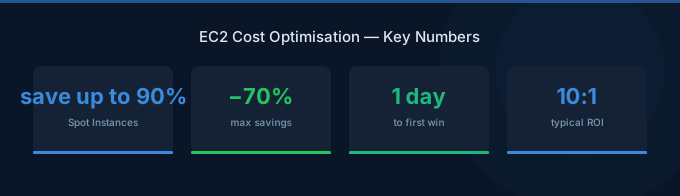
EC2 optimization is the highest-ROI activity in cloud cost management. Follow the 12 strategies in order, starting with the easiest wins:
- Delete idle and over-provisioned — Immediate savings, zero risk
- Graviton + scheduling — 20% + 65% savings with minimal effort
- Savings Plans + Spot — Cover committed and flexible workloads
- Auto-scale + tag — Sustain savings with automation and accountability
Lower Your EC2 Costs with Wring
Wring helps you access AWS credits and volume discounts to lower your EC2 costs. Through group buying power, Wring negotiates better rates so you pay less per compute hour.


