AI costs are the new cloud cost problem. While traditional cloud spend grows 15-20% annually, AI infrastructure budgets are doubling every 6-12 months. A single production LLM pipeline can cost more than the rest of your AWS bill combined — and most organizations overspend by 40-60% on AI workloads because they apply the same cost management practices (or none at all) that they use for traditional infrastructure.
The difference with AI costs: the optimization levers are completely different. You're not rightsizing EC2 instances — you're choosing between models with 100x cost differences, optimizing token usage patterns, and deciding between API calls and self-hosted inference.
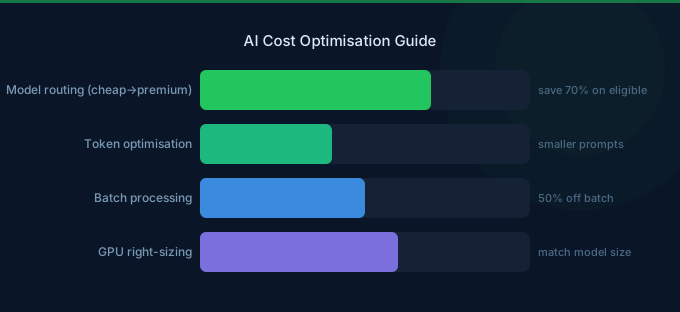
TL;DR: AI costs break into three categories: model inference (per-token API costs), compute infrastructure (GPU instances for training/self-hosting), and data processing (embedding generation, RAG pipelines). Cut costs by: (1) routing tasks to the cheapest capable model, (2) optimizing prompts to reduce token consumption 30-50%, (3) using batch processing for non-real-time workloads (50% off), (4) caching frequent responses, (5) choosing Graviton-based inference where possible. Most organizations can reduce AI costs 40-60% with these strategies.
The AI Cost Landscape
Model Selection: The Biggest Cost Lever
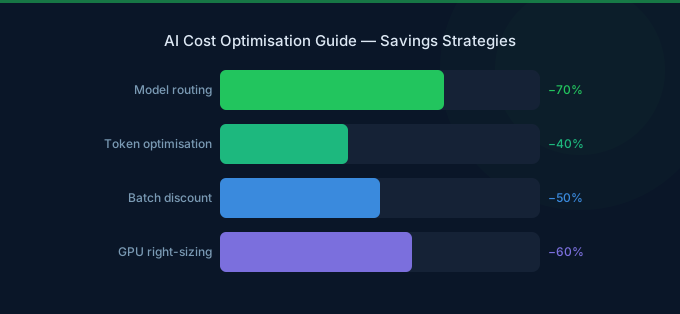
Choosing the right model for each task is the single highest-impact optimization. The cost difference between models is enormous — up to 100x between the cheapest and most expensive options.
The Model Cost Spectrum
| Model Tier | Example Models | Input Cost (per 1M tokens) | Output Cost (per 1M tokens) | Best For |
|---|---|---|---|---|
| Premium | Claude 3 Opus, o1 | $15.00 | $60-75 | Complex reasoning, research |
| Flagship | Claude 3.5 Sonnet, GPT-4o | $2.50-3.00 | $10-15 | General production tasks |
| Budget | Claude 3.5 Haiku, Llama 3.1 70B | $0.72-1.00 | $0.72-5.00 | Classification, extraction |
| Micro | GPT-4o-mini, Llama 3.1 8B | $0.15-0.30 | $0.30-0.60 | Simple tasks, routing |
Multi-Model Routing Strategy
Don't use one model for everything. Route tasks to the cheapest model that can handle them:
Tier 1 — Micro models ($0.15-0.60/M tokens): Intent classification, entity extraction, simple formatting, content filtering, language detection.
Tier 2 — Budget models ($0.72-5.00/M tokens): Summarization, translation, structured data extraction, FAQ responses, sentiment analysis.
Tier 3 — Flagship models ($2.50-15.00/M tokens): Content generation, complex analysis, customer support with nuance, code generation, multi-step reasoning.
Tier 4 — Premium models ($15-75/M tokens): Research synthesis, legal/medical analysis, complex code architecture, tasks requiring maximum accuracy.
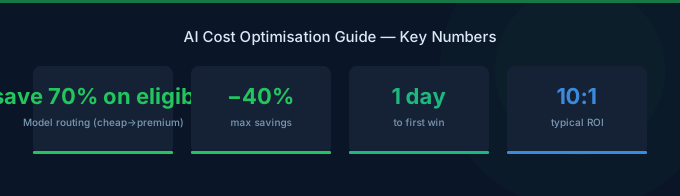
A well-designed routing layer can reduce inference costs 50-70% compared to using a flagship model for everything.
Token Optimization Strategies
After model selection, reducing token consumption is your next biggest lever.
1. Prompt Engineering for Cost
Every token in your prompt costs money — both input tokens and the output tokens they generate.
Before optimization (850 tokens): A verbose system prompt with extensive instructions, examples, and formatting requirements repeated in every API call.
After optimization (280 tokens): A concise system prompt that uses shorthand, removes redundant instructions, and relies on few-shot examples only when needed.
Impact: 60% fewer input tokens per request. At 1M requests/month with a flagship model, this saves $1,500+/month on input tokens alone.
2. Context Window Management
Sending full conversation history with every request is the most common token waste. Strategies:
- Sliding window: Only send the last N messages instead of full history
- Summarization: Periodically summarize old context into a shorter summary
- Retrieval-based context: Use RAG to inject only relevant context instead of everything
- Token budgeting: Set hard limits on context size per request
3. Output Length Control
Output tokens cost 3-5x more than input tokens for most models. Control them:
- Set explicit
max_tokenslimits appropriate for each task - Use structured output formats (JSON) to prevent verbose prose
- Request bullet points instead of paragraphs where possible
- Implement streaming with early termination for sufficient responses
4. Caching and Deduplication
- Semantic caching: Cache responses for similar (not just identical) queries. A semantic similarity check is far cheaper than a new inference call.
- Prompt caching: Many providers offer prompt prefix caching — reuse common system prompts across requests for reduced input costs.
- Result deduplication: For batch processing, detect duplicate inputs before sending them for inference.
Inference Cost Optimization
Batch Processing (50% Savings)
Both OpenAI and AWS Bedrock offer batch/async processing at significant discounts:
| Platform | Standard Price | Batch Price | Savings | Latency |
|---|---|---|---|---|
| OpenAI Batch API | Full price | 50% off | 50% | Within 24 hours |
| Bedrock Batch Inference | Full price | 50% off | 50% | Async processing |
Any workload that doesn't need real-time responses should use batch: document processing, content generation, data enrichment, analysis pipelines, embedding generation.
Provisioned Throughput (30-40% Savings)
For consistent, high-volume inference on AWS Bedrock:
| Commitment | Discount |
|---|---|
| No commitment | On-demand pricing |
| 1-month | ~30% savings |
| 6-month | ~40% savings |
Provisioned Throughput makes sense when spending $5,000+/month on a single model. It also provides guaranteed capacity — no throttling during peak hours.
Self-Hosted vs API: The Break-Even Calculation
Self-hosting a model on GPU instances (SageMaker, EC2 with GPUs) becomes cheaper than API calls at high volume. The break-even depends on:
| Factor | API (Bedrock/OpenAI) | Self-Hosted (SageMaker/EC2) |
|---|---|---|
| Low volume (under 1M tokens/day) | Cheaper | Way more expensive |
| Medium volume (1-10M tokens/day) | Usually cheaper | Approaching break-even |
| High volume (over 10M tokens/day) | More expensive | Usually cheaper |
| Ops complexity | Zero | Significant |
| Model flexibility | Limited to provider | Any open model |
Rule of thumb: Stay on APIs until you're spending $10K+/month on a single model AND have ML engineering capacity for self-hosting.
GPU Instance Optimization
For teams running self-hosted models or fine-tuning:
Choose the Right GPU Instance
| Instance | GPU | VRAM | On-Demand/hr | Best For |
|---|---|---|---|---|
| g5.xlarge | A10G | 24 GB | $1.01 | Small model inference |
| g5.2xlarge | A10G | 24 GB | $1.21 | Medium inference |
| p4d.24xlarge | 8x A100 | 320 GB | $32.77 | Training, large models |
| p5.48xlarge | 8x H100 | 640 GB | $98.32 | Cutting-edge training |
| inf2.xlarge | Inferentia2 | — | $0.76 | Optimized inference |
GPU Cost Reduction Strategies
-
Spot Instances for Training — Training jobs can checkpoint and resume. Use Spot for 60-70% savings on GPU compute. SageMaker Managed Spot Training handles interruptions automatically.
-
AWS Inferentia for Inference — Inferentia2 chips cost 50-70% less than GPU instances for inference workloads. Requires model compilation with AWS Neuron SDK but delivers significant savings for supported models.
-
Right-Size GPU Memory — A 7B parameter model doesn't need an A100. Match GPU VRAM to model size. Running a small model on a large GPU wastes 60-80% of the instance cost.
-
Multi-Model Endpoints — Host multiple small models on a single GPU instance using SageMaker Multi-Model Endpoints. Share GPU resources across models instead of dedicating one instance per model.
-
Scheduled Scaling — Training clusters and inference endpoints don't need to run 24/7. Scale to zero during off-hours. SageMaker Inference endpoints support auto-scaling to zero.
Monitoring AI Costs
Key Metrics to Track
| Metric | What It Tells You | Target |
|---|---|---|
| Cost per inference | Unit economics of each AI call | Declining over time |
| Cost per token (effective) | Real cost including caching | Below list price |
| Token efficiency ratio | Output quality per token spent | Improving with optimization |
| Cache hit rate | Percentage of requests served from cache | Over 30% for common queries |
| Model utilization | GPU usage for self-hosted | Over 70% |
| Cost per business outcome | AI cost per customer query resolved, document processed, etc. | Stable or declining |
AWS Tools for AI Cost Monitoring
- AWS Cost Explorer — Filter by Bedrock, SageMaker, EC2 GPU instances. Create custom reports for AI-specific spend.
- CloudWatch Metrics — Track token counts, latency, and error rates per model. Set alarms for usage spikes.
- SageMaker Model Monitor — Monitor inference quality and costs for self-hosted models.
- Bedrock Model Invocation Logging — Log all API calls with token counts for detailed cost analysis.
AI Cost Optimization Framework
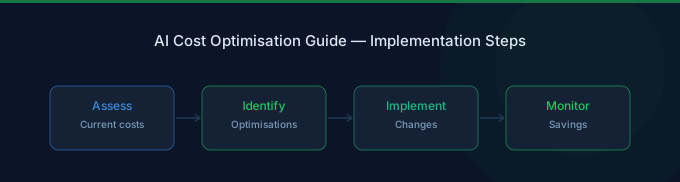
Phase 1: Visibility (Week 1)
- Categorize all AI spend: inference APIs, GPU instances, data processing, storage
- Calculate cost per inference call for each model/endpoint
- Identify your top 5 cost drivers by dollar amount
- Set up cost monitoring dashboards
Phase 2: Quick Wins (Week 2-3)
- Implement multi-model routing — route simple tasks to budget models
- Optimize prompts — reduce token count by 30-50%
- Enable batch processing for non-real-time workloads
- Set
max_tokenslimits on all inference calls - Implement response caching for repeated queries
Phase 3: Infrastructure Optimization (Month 2)
- Evaluate self-hosting for high-volume models
- Purchase Provisioned Throughput for consistent Bedrock usage
- Use Spot instances for all training jobs
- Evaluate Inferentia for inference workloads
- Right-size GPU instances
Phase 4: Continuous Optimization (Ongoing)
- Track cost per business outcome weekly
- A/B test cheaper models for quality parity
- Review and optimize RAG pipeline costs
- Update model routing rules as new models launch
- Renegotiate or recommit based on usage patterns
Related Guides
- FinOps for AI
- AWS Bedrock Cost Optimization Guide
- LLM Inference Cost Optimization
- GPU Cost Optimization Playbook
- AWS Bedrock Pricing Guide
Frequently Asked Questions
How much does it cost to run AI workloads on AWS?
AI costs vary enormously based on scale and approach. A small chatbot using Claude 3.5 Haiku via Bedrock might cost $100-500/month. A production AI pipeline processing millions of documents with GPT-4o-class models can cost $10,000-50,000/month. Self-hosted training on GPU instances adds $5,000-100,000/month depending on cluster size.
What's the cheapest way to run LLM inference on AWS?
For low volume, use Bedrock with budget models (Llama 3.1, Claude Haiku). For high volume, use Bedrock Provisioned Throughput (30-40% off) or Batch Inference (50% off). For very high volume with ML engineering capacity, self-host open models on Inferentia2 instances for the lowest per-inference cost.
How do I reduce AI API costs without losing quality?
Use multi-model routing: send simple tasks to cheap models (GPT-4o-mini at $0.15/M input tokens) and complex tasks to flagship models. Optimize prompts to reduce token count by 30-50%. Implement semantic caching for frequently asked questions. Use batch processing for anything that doesn't need real-time responses.
Should I self-host models or use APIs?
Use APIs until you're spending over $10K/month on a single model AND have ML engineering resources. APIs are simpler, more reliable, and automatically get model updates. Self-hosting makes economic sense only at high volume with consistent demand.
Start Optimizing AI Costs Today
AI cost optimization is different from traditional cloud optimization — the levers are model selection, token efficiency, and infrastructure choices rather than instance sizing and reservations. The framework:
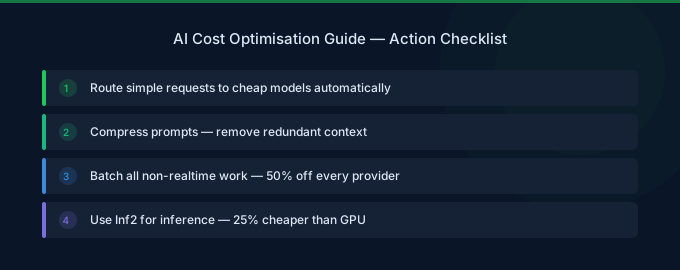
- Route intelligently — Match each task to the cheapest capable model
- Optimize tokens — Reduce prompt size by 30-50% and control output length
- Use batch processing — 50% savings on anything that doesn't need real-time
- Cache aggressively — Same question twice should never cost twice
- Monitor per-outcome costs — Track cost per business result, not just total spend
Lower Your Cloud Costs with Wring
Wring helps you access AWS credits and volume discounts to reduce your cloud bill. Through group buying power, Wring negotiates better per-unit rates across all AWS services.