
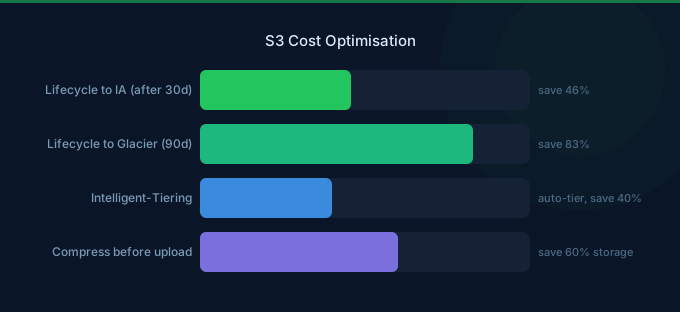
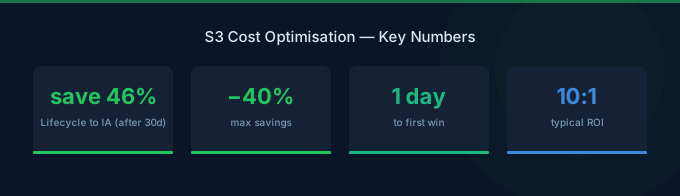
S3 is often the largest single line item on AWS bills after EC2. Most teams store far more data than they need, in the wrong storage class, with no lifecycle policies. The good news: S3 has more cost optimization levers than almost any other AWS service. Implementing even half of these strategies typically reduces S3 spend by 40-60%.
TL;DR: The top 3 S3 savings: (1) Enable Intelligent-Tiering for all data with unpredictable access patterns — it automatically moves objects between tiers at zero retrieval cost. (2) Set lifecycle policies to transition objects to Glacier after 90 days and delete after retention period. (3) Compress objects before upload — gzip typically reduces size 60-80%. These three alone save most teams 40-50% on S3.
S3 Storage Class Pricing Reminder
| Storage Class | Cost/GB/month | Best For |
|---|---|---|
| S3 Standard | $0.023 | Frequently accessed data |
| S3 Intelligent-Tiering | $0.023 (frequent) / $0.0125 (infrequent) | Unknown access patterns |
| S3 Standard-IA | $0.0125 | Infrequent access, instant retrieval |
| S3 One Zone-IA | $0.010 | Non-critical infrequent data |
| S3 Glacier Instant | $0.004 | Archive with millisecond retrieval |
| S3 Glacier Flexible | $0.0036 | Archive, minutes to hours retrieval |
| S3 Glacier Deep Archive | $0.00099 | Long-term archive, 12-hour retrieval |
Strategy 1: Enable S3 Intelligent-Tiering
Intelligent-Tiering automatically moves objects between access tiers based on usage patterns. There's no retrieval fee for automatic tier transitions.
| Tier | Access Pattern | Cost/GB |
|---|---|---|
| Frequent | Accessed regularly | $0.023 |
| Infrequent | Not accessed for 30 days | $0.0125 |
| Archive Instant | Not accessed for 90 days | $0.004 |
| Archive | Not accessed for 180 days (opt-in) | $0.0036 |
| Deep Archive | Not accessed for 730 days (opt-in) | $0.00099 |
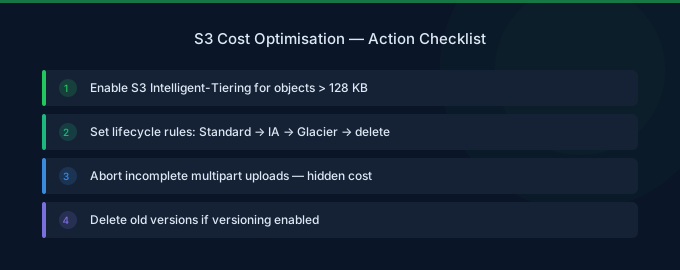
Monitoring fee: $0.0025 per 1,000 objects/month. Worth it for objects over 128 KB.
Savings: 45-76% for data with unpredictable access.
Strategy 2: Implement Lifecycle Policies
Create rules to automatically transition and expire objects:
| Rule | Action | Typical Savings |
|---|---|---|
| Objects over 30 days | Move to Standard-IA | 46% per GB |
| Objects over 90 days | Move to Glacier Instant | 83% per GB |
| Objects over 365 days | Move to Glacier Deep Archive | 96% per GB |
| Non-current versions over 30 days | Delete | 100% |
| Incomplete multipart uploads over 7 days | Abort | 100% |
Critical: Always add an "abort incomplete multipart uploads" rule. Orphaned uploads accumulate silently and cost standard rates.
Strategy 3: Compress Before Upload
Compressing objects before upload reduces both storage and data transfer costs.
| Data Type | Compression Ratio | Storage Savings |
|---|---|---|
| JSON/CSV | 80-90% | $0.023 → $0.003/GB effective |
| Log files | 85-95% | $0.023 → $0.002/GB effective |
| XML | 75-85% | $0.023 → $0.005/GB effective |
| Already compressed (images, video) | 0-5% | Minimal |
Use gzip or zstd for text-based data. Enable S3 Transfer Acceleration only when upload speed justifies the $0.04/GB premium.
Strategy 4: Use S3 Storage Lens
S3 Storage Lens provides bucket-level and organization-wide analytics. Free metrics include:
- Total storage by storage class
- Objects by age distribution
- Incomplete multipart upload bytes
- Non-current version bytes
Enable advanced metrics ($0.20/million objects) for request-level analytics that identify hot and cold buckets.
Strategy 5: Delete Non-Current Object Versions
Versioned buckets accumulate old versions indefinitely. For a bucket with frequent overwrites, non-current versions can be 3-5x larger than current data.
Add lifecycle rules to delete non-current versions after 30 days (or fewer for non-critical data).
Strategy 6: Optimize Request Patterns
S3 charges per request, and request costs vary by storage class:
| Storage Class | PUT/POST | GET |
|---|---|---|
| Standard | $0.005/1K | $0.0004/1K |
| Standard-IA | $0.01/1K | $0.001/1K |
| Glacier Instant | $0.02/1K | $0.01/1K |
Reduce requests by:
- Batching small files into larger archives
- Using S3 Select to retrieve partial objects instead of full downloads
- Caching frequently accessed objects with CloudFront
Strategy 7: Use S3 Express One Zone for High-Performance Workloads
For latency-sensitive applications, S3 Express One Zone delivers single-digit millisecond latency at $0.16/GB/month — more expensive per GB but with 50% lower request costs and 10x faster access than Standard.
Only use for hot data that needs sub-10ms access (ML training data, real-time analytics).
Strategy 8: Eliminate Cross-Region Replication Where Unnecessary
Cross-Region Replication (CRR) doubles your storage costs plus $0.02/GB in data transfer. Only enable it for disaster recovery or compliance requirements that specifically mandate multi-region data storage.
Strategy 9: Use S3 Batch Operations for Bulk Changes
Instead of scripting lifecycle changes, use S3 Batch Operations ($0.25 per million objects + $0.50 per job) to efficiently change storage classes, copy objects, or apply tags in bulk.
Strategy 10: Monitor with CloudWatch and S3 Analytics
Enable S3 Analytics Storage Class Analysis to get recommendations on which storage class is optimal for each bucket based on actual access patterns. This takes 30 days to gather data but provides data-driven transition recommendations.
Related Guides
- AWS S3 Pricing: Storage Classes and Hidden Costs
- AWS Data Transfer Cost Optimization Guide
- AWS CloudFront Cost Optimization Guide
- Cloud Cost Optimization Checklist: 30 Key Actions
FAQ
How much can I realistically save on S3?
Most teams save 40-60% by implementing lifecycle policies, Intelligent-Tiering, and compression. Teams with large archives (over 10 TB) can save 80%+ by migrating to Glacier Deep Archive.
Is S3 Intelligent-Tiering worth the monitoring fee?
Yes, for objects over 128 KB. The $0.0025/1,000 objects monitoring fee is negligible compared to the automatic tier savings. Objects under 128 KB are not charged the monitoring fee and stay in the frequent access tier.
Should I use Standard-IA or Intelligent-Tiering?
Use Intelligent-Tiering when access patterns are unpredictable. Use Standard-IA when you know data is accessed less than once per month. Standard-IA has a 128 KB minimum object size charge and 30-day minimum storage duration.
Lower Your S3 Costs with Wring
Wring helps you access AWS credits and volume discounts to lower your S3 costs. Through group buying power, Wring negotiates better rates so you pay less per GB stored.


