
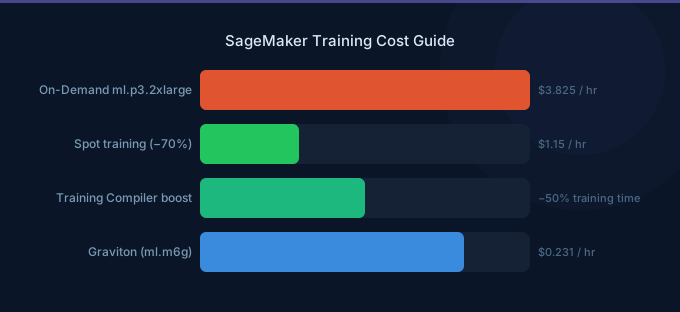
SageMaker Training provides managed ML training infrastructure that eliminates cluster management, handles Spot interruptions automatically, and terminates instances when training completes. The SageMaker surcharge over base EC2 pricing runs 15-40% depending on instance type, but features like Managed Spot Training, Warm Pools, and Training Compiler can more than offset that premium. This guide covers SageMaker Training pricing, Spot savings, distributed training configuration, and optimization strategies.
TL;DR: SageMaker training instances range from $0.05/hr (ml.m5.large) to ~$113/hr (ml.p5.48xlarge). Managed Spot Training saves up to 90% with automatic checkpointing. Warm Pools save 5-10 minutes of startup time per job. Training Compiler can reduce training time by up to 50% for supported models. The auto-termination feature alone justifies the SageMaker surcharge for most teams.
Training Instance Pricing
CPU Training Instances
| Instance | vCPUs | RAM | SageMaker Price/hr | EC2 Equivalent/hr | SageMaker Premium |
|---|---|---|---|---|---|
| ml.m5.large | 2 | 8 GB | $0.115 | $0.096 | 20% |
| ml.m5.xlarge | 4 | 16 GB | $0.23 | $0.192 | 20% |
| ml.m5.4xlarge | 16 | 64 GB | $0.922 | $0.768 | 20% |
| ml.c5.xlarge | 4 | 8 GB | $0.204 | $0.17 | 20% |
| ml.c5.9xlarge | 36 | 72 GB | $1.836 | $1.53 | 20% |
GPU Training Instances
| Instance | GPU | GPU Memory | SageMaker Price/hr | EC2 Equivalent/hr | SageMaker Premium |
|---|---|---|---|---|---|
| ml.g4dn.xlarge | 1x T4 | 16 GB | $0.736 | $0.526 | 40% |
| ml.g5.xlarge | 1x A10G | 24 GB | $1.408 | $1.006 | 40% |
| ml.g5.2xlarge | 1x A10G | 24 GB | $1.694 | $1.212 | 40% |
| ml.g5.12xlarge | 4x A10G | 96 GB | $7.941 | $5.672 | 40% |
| ml.p3.2xlarge | 1x V100 | 16 GB | $3.825 | $3.06 | 25% |
| ml.p3.8xlarge | 4x V100 | 64 GB | $14.688 | $12.24 | 20% |
| ml.p3.16xlarge | 8x V100 | 128 GB | $28.152 | $24.48 | 15% |
| ml.p4d.24xlarge | 8x A100 | 320 GB | $37.688 | $32.77 | 15% |
| ml.p5.48xlarge | 8x H100 | 640 GB | ~$113.07 | $98.32 | 15% |
Accelerator Training Instances
| Instance | Accelerator | Memory | SageMaker Price/hr | EC2 Equivalent/hr |
|---|---|---|---|---|
| ml.trn1.2xlarge | 1x Trainium | 32 GB | $1.542 | $1.34 |
| ml.trn1.32xlarge | 16x Trainium | 512 GB | $24.725 | $21.50 |
| ml.trn1n.32xlarge | 16x Trainium | 512 GB | $28.497 | $24.78 |
Managed Spot Training
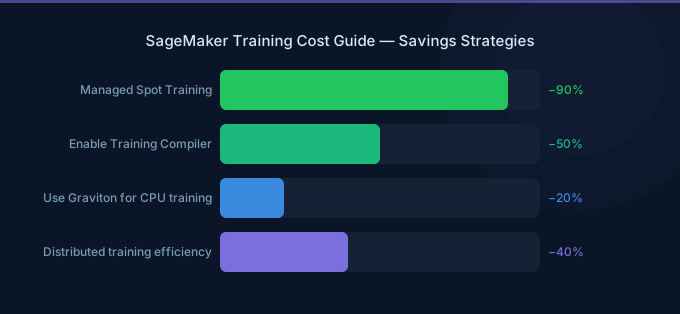
Managed Spot Training is SageMaker's most powerful cost-saving feature. It uses EC2 Spot Instances for training and automatically handles interruptions.
How It Works
- You enable Spot in your training job configuration
- SageMaker launches Spot instances at 60-90% discount
- If interrupted, SageMaker automatically resumes from the latest checkpoint
- You specify a maximum wait time for Spot capacity
Spot Savings by Instance Type
| Instance | On-Demand/hr | Spot/hr (typical) | Savings |
|---|---|---|---|
| ml.g5.xlarge | $1.408 | $0.42-$0.70 | 50-70% |
| ml.g5.12xlarge | $7.941 | $2.38-$3.97 | 50-70% |
| ml.p3.2xlarge | $3.825 | $1.15-$1.91 | 50-70% |
| ml.p4d.24xlarge | $37.688 | $11.31-$18.84 | 50-70% |
| ml.trn1.32xlarge | $24.725 | $7.42-$12.36 | 50-70% |
Spot Training Cost Example
A 24-hour fine-tuning job on ml.p4d.24xlarge:
| Pricing | Cost | Savings |
|---|---|---|
| On-Demand | $904.51 | Baseline |
| Spot (60% savings) | $361.80 | $542.71 |
| Spot (90% savings) | $90.45 | $814.06 |
Checkpointing for Spot Resilience
Checkpointing is critical for Spot training — without it, an interruption restarts training from scratch.
| Model Size | Checkpoint Size | Recommended Frequency | S3 Cost per Checkpoint |
|---|---|---|---|
| Under 1B params | 2-4 GB | Every 15 minutes | $0.05-$0.09 |
| 1B-7B params | 4-28 GB | Every 30 minutes | $0.09-$0.64 |
| 7B-70B params | 28-280 GB | Every 60 minutes | $0.64-$6.44 |
Configure checkpointing in your training job by specifying an S3 checkpoint path and setting max_wait to at least 2x your expected training time.
Distributed Training
SageMaker simplifies distributed training with built-in support for data parallel and model parallel strategies.
Data Parallel Training
Data parallel distributes data across multiple GPUs, each holding a complete copy of the model.
| Configuration | Instances | GPUs | SageMaker Cost/hr | Scaling Efficiency |
|---|---|---|---|---|
| 1x ml.p4d.24xlarge | 1 | 8x A100 | $37.69 | 100% (baseline) |
| 2x ml.p4d.24xlarge | 2 | 16x A100 | $75.38 | 85-95% |
| 4x ml.p4d.24xlarge | 4 | 32x A100 | $150.75 | 80-90% |
| 8x ml.p4d.24xlarge | 8 | 64x A100 | $301.50 | 75-85% |
Scaling efficiency drops with more nodes due to gradient synchronization overhead. At 85% efficiency with 2 nodes, you get 1.7x speedup for 2x cost — still a net win if wall-clock time matters.
Model Parallel Training
Model parallel splits the model across multiple GPUs, necessary when the model does not fit in a single GPU's memory.
| Use Case | Strategy | When to Use |
|---|---|---|
| Model fits on 1 GPU | No parallelism needed | Under ~14B params (A100 80 GB) |
| Model fits on 1 node | Tensor parallelism | 14B-70B params |
| Model exceeds 1 node | Pipeline parallelism + tensor | 70B+ params |
SageMaker's distributed training libraries handle the complexity of sharding models across GPUs and nodes.
Warm Pools
Warm Pools keep training instances provisioned between jobs, eliminating the 5-10 minute startup time for each training job.
| Feature | Without Warm Pools | With Warm Pools |
|---|---|---|
| Instance startup | 5-10 minutes per job | Under 30 seconds (after first job) |
| Container setup | Every job | Cached from previous job |
| Billing between jobs | None | Instance cost continues |
| Best for | Infrequent training | Rapid iteration, hyperparameter tuning |
Warm Pool Cost Analysis
Running 20 training jobs per day, each taking 30 minutes on ml.g5.xlarge:
| Scenario | Compute Cost | Startup Waste | Total Daily Cost |
|---|---|---|---|
| Without Warm Pools | 10 hrs x $1.408 = $14.08 | 20 x 7.5 min = 2.5 hrs x $1.408 = $3.52 | $17.60 |
| With Warm Pools (keep-alive 2 hrs) | 10 hrs x $1.408 = $14.08 | 2 hrs idle x $1.408 = $2.82 | $16.90 |
Warm Pools save ~$0.70/day in this scenario. The real value is developer productivity — eliminating 150 minutes of daily wait time.
SageMaker Training Compiler
Training Compiler optimizes DL model training by compiling the training graph, reducing training time by up to 50% for supported models.
Supported Frameworks and Models
| Framework | Supported Models | Typical Speedup |
|---|---|---|
| PyTorch | Hugging Face Transformers (BERT, GPT-2, ViT) | 25-50% |
| TensorFlow | Hugging Face Transformers | 10-30% |
Cost Impact
| Scenario | Without Compiler | With Compiler (40% faster) | Savings |
|---|---|---|---|
| 8-hour training job (ml.p3.2xlarge) | $30.60 | $18.36 | $12.24 (40%) |
| 24-hour training job (ml.p4d.24xlarge) | $904.51 | $542.71 | $361.80 (40%) |
Training Compiler has no additional charge — you pay only for the (reduced) training time. Enable it by adding the compiler configuration to your estimator.
SageMaker Managed Training vs Self-Managed EC2
| Feature | SageMaker Training | Self-Managed EC2 |
|---|---|---|
| Auto-termination | Automatic on completion | Must implement yourself |
| Spot management | Automatic resume from checkpoint | Manual implementation |
| Distributed training | Simplified API | Manual cluster configuration |
| Experiment tracking | SageMaker Experiments | MLflow or custom |
| Cost premium | 15-40% over EC2 | None |
| Startup time | 5-10 min (without Warm Pools) | Already running (if pre-provisioned) |
When SageMaker Training Pays for Itself
The SageMaker premium pays for itself when:
- You use Managed Spot Training — The 60-90% Spot savings far exceeds the 15-40% SageMaker premium
- You run many short jobs — Auto-termination prevents idle GPU waste
- Your team lacks cluster management expertise — The operational cost of managing GPU clusters often exceeds the SageMaker premium
Cost Optimization Tips
-
Always enable Managed Spot Training — The 60-90% Spot savings dwarfs the SageMaker surcharge. Set
max_waitto 2x your expected training time and implement checkpointing for fault tolerance. -
Use Training Compiler for supported models — A free 25-50% reduction in training time directly reduces your compute bill. Check supported models before starting.
-
Enable Warm Pools for iterative development — When running multiple training experiments per day, Warm Pools eliminate 5-10 minutes of startup per job. Set the keep-alive period to match your iteration cadence.
-
Right-size instances based on GPU utilization — Monitor GPU utilization with SageMaker Debugger. If utilization is under 50%, you are likely paying for more GPU capacity than needed.
-
Use SageMaker Hyperparameter Tuning with Spot — Hyperparameter tuning runs many short training jobs. Combining Spot pricing with early stopping reduces costs by 80-90% compared to grid search on on-demand instances.
-
Clean up training artifacts — SageMaker stores model artifacts, checkpoints, and logs in S3. A large-scale training campaign can generate terabytes of artifacts. Set S3 lifecycle policies to archive or delete old artifacts.
-
Consider Trn1 instances for compatible workloads — SageMaker supports ml.trn1 instances at $24.73/hr for the 32xlarge, versus $37.69/hr for ml.p4d.24xlarge — a 34% saving. The Neuron SDK must support your model and framework.
Related Guides
- AWS SageMaker Pricing Guide
- AWS SageMaker Cost Optimization Guide
- AWS GPU Instance Pricing Guide
- AI Cost Optimization Guide
FAQ
How much does a typical SageMaker training job cost?
A fine-tuning job for a 7B model on ml.g5.2xlarge with Managed Spot Training costs $3-8 for a 4-hour run. A larger training job on ml.p4d.24xlarge for 24 hours costs $90-360 with Spot pricing. Pre-training large models on multiple P5 instances can cost $10,000-100,000+.
Is Managed Spot Training reliable for production training?
Yes, when combined with checkpointing. SageMaker automatically resumes from the latest checkpoint after a Spot interruption. Set max_wait generously (2-3x expected duration) to account for potential Spot capacity delays. For critical deadlines, start with Spot and fall back to on-demand if Spot capacity is not available within your time budget.
Should I use SageMaker Training or train in a SageMaker Studio notebook?
Use SageMaker Training Jobs for any training run longer than 30 minutes. Training Jobs auto-terminate when complete (no idle costs), support Managed Spot Training (60-90% savings), and scale to distributed multi-node configurations. Studio notebooks are best for interactive experimentation, data exploration, and short training iterations.
Lower Your SageMaker Training Costs with Wring
Wring helps you access AWS credits and volume discounts to lower your SageMaker training costs. Through group buying power, Wring negotiates better rates so you pay less per training hour.


