
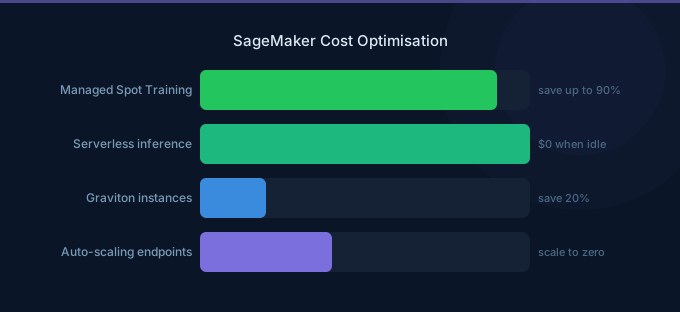
SageMaker is one of the highest-spend AWS services for ML teams, and most of that spend is waste. Inference endpoints running 24/7 at under 10% utilization, training jobs on oversized GPU instances, notebooks left running overnight, and endpoints provisioned for peak traffic that arrives once a day. The platform has more cost optimization levers than almost any other AWS service — you just need to know where to pull.
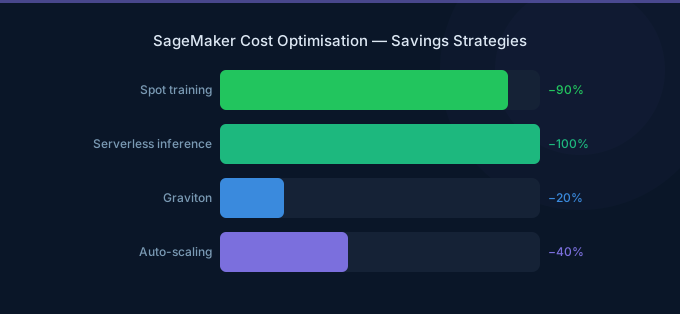
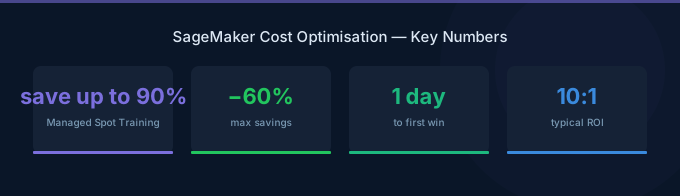
TL;DR: The three biggest SageMaker savings: (1) Use Managed Spot Training for 60-90% off training costs — most training jobs are fault-tolerant and complete with zero interruptions. (2) Switch low-traffic inference endpoints to Serverless Inference or scale to zero with auto-scaling — idle GPU endpoints are the number one waste. (3) Use Graviton (ml.c7g, ml.m7g) instances for CPU-based inference — 20% cheaper with 20% better performance. These three alone save most teams 40-60%.
Where SageMaker Costs Hide
Before optimizing, understand where the money goes. For a typical ML team:
| Component | Typical Share | Common Waste |
|---|---|---|
| Inference endpoints | 50-70% | Idle endpoints, oversized instances |
| Training jobs | 15-25% | Full on-demand pricing, oversized GPUs |
| Notebooks/Studio | 5-15% | Running overnight, weekends |
| Storage (S3, EFS) | 3-5% | Old model artifacts, training data copies |
| Data processing | 2-5% | Unoptimized Spark jobs |
Inference endpoints dominate — a single ml.g5.xlarge endpoint costs $737/month running 24/7. Teams with 5-10 endpoints can spend $3,000-7,000/month on inference alone.
Training Cost Optimization
Strategy 1: Use Managed Spot Training
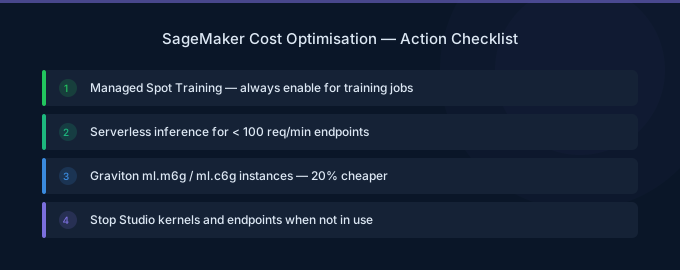
Spot instances provide up to 90% savings for training jobs. SageMaker Managed Spot handles interruptions automatically with checkpointing.
| Instance | On-Demand/hr | Spot/hr | Savings |
|---|---|---|---|
| ml.g5.xlarge (1 GPU) | $1.01 | $0.30 | 70% |
| ml.g5.2xlarge (1 GPU) | $1.52 | $0.46 | 70% |
| ml.g5.12xlarge (4 GPU) | $7.09 | $2.13 | 70% |
| ml.p4d.24xlarge (8 A100) | $32.77 | $9.83 | 70% |
How to enable: Set use_spot_instances=True and max_wait (maximum time including interruptions) in your training job configuration. Set max_wait to 2x your expected training time.
Checkpointing: Enable checkpointing to S3 so training resumes from the last checkpoint after an interruption. Most frameworks (PyTorch, TensorFlow) support this natively.
Real-world results: Most Spot training jobs complete without any interruption. When interruptions occur, checkpointing means you only lose minutes, not hours.
Strategy 2: Right-Size Training Instances
Teams frequently use the largest GPU available "to be safe." But many training jobs are bottlenecked by data loading, not GPU compute.
How to right-size:
- Run a short training job (10 minutes) and monitor GPU utilization via CloudWatch
- If GPU utilization is under 50%, try a smaller instance
- If GPU memory utilization is under 30%, you're overpaying for unused VRAM
| Scenario | Oversized | Right-Sized | Monthly Savings |
|---|---|---|---|
| Fine-tuning a 7B model | ml.p4d.24xlarge ($32.77/hr) | ml.g5.2xlarge ($1.52/hr) | 95% |
| Training a tabular model | ml.g5.xlarge ($1.01/hr) | ml.c7g.2xlarge ($0.39/hr) | 61% |
| Image classification | ml.g5.12xlarge ($7.09/hr) | ml.g5.2xlarge ($1.52/hr) | 79% |
Strategy 3: Use SageMaker Training Compiler
SageMaker Training Compiler optimizes deep learning model training, reducing training time by up to 50% for supported frameworks (PyTorch, TensorFlow with Hugging Face). Less training time = less cost, with no code changes required.
Strategy 4: Optimize Data Loading
Slow data loading leaves GPUs idle. Use these patterns:
| Technique | Impact |
|---|---|
| SageMaker Pipe Mode | Stream data from S3 instead of downloading — eliminates startup delay |
| FSx for Lustre | High-throughput shared filesystem for large datasets |
| ShardedByS3Key | Distribute data across training instances automatically |
| Prefetching | DataLoader workers load next batch while GPU processes current |
Inference Cost Optimization
Strategy 5: Use Serverless Inference for Low-Traffic Models
Serverless Inference scales to zero when idle and automatically handles traffic spikes.
| Component | Cost |
|---|---|
| Compute | Based on memory and processing time |
| Memory | From 1 GB to 6 GB |
| Cold start | 1-2 seconds (first request after idle) |
| Idle cost | $0 |
| Scenario | Real-Time Endpoint | Serverless | Savings |
|---|---|---|---|
| 100 requests/day, ml.c5.large | $63/month (24/7) | ~$5/month | 92% |
| 1K requests/day, ml.m5.xlarge | $139/month (24/7) | ~$20/month | 86% |
Use Serverless when: Traffic is sporadic, latency of 1-2 seconds is acceptable, and you don't need GPU inference.
Strategy 6: Auto-Scale Real-Time Endpoints
Configure auto-scaling to match capacity to demand:
| Metric | Target |
|---|---|
InvocationsPerInstance | Scale based on requests per instance |
CPUUtilization | Scale based on CPU load |
| Minimum instances | 0 (scale to zero) or 1 (always-on) |
| Cooldown | 300 seconds (scale in), 60 seconds (scale out) |
Scale to zero: Set minimum instances to 0 for development and internal models. The endpoint scales up on the first request (with cold start latency) and scales down after the cooldown period.
Strategy 7: Use Inference Components (Multi-Model Endpoints)
Host multiple models on a single endpoint instance:
| Approach | 3 Models Separately | 3 Models on 1 Endpoint |
|---|---|---|
| Instances | 3x ml.g5.xlarge | 1x ml.g5.4xlarge |
| Monthly cost | $2,211 | $1,474 |
| Savings | — | 33% |
Inference Components dynamically load models into memory based on traffic, maximizing GPU utilization across models.
Strategy 8: Use Graviton for CPU Inference
For models that don't require GPU (scikit-learn, XGBoost, some ONNX models), Graviton instances are 20% cheaper with 20% better price-performance:
| Instance | On-Demand/hr | Use Case |
|---|---|---|
| ml.c7g.medium (Graviton) | $0.05 | Lightweight models |
| ml.c7g.xlarge (Graviton) | $0.19 | Medium CPU models |
| ml.c6i.xlarge (Intel) | $0.24 | Same workload, 26% more expensive |
Strategy 9: Use Batch Transform for Offline Predictions
For predictions that don't need real-time responses, Batch Transform processes data in S3 and shuts down when done:
| Approach | 1M predictions/day | Monthly Cost |
|---|---|---|
| Real-time endpoint (24/7) | ml.c5.xlarge always on | $126/month |
| Batch Transform (2 hours/day) | ml.c5.xlarge for 2 hrs | $8/month |
Notebook and Studio Optimization
Strategy 10: Auto-Stop Idle Notebooks
SageMaker Studio notebooks and classic notebook instances run until manually stopped. Use lifecycle configurations to auto-stop after idle periods:
| Configuration | Impact |
|---|---|
| Auto-stop after 1 hour idle | Eliminates overnight/weekend costs |
| Typical savings | 60-70% of notebook costs |
A ml.t3.medium notebook running 24/7 costs $31/month. With 8-hour workday auto-stop, it costs $10/month.
Strategy 11: Use the Right Notebook Instance
| Task | Recommended Instance | Cost/hr |
|---|---|---|
| Code editing, small data | ml.t3.medium | $0.042 |
| Data exploration, pandas | ml.m5.xlarge | $0.190 |
| GPU prototyping | ml.g4dn.xlarge | $0.526 |
| Large-scale training dev | Use training jobs instead | — |
Common waste: Developers using ml.g5.xlarge ($1.01/hr) notebooks for writing code and reviewing results, when ml.t3.medium ($0.042/hr) suffices.
Storage and Infrastructure
Strategy 12: Clean Up Model Artifacts
SageMaker stores model artifacts, training outputs, and checkpoints in S3. These accumulate:
| Artifact | Typical Size | Cleanup Strategy |
|---|---|---|
| Training checkpoints | 1-50 GB per job | Delete after final model is selected |
| Model artifacts | 0.5-20 GB per version | Keep only production and rollback versions |
| Processing job outputs | 1-10 GB per job | Delete after validation |
Set S3 lifecycle policies on your SageMaker output bucket:
- Delete training checkpoints after 30 days
- Move old model artifacts to Glacier after 90 days
Cost Monitoring
Track these CloudWatch metrics across all SageMaker components:
| Metric | What to Watch |
|---|---|
CPUUtilization (endpoints) | Under 20% = over-provisioned |
GPUUtilization (endpoints) | Under 30% = consider smaller instance |
InvocationsPerInstance | Near zero = candidate for Serverless |
ModelLatency | Increasing = may need larger instance |
OverheadLatency | High = networking issue, not instance size |
Use AWS Cost Explorer filtered to SageMaker with "Usage Type" grouping to see training vs inference vs notebook costs separately.
Related Guides
- AWS SageMaker Pricing: Training, Inference, Studio
- AWS Bedrock vs SageMaker
- GPU Cost Optimization Playbook
- AI Cost Optimization: Reduce LLM and GPU Spend
FAQ
What's the single biggest SageMaker cost savings?
Switching idle inference endpoints to Serverless Inference or scaling to zero. Most teams have 2-5 endpoints running 24/7 that serve fewer than 100 requests per hour — these can be 90%+ cheaper on Serverless.
Is Managed Spot Training reliable?
Yes. In practice, most Spot training jobs complete without interruption. When interruptions occur (approximately 5-10% of jobs), checkpointing means you only lose the time since the last checkpoint (typically minutes). The 70% cost savings far outweigh the occasional restart.
How do I calculate my SageMaker ROI?
Compare the cost of SageMaker infrastructure (training + inference + notebooks) against the business value of your ML models. Then optimize: most teams can cut SageMaker costs 40-60% without affecting model performance, directly improving ROI.
Lower Your SageMaker Costs with Wring
Wring helps you access AWS credits and volume discounts to lower your SageMaker costs. Through group buying power, Wring negotiates better rates so you pay less per training hour.


