
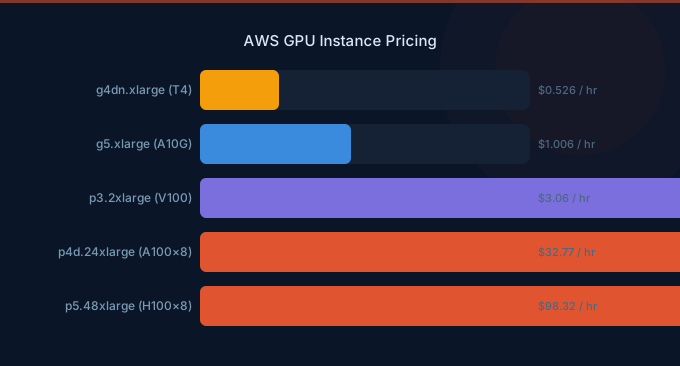
AWS GPU instances span a wide range of price points and capabilities, from $0.758/hr for inference-optimized Inf2 instances up to $98.32/hr for the top-tier P5.48xlarge with eight NVIDIA H100 GPUs. Choosing the right instance family is the highest-impact decision for your ML infrastructure budget. The wrong choice can cost 10-40x more than necessary for the same workload. This guide covers every GPU and accelerator instance family available on EC2 with current on-demand, Spot, and Reserved pricing.
TL;DR: For training, use P5 (H100) or P4d (A100) for large models, Trn1 (Trainium) for cost-efficient training at $1.34/hr. For inference, Inf2 starts at $0.758/hr and beats GPUs on price-performance for supported models. G5 (A10G) at $1.006/hr is the best general-purpose GPU. Spot instances save 60-90% across all families.
GPU Instance Family Overview
| Family | GPU/Accelerator | GPUs per Instance | Primary Use Case | On-Demand Start |
|---|---|---|---|---|
| P5 | NVIDIA H100 | 8 | Large model training | $98.32/hr |
| P4d | NVIDIA A100 | 8 | Training and inference | $32.77/hr |
| P3 | NVIDIA V100 | 1-8 | Legacy training | $3.06/hr |
| G6 | NVIDIA L4 | 1-8 | Inference, graphics | $0.978/hr |
| G5 | NVIDIA A10G | 1-8 | Inference, graphics | $1.006/hr |
| G4dn | NVIDIA T4 | 1-4 | Budget inference | $0.526/hr |
| Inf2 | AWS Inferentia2 | 1-12 | High-throughput inference | $0.758/hr |
| Trn1 | AWS Trainium | 1-16 | Cost-efficient training | $1.34/hr |
P5 Instances (NVIDIA H100)
The P5 family delivers the highest GPU performance on AWS, powered by NVIDIA H100 Tensor Core GPUs with 80 GB HBM3 memory each.
| Instance | GPUs | GPU Memory | vCPUs | RAM | Network | On-Demand/hr |
|---|---|---|---|---|---|---|
| p5.48xlarge | 8x H100 | 640 GB HBM3 | 192 | 2,048 GB | 3,200 Gbps EFAv2 | $98.32 |
P5 instances are designed for the largest training jobs — foundation models, LLM pre-training, and large-scale distributed training. The 3,200 Gbps EFA networking enables efficient multi-node training. At $98.32/hr on-demand, a single month of continuous P5 usage costs $71,770. Reserved pricing and Spot instances are essential for managing costs.
| Pricing Option | p5.48xlarge/hr | Monthly (continuous) | Annual Savings |
|---|---|---|---|
| On-Demand | $98.32 | $71,770 | Baseline |
| 1-Year Reserved (No Upfront) | ~$62.24 | $45,435 | 37% |
| 3-Year Reserved (All Upfront) | ~$37.39 | $27,295 | 62% |
| Spot (varies) | ~$29.50-$49.16 | Variable | 50-70% |
P4d Instances (NVIDIA A100)
The P4d family uses NVIDIA A100 GPUs with 40 GB HBM2e memory. Still the workhorse for many training and inference workloads.
| Instance | GPUs | GPU Memory | vCPUs | RAM | On-Demand/hr |
|---|---|---|---|---|---|
| p4d.24xlarge | 8x A100 | 320 GB HBM2e | 96 | 1,152 GB | $32.77 |
| p4de.24xlarge | 8x A100 (80 GB) | 640 GB HBM2e | 96 | 1,152 GB | $40.97 |
| Pricing Option | p4d.24xlarge/hr | Monthly (continuous) | Annual Savings |
|---|---|---|---|
| On-Demand | $32.77 | $23,922 | Baseline |
| 1-Year Reserved | ~$20.37 | $14,870 | 38% |
| 3-Year Reserved | ~$12.58 | $9,184 | 62% |
| Spot | ~$9.83-$16.38 | Variable | 50-70% |
G5 Instances (NVIDIA A10G)
The G5 family is the most popular choice for inference workloads and single-GPU training. A10G GPUs provide 24 GB GDDR6X memory.
| Instance | GPUs | GPU Memory | vCPUs | RAM | On-Demand/hr |
|---|---|---|---|---|---|
| g5.xlarge | 1x A10G | 24 GB | 4 | 16 GB | $1.006 |
| g5.2xlarge | 1x A10G | 24 GB | 8 | 32 GB | $1.212 |
| g5.4xlarge | 1x A10G | 24 GB | 16 | 64 GB | $1.624 |
| g5.8xlarge | 1x A10G | 24 GB | 32 | 128 GB | $2.448 |
| g5.12xlarge | 4x A10G | 96 GB | 48 | 192 GB | $5.672 |
| g5.24xlarge | 4x A10G | 96 GB | 96 | 384 GB | $8.144 |
| g5.48xlarge | 8x A10G | 192 GB | 192 | 768 GB | $16.288 |
Spot pricing for G5 instances typically provides 60-70% savings:
| Instance | On-Demand/hr | Spot/hr (typical) | Savings |
|---|---|---|---|
| g5.xlarge | $1.006 | $0.30-$0.50 | 50-70% |
| g5.2xlarge | $1.212 | $0.36-$0.60 | 50-70% |
| g5.12xlarge | $5.672 | $1.70-$2.83 | 50-70% |
G6 Instances (NVIDIA L4)
G6 instances use the newer NVIDIA L4 GPUs, offering better inference performance per dollar than G5 for many workloads.
| Instance | GPUs | GPU Memory | vCPUs | RAM | On-Demand/hr |
|---|---|---|---|---|---|
| g6.xlarge | 1x L4 | 24 GB | 4 | 16 GB | $0.978 |
| g6.2xlarge | 1x L4 | 24 GB | 8 | 32 GB | $1.168 |
| g6.4xlarge | 1x L4 | 24 GB | 16 | 64 GB | $1.548 |
| g6.12xlarge | 4x L4 | 96 GB | 48 | 192 GB | $5.016 |
| g6.48xlarge | 8x L4 | 192 GB | 192 | 768 GB | $13.35 |
Inf2 Instances (AWS Inferentia2)
Inf2 instances use AWS-designed Inferentia2 chips, offering the lowest cost per inference on AWS. They require the AWS Neuron SDK.
| Instance | Accelerators | Accelerator Memory | vCPUs | RAM | On-Demand/hr |
|---|---|---|---|---|---|
| inf2.xlarge | 1x Inferentia2 | 32 GB HBM2e | 4 | 16 GB | $0.758 |
| inf2.8xlarge | 1x Inferentia2 | 32 GB HBM2e | 32 | 128 GB | $1.968 |
| inf2.24xlarge | 6x Inferentia2 | 192 GB HBM2e | 96 | 384 GB | $6.49 |
| inf2.48xlarge | 12x Inferentia2 | 384 GB HBM2e | 192 | 768 GB | $12.981 |
Trn1 Instances (AWS Trainium)
Trn1 instances use AWS Trainium chips, purpose-built for deep learning training at lower cost than NVIDIA GPUs.
| Instance | Accelerators | Accelerator Memory | vCPUs | RAM | On-Demand/hr |
|---|---|---|---|---|---|
| trn1.2xlarge | 1x Trainium | 32 GB HBM2e | 8 | 32 GB | $1.34 |
| trn1.32xlarge | 16x Trainium | 512 GB HBM2e | 128 | 512 GB | $21.50 |
| trn1n.32xlarge | 16x Trainium | 512 GB HBM2e | 128 | 512 GB | $24.78 |
Trn1n includes enhanced networking (1,600 Gbps EFA) for multi-node distributed training.
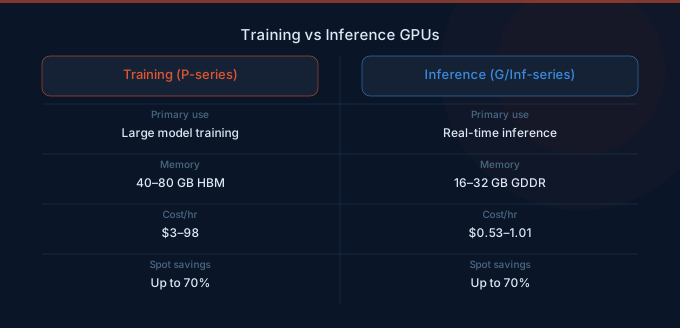
Training vs Inference: Choosing the Right Instance
| Workload | Recommended Instance | Why |
|---|---|---|
| LLM pre-training (100B+ params) | P5.48xlarge | H100 with 3,200 Gbps networking |
| Fine-tuning 7B-70B models | P4d.24xlarge or Trn1.32xlarge | Good performance, lower cost |
| Fine-tuning under 7B models | G5.xlarge or G5.2xlarge | Single A10G is sufficient |
| LLM inference (70B models) | Inf2.48xlarge or G5.48xlarge | High memory, low per-token cost |
| LLM inference (7B-13B models) | Inf2.xlarge or G5.xlarge | Single accelerator is enough |
| Image generation | G5.2xlarge or G6.2xlarge | Optimized for single-GPU workloads |
| Cost-efficient training | Trn1.32xlarge | Up to 50% cheaper than P4d |
Cost Optimization Tips
-
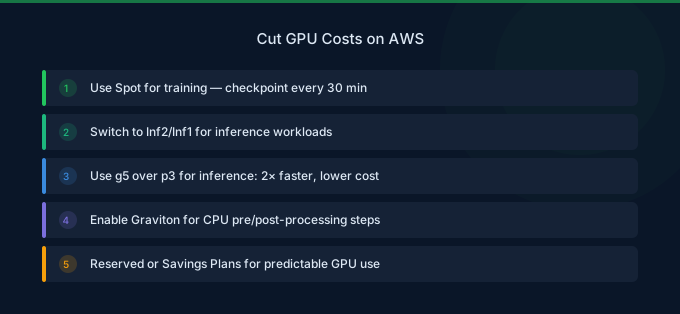
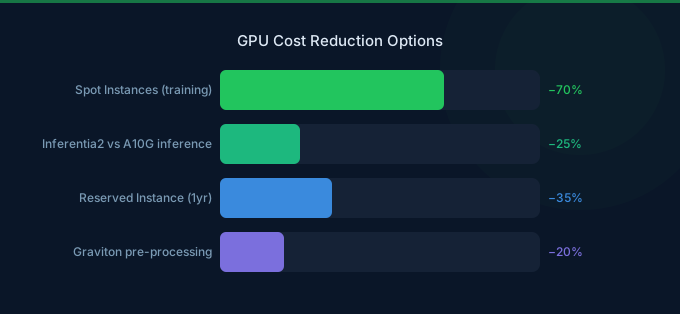
Use Spot instances for training — Spot pricing saves 60-90% for GPU instances. Implement checkpointing every 15-30 minutes so you can resume from interruptions without losing progress.
-
Match instance to model size — Running a 7B parameter model on a p4d.24xlarge (8x A100) wastes 87% of your GPU capacity. A single g5.xlarge is often sufficient.
-
Consider Inferentia2 for inference — Inf2.xlarge at $0.758/hr provides better throughput per dollar than G5 instances for supported models (Llama, GPT-NeoX, BERT, and more via the Neuron SDK).
-
Use Reserved Instances for steady-state workloads — 3-year Reserved pricing saves up to 62% on P4d and P5 instances. Combine with Spot for burst training.
-
Shut down idle instances — GPU instances are the most expensive EC2 types. An idle p4d.24xlarge running over a weekend costs $1,573. Implement auto-stop scripts or use SageMaker managed training with automatic termination.
-
Use Trainium for compatible training jobs — Trn1 instances offer 30-50% cost savings over equivalent GPU instances for training workloads that are compatible with the Neuron SDK.
Related Guides
- AWS EC2 Pricing Guide
- AWS SageMaker Pricing Guide
- GPU Cost Optimization Playbook
- AWS Bedrock vs SageMaker
FAQ
Which GPU instance is best for fine-tuning LLMs?
For models under 13B parameters, a single g5.2xlarge (1x A10G, 24 GB) is typically sufficient and costs $1.212/hr. For 13B-70B models, use p4d.24xlarge (8x A100, 320 GB) at $32.77/hr or trn1.32xlarge at $21.50/hr. For 70B+ models, P5 instances with H100 GPUs provide the best training speed.
How much can I save with Spot instances for ML training?
Spot instances typically save 60-70% for G5 instances and 50-70% for P4d/P5 instances. The key requirement is implementing checkpointing so training can resume after a Spot interruption. SageMaker Managed Spot Training handles this automatically.
Should I use Inferentia2 or NVIDIA GPUs for inference?
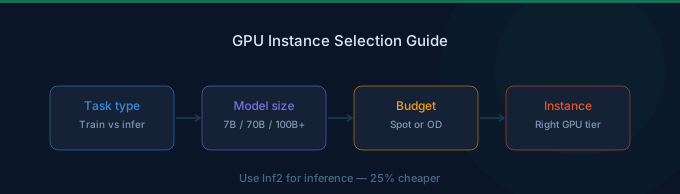
Use Inferentia2 (Inf2) when your model is supported by the AWS Neuron SDK and you want the lowest cost per inference. Inf2.xlarge at $0.758/hr is 25% cheaper than the comparable g5.xlarge at $1.006/hr. Use NVIDIA GPUs when you need broader model compatibility, CUDA-specific features, or when running models not yet supported by Neuron.
Lower Your GPU Instance Costs with Wring
Wring helps you access AWS credits and volume discounts to lower your GPU instance costs. Through group buying power, Wring negotiates better rates so you pay less per GPU hour.


