Training AI models on AWS involves far more than just GPU hours. Compute typically accounts for 70-85% of total cost, but storage, data transfer, networking, and the SageMaker management surcharge can add 15-30% on top. A fine-tuning job that appears to cost $50 in GPU time can actually cost $65-80 when you include EBS, S3, data transfer, and tooling. This guide covers every cost component for AI training on AWS, from a $50 fine-tuning job to a $500K+ pre-training run.
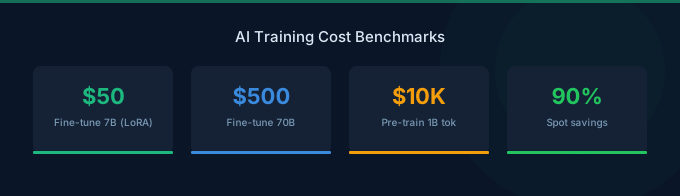
TL;DR: Fine-tuning a 7B model costs $50-200 (4-8 hours on a g5.2xlarge with Spot). Training a custom model from scratch costs $10K-100K+ depending on model size and dataset. The biggest cost levers are Spot instances (save 60-90%), right-sizing GPU instances, and using managed Spot training through SageMaker. Storage and data transfer add 10-20% to compute costs.
Training Cost Components
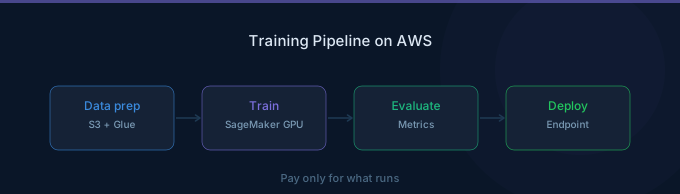
Every AI training job on AWS has five cost components:
| Component | Typical Share | Service | Key Cost Driver |
|---|---|---|---|
| Compute (GPU/accelerator) | 70-85% | EC2 or SageMaker | Instance type and duration |
| Storage (training data) | 5-15% | S3 | Dataset size |
| Storage (model checkpoints) | 3-10% | EBS or FSx Lustre | Checkpoint frequency and size |
| Data transfer | 2-5% | VPC, inter-AZ | Multi-node communication |
| Management overhead | 0-15% | SageMaker surcharge | Managed vs self-managed |
Compute Costs by Instance Type
Training Instance Pricing
| Instance | GPU | GPU Memory | On-Demand/hr | Spot/hr (typical) | SageMaker/hr |
|---|---|---|---|---|---|
| g5.xlarge | 1x A10G | 24 GB | $1.006 | $0.30-$0.50 | $1.41 |
| g5.2xlarge | 1x A10G | 24 GB | $1.212 | $0.36-$0.60 | $1.69 |
| g5.12xlarge | 4x A10G | 96 GB | $5.672 | $1.70-$2.84 | $7.94 |
| p3.2xlarge | 1x V100 | 16 GB | $3.06 | $0.92-$1.53 | $3.825 |
| p4d.24xlarge | 8x A100 | 320 GB | $32.77 | $9.83-$16.39 | $37.69 |
| p5.48xlarge | 8x H100 | 640 GB | $98.32 | $29.50-$49.16 | ~$113.07 |
| trn1.32xlarge | 16x Trainium | 512 GB | $21.50 | $6.45-$10.75 | $24.73 |
The SageMaker column reflects the SageMaker ML instance pricing surcharge, which adds roughly 15-40% over base EC2 pricing for managed training features.
Fine-Tuning Cost Estimates
Fine-Tuning a 7B Model (Llama 2 7B, LoRA)
| Component | Details | Cost |
|---|---|---|
| Compute | g5.2xlarge Spot, 4 hours | $1.44-$2.40 |
| EBS storage | 100 GB gp3 for model + data | $0.11 |
| S3 storage | 50 GB training data | $1.15 |
| S3 storage | Checkpoints (10 GB) | $0.23 |
| Total | $2.93-$3.89 |
For a single fine-tuning run with LoRA on a modest dataset, costs are minimal. In practice, you will run multiple experiments with different hyperparameters.
Full Fine-Tuning Cost with Experimentation
| Phase | Runs | Instance | Hours per Run | Total Cost (Spot) |
|---|---|---|---|---|
| Hyperparameter search | 10 | g5.2xlarge | 2 hrs | $7.20-$12.00 |
| Full training | 3 | g5.2xlarge | 8 hrs | $8.64-$14.40 |
| Evaluation | 3 | g5.xlarge | 1 hr | $0.90-$1.50 |
| Storage (all artifacts) | - | S3 + EBS | Monthly | $5.00 |
| Total | $21.74-$32.90 |
Fine-Tuning a 70B Model (Full Fine-Tune)
| Component | Details | Cost |
|---|---|---|
| Compute | p4d.24xlarge Spot, 24 hours | $235.92-$393.36 |
| EBS storage | 1 TB gp3 (model + optimizer states) | $2.67 |
| S3 storage | 200 GB dataset + checkpoints | $4.60 |
| Data transfer | Inter-AZ (minimal for single node) | $1.00 |
| Total | $244.19-$401.63 |
Pre-Training Cost Estimates
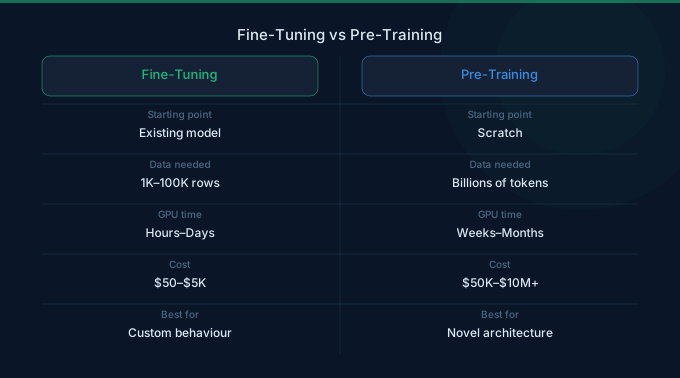
Pre-training costs scale dramatically with model size and dataset size.
Estimated Pre-Training Costs
| Model Size | Instance | Training Time | Compute Cost (On-Demand) | Compute Cost (Spot) |
|---|---|---|---|---|
| 1B parameters | p4d.24xlarge | ~3 days | $2,359 | $707-$1,180 |
| 7B parameters | 4x p4d.24xlarge | ~2 weeks | $43,869 | $13,161-$21,935 |
| 13B parameters | 8x p4d.24xlarge | ~3 weeks | $131,606 | $39,482-$65,803 |
| 70B parameters | 16x p5.48xlarge | ~4 weeks | $1,057,190 | $317,157-$528,595 |
These estimates assume training on a ~1T token dataset. Actual costs vary with batch size, sequence length, and convergence behavior.
Storage Costs for Training
S3 (Training Data and Model Artifacts)
| Storage Class | Cost per GB/month | Best For |
|---|---|---|
| S3 Standard | $0.023 | Active training datasets |
| S3 Infrequent Access | $0.0125 | Completed model artifacts |
| S3 Glacier | $0.004 | Archived checkpoints |
EBS (Attached Instance Storage)
| Volume Type | Cost per GB/month | IOPS | Best For |
|---|---|---|---|
| gp3 | $0.08 | 3,000 (base) | General training |
| io2 | $0.125 | Up to 64,000 | High-throughput data loading |
| Instance store | Included | Very high | Temporary scratch space |
FSx for Lustre (High-Performance Shared Storage)
| Configuration | Cost per GB/month | Best For |
|---|---|---|
| Persistent, 125 MB/s/TiB | $0.145 | Multi-node shared data |
| Persistent, 1,000 MB/s/TiB | $0.290 | Large-scale distributed training |
| Scratch | $0.140 | Temporary high-speed storage |
FSx for Lustre is essential for multi-node training where all nodes need fast access to the same dataset. A 1 TB persistent filesystem costs approximately $145/month.
SageMaker Managed vs Self-Managed EC2
| Feature | SageMaker Managed Training | Self-Managed EC2 |
|---|---|---|
| Compute pricing | 15-40% surcharge over EC2 | Base EC2 pricing |
| Managed Spot Training | Built-in with auto-resume | Manual implementation |
| Auto-termination | Automatic on completion | Must script yourself |
| Distributed training | Simplified configuration | Manual cluster setup |
| Experiment tracking | SageMaker Experiments | MLflow or custom |
| Typical monthly overhead | Higher compute, lower ops | Lower compute, higher ops |
When SageMaker Is Worth the Surcharge
SageMaker's surcharge pays for itself when:
- You use Managed Spot Training — SageMaker automatically handles Spot interruptions and resumes from checkpoints. Implementing this yourself on EC2 requires significant engineering effort.
- Your team lacks DevOps expertise — SageMaker eliminates cluster management, networking configuration, and scaling.
- You run many experiments — SageMaker Experiments, hyperparameter tuning, and automatic model artifact management save engineering time.
When Self-Managed EC2 Saves Money
EC2 is cheaper when:
- You have a dedicated ML platform team — The engineering cost to build and maintain training infrastructure is already amortized.
- You run long, continuous training jobs — Reserved Instance pricing on EC2 is cheaper than SageMaker's on-demand surcharge.
- You need custom environments — Complex CUDA configurations, custom kernels, or non-standard frameworks.
Spot Training Best Practices
Spot instances save 60-90% on GPU compute, but require fault tolerance.
Checkpointing Strategy
| Model Size | Checkpoint Size | Recommended Frequency | Storage Cost (S3) per Day |
|---|---|---|---|
| 1B model | ~4 GB | Every 30 minutes | $0.09 |
| 7B model | ~28 GB | Every 30 minutes | $0.64 |
| 70B model | ~280 GB | Every 60 minutes | $3.22 |
Spot Interruption Rates by Instance
| Instance | Typical Interruption Rate | Average Time Between Interruptions |
|---|---|---|
| g5.xlarge | 5-10% | 10-20 hours |
| g5.2xlarge | 5-10% | 10-20 hours |
| p4d.24xlarge | under 5% | 20+ hours |
| p5.48xlarge | under 5% | 20+ hours |
Distributed Training Costs
Multi-node training adds networking and coordination overhead.
| Configuration | Compute Cost/hr | Network Cost | Total/hr |
|---|---|---|---|
| 2x p4d.24xlarge | $65.54 | Included (EFA) | $65.54 |
| 4x p4d.24xlarge | $131.08 | Included (EFA) | $131.08 |
| 8x p4d.24xlarge | $262.16 | Included (EFA) | $262.16 |
EFA (Elastic Fabric Adapter) networking is included with P4d and P5 instances at no additional charge. The main distributed training overhead is reduced per-GPU efficiency — expect 85-95% scaling efficiency for data parallel training and 75-90% for model parallel training.
Cost Optimization Tips
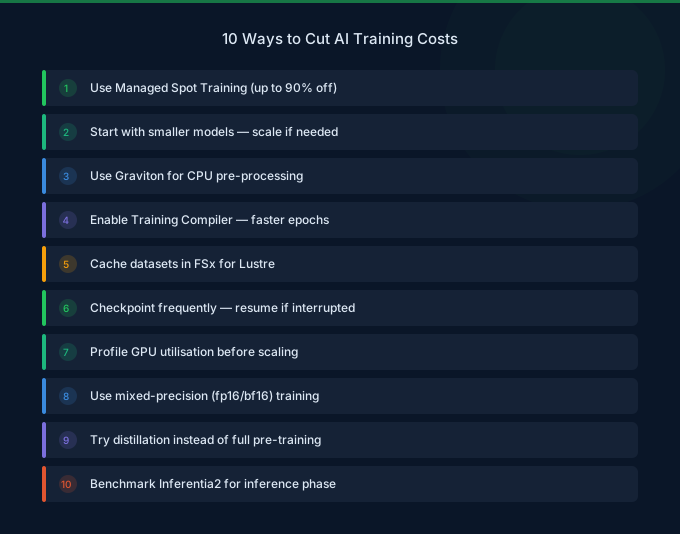
-
Use Managed Spot Training through SageMaker — Save 60-90% on compute with automatic checkpoint and resume. The SageMaker surcharge is far less than the Spot savings.
-
Start with LoRA or QLoRA — Parameter-efficient fine-tuning reduces GPU memory requirements by 60-80%, letting you use cheaper instances. A 7B model fits on a single g5.xlarge with QLoRA.
-
Use mixed precision training (FP16 or BF16) — Reduces memory usage by 50% and speeds up training by 20-40% on modern GPUs, directly reducing your compute hours.
-
Right-size your instance — Profile GPU memory usage during the first few training steps. If peak GPU memory is under 16 GB, you may be able to use a cheaper instance.
-
Implement gradient checkpointing — Trades compute for memory, allowing you to train larger models on smaller GPUs. Increases training time by 20-30% but can drop you to a cheaper instance tier.
-
Clean up checkpoints — Delete intermediate checkpoints after training completes. A 70B model with hourly checkpoints over a 2-week run generates ~9.4 TB of checkpoint data.
-
Use FSx for Lustre for multi-node training — Shared high-performance storage eliminates the need to copy training data to each node's local storage.
Related Guides
- AWS GPU Instance Pricing Guide
- AWS SageMaker Cost Optimization Guide
- AWS Bedrock Fine-Tuning Guide
- GPU Cost Optimization Playbook
FAQ
How much does it cost to fine-tune a 7B model on AWS?
A single LoRA fine-tuning run on a 7B model costs $2-5 using a g5.2xlarge Spot instance for 4-8 hours. Realistically, with hyperparameter experimentation, expect $20-50 total. Full fine-tuning (not LoRA) of a 7B model requires more GPU memory — a p4d.24xlarge for 8-24 hours costing $80-400 on Spot.
Is SageMaker worth the extra cost for training?
SageMaker adds a 15-40% surcharge over EC2 pricing, but the Managed Spot Training feature alone can save 60-90% on compute. For most teams, the combination of Managed Spot plus automatic infrastructure management makes SageMaker net-cheaper than self-managed EC2 for training jobs.
What is the cheapest way to train a large model on AWS?
Use Trn1 instances (AWS Trainium) with Spot pricing. A trn1.32xlarge at Spot rates costs roughly $6.45-$10.75/hr — compared to $32.77/hr on-demand for a p4d.24xlarge. The tradeoff is that Trainium requires the Neuron SDK, which supports a smaller set of models and frameworks than CUDA.
Lower Your AI Training Costs with Wring
Wring helps you access AWS credits and volume discounts to lower your AI training costs. Through group buying power, Wring negotiates better rates so you pay less per GPU hour for training workloads.