
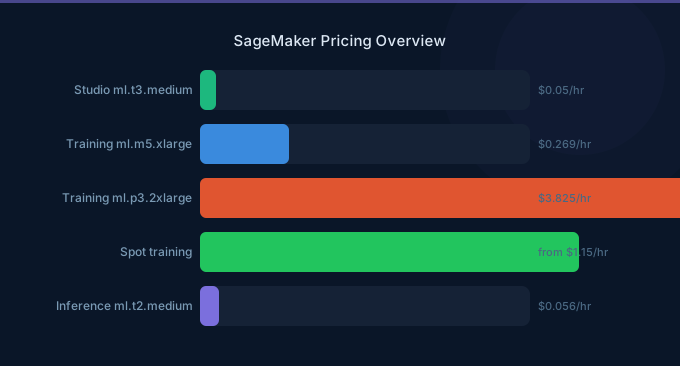
SageMaker is AWS's most comprehensive ML platform — and one of the most complex to price. It has separate pricing for training, inference, notebooks, data processing, feature store, model monitoring, and more. The bill can surprise you because costs accumulate across multiple components simultaneously.
The biggest SageMaker cost trap: inference endpoints running 24/7 on GPU instances. A single ml.g5.xlarge endpoint costs $1.01/hour — $737/month — whether it's serving 1,000 requests per hour or zero. For many workloads, the endpoint sits idle 60-80% of the time.
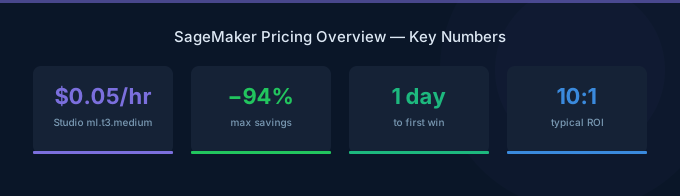
TL;DR: SageMaker costs are dominated by two components: training jobs (GPU hours, reduced 60-70% with Managed Spot) and inference endpoints (24/7 instance costs). Key prices: ml.g5.xlarge = $1.01/hr, ml.p4d.24xlarge = $37.69/hr for training. Optimize with: Managed Spot Training (60-70% off), auto-scaling inference endpoints, serverless inference for low-traffic models, and multi-model endpoints to share GPU resources.
SageMaker Pricing Components
Training Instance Pricing
| Instance | GPU | VRAM | On-Demand/hr | Monthly (24/7) |
|---|---|---|---|---|
| ml.m7i.xlarge (CPU) | None | — | $0.23 | $168 |
| ml.g5.xlarge (A10G) | 1 | 24 GB | $1.01 | $737 |
| ml.g5.2xlarge (A10G) | 1 | 24 GB | $1.52 | $1,110 |
| ml.g5.12xlarge (4x A10G) | 4 | 96 GB | $7.09 | $5,176 |
| ml.p4d.24xlarge (8x A100) | 8 | 320 GB | $37.69 | $27,514 |
| ml.p5.48xlarge (8x H100) | 8 | 640 GB | $65.85 | $48,071 |
| ml.trn1.32xlarge (Trainium) | 16 | 512 GB | $21.50 | $15,695 |
Managed Spot Training applies EC2 Spot pricing to training jobs: 60-70% savings. Training checkpoints every 15-30 minutes to handle interruptions.
Inference Endpoint Pricing
Same instance types as training, billed per second while the endpoint is active:
| Instance | On-Demand/hr | Monthly (24/7) | Typical Use |
|---|---|---|---|
| ml.t3.medium (CPU) | $0.05 | $37 | Simple models, low traffic |
| ml.c7g.large (Graviton) | $0.10 | $73 | CPU inference, medium traffic |
| ml.g5.xlarge (A10G) | $1.21 | $883 | GPU inference, LLMs |
| ml.inf2.xlarge (Inferentia2) | $0.76 | $555 | Optimized inference |
Serverless Inference
For models with infrequent or unpredictable traffic:
| Resource | Price |
|---|---|
| Duration | $0.0000667/second per GB of memory provisioned |
| Requests | $0.20 per 1M requests |
| Cold start | 1-5 seconds (varies by model size) |
Serverless inference scales to zero — you pay nothing when there are no requests. Ideal for dev/test and low-traffic production models.
Other Components
| Component | Price |
|---|---|
| Studio Notebooks | Per instance-hour (same as training instances) |
| Processing Jobs | Per instance-hour (for data processing) |
| Feature Store | $0.06/GB/month (online), $0.023/GB/month (offline) |
| Model Monitor | $0.18/hour for monitoring jobs |
| Data Wrangler | $0.204/hour for data prep instances |
| Canvas | $1.90/hour for no-code ML |
Real-World Cost Examples
Small ML Team (2 data scientists, 3 models in production)
| Component | Monthly Cost |
|---|---|
| Studio notebooks (2x ml.t3.medium, 8hrs/day) | $17 |
| Training (ml.g5.xlarge, 40hrs/mo, Spot) | $12 |
| Inference endpoint 1 (ml.c7g.large, 24/7) | $73 |
| Inference endpoint 2 (ml.g5.xlarge, 24/7) | $883 |
| Inference endpoint 3 (Serverless) | $15 |
| S3 storage (100GB training data) | $2.30 |
| Total | $1,002 |
Mid-Size ML Operation (10 models, GPU training)
| Component | Monthly Cost |
|---|---|
| Studio (5x ml.g5.xlarge, 8hrs/day weekdays) | $883 |
| Training (ml.p4d.24xlarge, 200hrs/mo, Spot) | $2,261 |
| GPU endpoints (3x ml.g5.xlarge, 24/7) | $2,649 |
| CPU endpoints (4x ml.c7g.large, 24/7) | $292 |
| Serverless endpoints (3 models) | $45 |
| Processing jobs (50hrs/mo) | $40 |
| Feature Store | $30 |
| Total | $6,200 |
Optimization Strategies
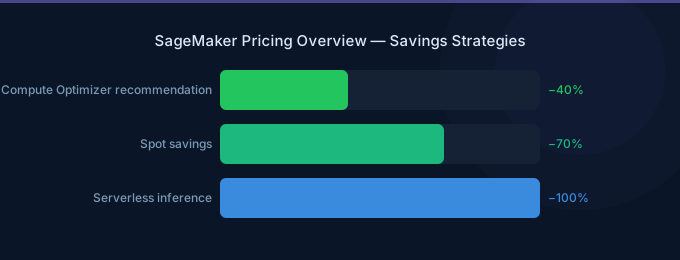
1. Managed Spot Training (60-70% Savings)
Every training job that can tolerate interruptions should use Managed Spot. SageMaker automatically handles checkpointing and resumption.
Implementation: Set use_spot_instances=True and max_wait_time in your training job configuration. Checkpoint to S3 every 15-30 minutes.
When NOT to use Spot: Very short jobs (under 30 minutes) where checkpoint overhead exceeds savings. Spot availability isn't guaranteed, so critical deadlines may require On-Demand fallback.
2. Auto-Scale Inference Endpoints
Default endpoints run at fixed capacity. Configure auto-scaling to match demand:
- Scale based on
InvocationsPerInstance(target: 70-80% of max throughput) - Set minimum instance count to 0 for dev/test
- Set maximum based on peak expected traffic
- Use scheduled scaling for predictable patterns
Savings: 40-65% for workloads with variable traffic patterns.
3. Serverless Inference for Low-Traffic Models
Models receiving fewer than 1,000 requests per hour are often cheaper on Serverless Inference than dedicated endpoints. The cold start (1-5 seconds) is acceptable for non-latency-critical workloads.
Break-even: Serverless is cheaper than ml.t3.medium ($37/month) for models receiving fewer than approximately 200,000 requests/month.
4. Multi-Model Endpoints
Host multiple models on a single instance. SageMaker loads and unloads models from memory on demand. One ml.g5.xlarge ($883/month) can serve 5-10 models instead of dedicating one endpoint per model.
Best for: Many models with individually low traffic. The trade-off is slightly higher latency when a model needs to be loaded from S3.
5. Use Inferentia2 for Inference
AWS Inferentia2 instances (ml.inf2) cost 30-50% less than equivalent GPU instances for inference. Requires model compilation with Neuron SDK but delivers significant savings for supported models (transformers, CNNs).
6. Shut Down Idle Notebooks
Studio notebooks left running overnight cost $0.05-$1.01/hour depending on instance size. Configure auto-shutdown policies — SageMaker Studio supports automatic idle timeout. A team of 5 data scientists leaving notebooks running 24/7 instead of 8 hours/day wastes $300-$2,000/month.
Related Guides
- AWS SageMaker Cost Optimization: Cut ML Costs
- AWS Bedrock vs SageMaker
- AWS Bedrock Pricing Guide
- GPU Cost Optimization Playbook
Frequently Asked Questions
How much does SageMaker cost per month?
A small ML operation (1-2 data scientists, 2-3 models, basic training) costs $500-1,500/month. A mid-size operation (5+ data scientists, 10+ models, GPU training) costs $3,000-10,000/month. Large operations with continuous training and many GPU inference endpoints can exceed $50,000/month.
Is SageMaker more expensive than running ML on EC2 directly?
SageMaker inference endpoints cost approximately 20% more per instance-hour than equivalent EC2 instances. The premium covers managed infrastructure: auto-scaling, model deployment, A/B testing, monitoring, and blue/green deployments. For teams with strong DevOps/MLOps capability, raw EC2 can be cheaper. For most teams, SageMaker's management features justify the premium.
How do I reduce SageMaker inference costs?
Five strategies: (1) Auto-scale endpoints to match demand. (2) Use Serverless Inference for low-traffic models. (3) Deploy multi-model endpoints to share GPU resources. (4) Use Inferentia2 instances for supported models. (5) Scale to zero for dev/test endpoints.
Should I use SageMaker or Bedrock for ML inference?
Use Bedrock for foundation model inference (Claude, Llama, Mistral) — no infrastructure management, per-token pricing. Use SageMaker for custom models you've trained or fine-tuned, or when you need to host open models with full control over the inference stack. Many organizations use both.
Lower Your SageMaker Costs with Wring
Wring helps you access AWS credits and volume discounts to lower your SageMaker costs. Through group buying power, Wring negotiates better rates so you pay less per compute hour.


