AWS Amplify offers a streamlined way to build and host full-stack web applications with features like CI/CD, server-side rendering, and backend APIs. The pricing model covers build minutes, hosting bandwidth, storage, and request processing. For small projects, the free tier is generous enough to run a production site at zero cost.
TL;DR: Amplify Hosting charges $0.01/build minute, $0.15/GB served, and $0.023/GB stored. The free tier includes 1,000 build minutes, 15 GB bandwidth, and 5 GB hosting storage per month. SSR (server-side rendering) adds $0.0000556/request and $0.00000834/GB-second of compute. Most portfolio sites and small apps run free or under $5/month.
Amplify Hosting Pricing
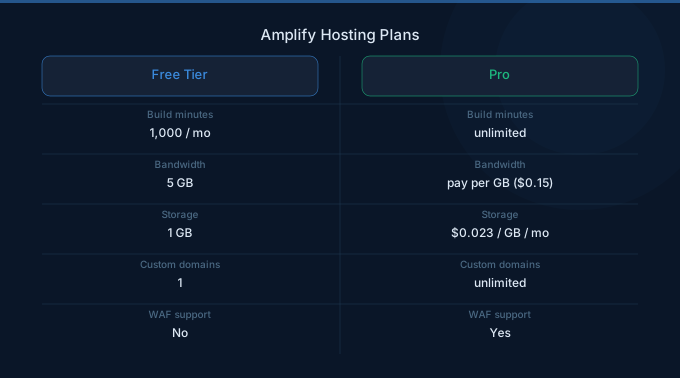
| Component | Free Tier (per month) | Beyond Free Tier |
|---|---|---|
| Build Minutes | 1,000 minutes | $0.01/minute |
| Data Served (Bandwidth) | 15 GB | $0.15/GB |
| Data Stored | 5 GB | $0.023/GB-month |
| Request Count (SSR) | 500,000 requests | $0.0000556/request |
| SSR Compute | 500,000 GB-seconds | $0.00000834/GB-second |
Build Minutes
Every deployment triggers a build process that compiles, tests, and packages your application. Build times vary by framework: a simple React app typically builds in 2-4 minutes, while a large Next.js project with many pages can take 10-20 minutes. At $0.01/minute beyond the free tier, even 5,000 build minutes per month only costs $40.
Bandwidth and Storage
Data served covers all content delivered to users, including HTML, JavaScript, CSS, images, and API responses. At $0.15/GB, a site serving 100 GB/month costs $12.75 beyond the free tier. This is competitive with CloudFront pricing but simpler since Amplify bundles CDN distribution automatically.
Storage covers your deployed application assets. Most web applications use well under 5 GB, keeping storage costs within the free tier.
SSR and Compute Pricing
| SSR Component | Price |
|---|---|
| Requests | $0.0000556 per request ($55.60/million) |
| Compute Duration | $0.00000834/GB-second |
| Streaming SSR | Same pricing as standard SSR |
Server-side rendered applications (Next.js, Nuxt, etc.) incur additional request and compute charges. Each SSR page render is a request, and compute time depends on how long the server function takes to generate the response.
For a Next.js app handling 1 million SSR requests/month with an average 100ms render time at 512 MB memory:
| Component | Calculation | Monthly Cost |
|---|---|---|
| Requests | 1M x $0.0000556 | $55.60 |
| Compute | 1M x 0.1s x 0.5 GB x $0.00000834 | $0.42 |
| Bandwidth (50 GB) | 50 x $0.15 | $7.50 |
| Total | $63.52 |
Amplify vs Manual CloudFront, S3, and Lambda Setup
| Factor | Amplify | Manual Setup |
|---|---|---|
| Static Hosting (50 GB/mo) | ~$7.50 | ~$5.00 (S3 + CloudFront) |
| SSR (1M req/mo) | ~$56 | ~$20-40 (Lambda@Edge) |
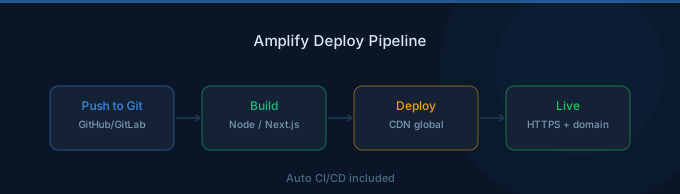
| Build/Deploy | $0.01/min (included CI/CD) | CodePipeline costs separately |
| SSL/Custom Domain | Included | ACM (free) + Route 53 ($0.50/zone) |
| Setup Complexity | Minutes | Hours to days |
| Best For | Speed to market | Cost optimization at scale |
Amplify costs 20-40% more than a manual setup at scale, but eliminates operational overhead. For teams without dedicated DevOps, the time savings justify the premium. For high-traffic applications serving over 500 GB/month, a manual CloudFront and S3 architecture becomes more cost-effective.
Amplify Studio and Backend
Amplify Studio provides a visual interface for building backends with authentication, storage, and APIs. Backend resources (Cognito, DynamoDB, AppSync, Lambda) are billed separately at their standard AWS rates. Amplify Studio itself has no additional charge.
| Backend Service | Typical Cost Driver |
|---|---|
| Authentication (Cognito) | $0.0055/MAU after 50K free |
| Database (DynamoDB) | $1.25/million writes on-demand |
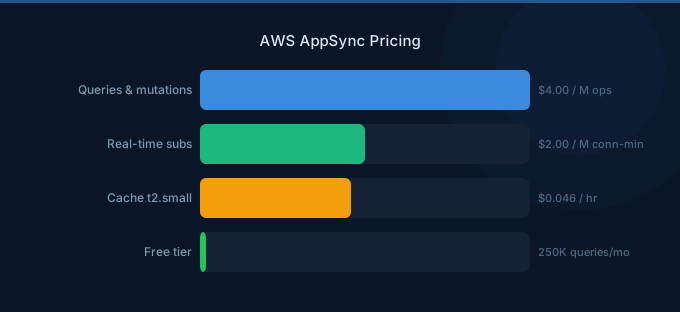
| API (AppSync) | $4.00/million queries |
| Storage (S3) | $0.023/GB-month |
Cost Optimization Strategies
-
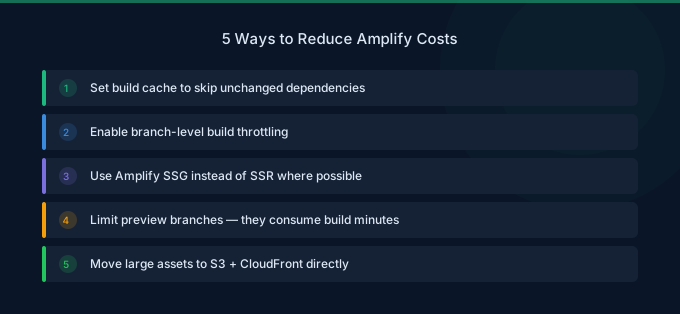
Use static generation over SSR. Static Site Generation (SSG) and Incremental Static Regeneration (ISR) serve pre-built pages from the CDN, avoiding per-request compute charges. Only use SSR for pages that truly need real-time data.
-
Optimize build times. Cache dependencies between builds, limit the number of pages generated at build time, and use monorepo-aware build configurations. Reducing a 15-minute build to 5 minutes saves $0.10 per deployment.
-
Compress and optimize assets. Smaller images and minified JavaScript reduce bandwidth costs. Use Next.js Image optimization or a build-time image compression plugin to reduce served data by 40-60%.
-
Set cache headers aggressively. Long cache durations on static assets reduce origin requests and bandwidth. Amplify respects standard Cache-Control headers in your application.
-
Monitor bandwidth usage. If your site serves over 200 GB/month, evaluate migrating to a manual CloudFront and S3 setup. The crossover point where manual infrastructure becomes cheaper varies by SSR usage.
-
Use preview branches wisely. Each pull request preview branch triggers builds and consumes hosting resources. Limit preview branches to active development work and clean up stale branches promptly.
Related Guides
- AWS CloudFront Pricing Guide
- AWS Lambda Pricing Guide
- AWS S3 Pricing Guide
- AWS Cognito Pricing Guide
FAQ
Is AWS Amplify free for small projects?
Yes. The free tier covers 1,000 build minutes, 15 GB bandwidth, and 5 GB storage per month. A personal portfolio or small business site with under 10,000 monthly visitors typically stays within the free tier indefinitely. Unlike the 12-month AWS Free Tier, Amplify's free tier is permanent.
How does Amplify pricing compare to Vercel and Netlify?
Amplify's free tier is competitive with Vercel's Hobby plan and Netlify's free tier. At scale, Amplify tends to be cheaper than Vercel Pro ($20/month base) for bandwidth-heavy sites but more expensive for SSR-heavy workloads. The main advantage of Amplify is native AWS integration with services like Cognito, DynamoDB, and AppSync.
Does Amplify charge for custom domains?
Amplify itself does not charge for custom domains or SSL certificates. However, you need a Route 53 hosted zone ($0.50/month) if you manage DNS through AWS. You can also point external DNS providers to Amplify at no cost.
Lower Your Amplify Hosting Costs with Wring
Wring helps you access AWS credits and volume discounts to lower your Amplify hosting costs. Through group buying power, Wring negotiates better rates so you pay less per build minute and GB served.