AWS App Runner removes the operational complexity of running containers by handling load balancing, scaling, and TLS certificates automatically. The pricing model charges separately for provisioned capacity (idle) and active usage (processing requests), making it critical to understand both dimensions to forecast costs accurately.
TL;DR: App Runner charges $0.064/vCPU-hour and $0.007/GB-hour for active instances processing traffic. Provisioned (idle) instances cost only $0.007/GB-hour with no vCPU charge. Automatic deployments from source repositories cost $1/month per connection. For low-traffic apps, App Runner's pause feature eliminates compute costs entirely.
Compute Pricing
| State | vCPU Cost | Memory Cost |
|---|---|---|
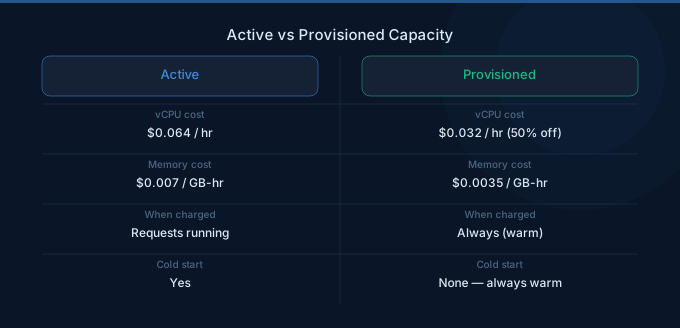
| Active Instance (processing requests) | $0.064/vCPU-hour | $0.007/GB-hour |
| Provisioned Instance (idle, waiting) | No charge | $0.007/GB-hour |
How Active vs Provisioned Works
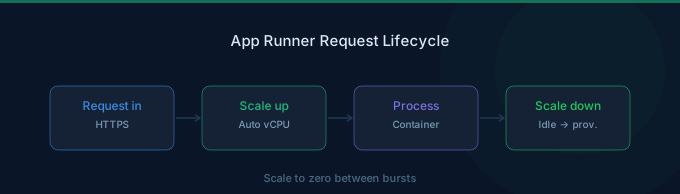
App Runner maintains a pool of provisioned container instances ready to handle traffic. When requests arrive, provisioned instances become active and incur both vCPU and memory charges. When idle (no requests being processed), you only pay the memory cost.
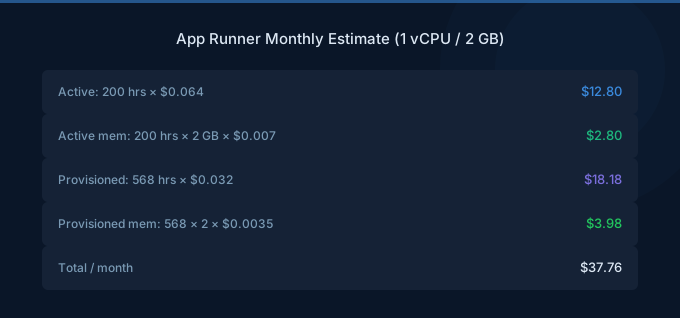
For a service configured with 1 vCPU and 2 GB memory running 24/7 with 50% active time:
| Component | Calculation | Monthly Cost |
|---|---|---|
| Active vCPU | 1 vCPU x 365 hrs x $0.064 | $23.36 |
| Active Memory | 2 GB x 365 hrs x $0.007 | $5.11 |
| Provisioned Memory | 2 GB x 365 hrs x $0.007 | $5.11 |
| Total | $33.58 |
The provisioned memory charge applies even when no requests are being processed, as long as the service is running. This is the baseline cost of keeping your app ready to respond.
Automatic Deployment Pricing
| Feature | Cost |
|---|---|
| Source Connection (GitHub, Bitbucket) | $1.00/month per connection |
| Build Minutes | Included (no extra charge) |
| Image-based Deployments (ECR) | No connection fee |
App Runner can automatically build and deploy from source code repositories or pull pre-built images from Amazon ECR. Source-based deployments include build time at no additional charge, though the $1/month connection fee applies. ECR-based deployments avoid this fee entirely.
Instance Configurations
| Instance Size | vCPU | Memory | Active Hourly Cost |
|---|---|---|---|
| Small | 0.25 | 0.5 GB | $0.0195 |
| Medium | 0.5 | 1 GB | $0.039 |
| Standard | 1 | 2 GB | $0.078 |
| Large | 2 | 4 GB | $0.156 |
| XL | 4 | 12 GB | $0.340 |
App Runner supports instance sizes from 0.25 vCPU up to 4 vCPU. Choose the smallest instance that handles your request processing needs, since auto-scaling adds more instances horizontally rather than scaling vertically.
App Runner vs Fargate vs Lambda
| Factor | App Runner | Fargate | Lambda |
|---|---|---|---|
| Minimum cost (idle) | ~$5/month (memory only) | ~$10/month (always running) | $0 (no requests) |
| Per-request overhead | Low (container warm) | Low (container warm) | Variable (cold starts) |
| Scaling | Automatic | Manual or auto-scaling rules | Automatic |
| Max request duration | 120 seconds | Unlimited | 15 minutes |
| Setup complexity | Minimal | Moderate (VPC, tasks, services) | Minimal |
| Best for | Web apps, APIs | Complex microservices | Event processing, APIs |
For simple web applications and APIs, App Runner typically costs 20-40% less than equivalent Fargate configurations because you avoid paying for vCPU during idle periods. Lambda is cheapest for sporadic traffic (under 100K requests/month) but introduces cold start latency. Fargate offers the most flexibility for complex container architectures at higher operational cost.
Pause and Resume
App Runner services can be paused when not needed, which stops all instances and eliminates compute charges entirely. You only pay for stored container images in ECR. This is ideal for development, staging, and demo environments that are only needed during business hours.
A service paused 16 hours per day saves roughly 66% on compute costs compared to running continuously.
Cost Optimization Strategies
-
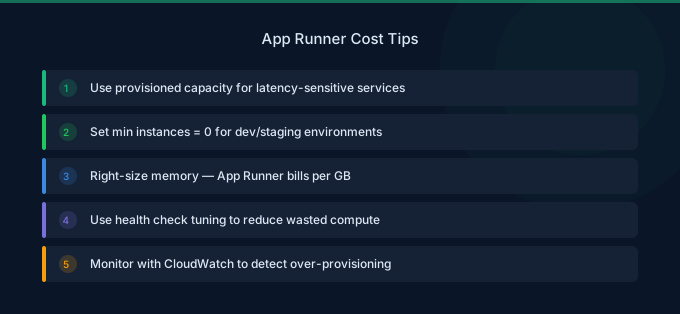
Right-size instance configurations. Start with the smallest instance (0.25 vCPU, 0.5 GB) and monitor response times. Scale up only when you see latency degradation under load. Horizontal scaling across smaller instances is more cost-effective than fewer large instances.
-
Pause non-production services. Development and staging environments should be paused outside working hours. Use AWS CLI or scheduled automation to pause services evenings and weekends.
-
Use ECR-based deployments. Skip the $1/month source connection fee by building images in your CI/CD pipeline and pushing to ECR. This also gives you more control over the build process.
-
Tune concurrency settings. The max concurrency setting controls how many concurrent requests each instance handles before scaling out. Higher concurrency means fewer instances but potentially slower responses. Find the balance for your workload.
-
Monitor active vs provisioned ratios. If your provisioned instances rarely become active, your minimum instance count may be too high. Reduce it to lower baseline memory costs.
-
Consider Lambda for very low traffic. If your app handles fewer than 100K requests per month, Lambda with a function URL may be significantly cheaper than App Runner's baseline provisioned cost.
Related Guides
FAQ
Does App Runner have a free tier?
No. App Runner does not offer a free tier. You pay for provisioned memory from the moment you create a service. For zero-cost idling, consider Lambda with function URLs instead.
How much does a basic App Runner service cost per month?
A minimal always-on service (0.25 vCPU, 0.5 GB memory) with low traffic costs approximately $3-5/month. A standard 1 vCPU, 2 GB service handling moderate traffic typically runs $25-50/month depending on active time.
Can I use App Runner for background workers?
App Runner is designed for request-driven workloads (web apps and APIs). For background processing, long-running tasks, or queue consumers, Fargate or ECS on EC2 are better choices since App Runner scales based on incoming HTTP requests, not queue depth or CPU utilization.
Lower Your App Runner Costs with Wring
Wring helps you access AWS credits and volume discounts to lower your App Runner costs. Through group buying power, Wring negotiates better rates so you pay less per vCPU hour.