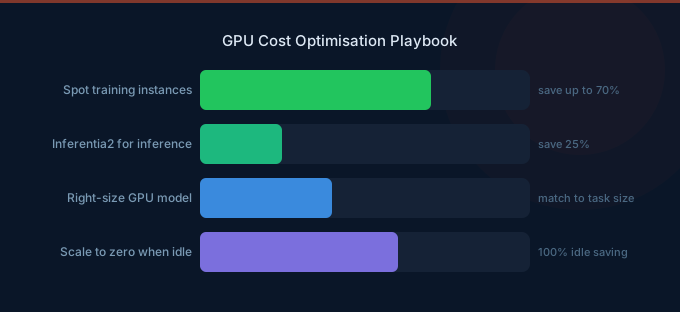
GPU instances are the most expensive resources in AWS. A single p5.48xlarge costs $98.32/hour — $71,773/month if left running. Even smaller GPU instances like g5.xlarge cost $737/month. The optimization stakes are higher than any other compute category, and the strategies are fundamentally different from general EC2 optimization.
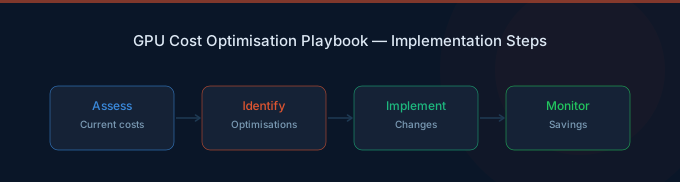
GPU cost optimization comes down to three questions: Are you using the right GPU for the workload? Are you paying the right price for it? And is it actually doing useful work?
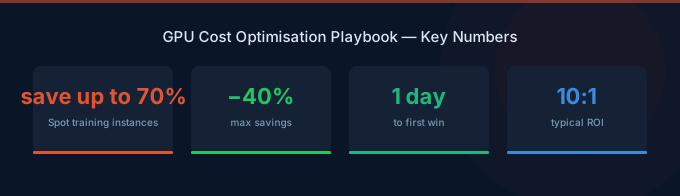
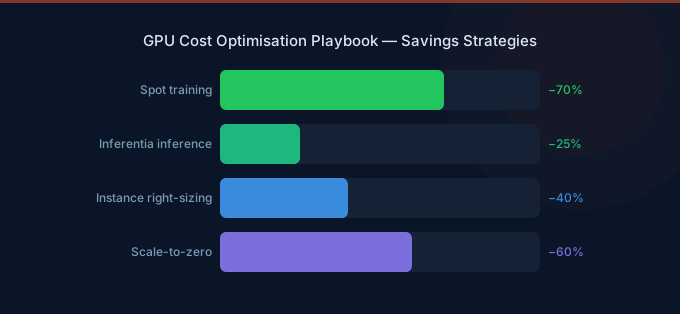
TL;DR: GPU costs on AWS break into training (batch, interruptible) and inference (continuous, latency-sensitive). Training optimization: use Spot instances (60-70% off), checkpoint frequently, right-size cluster to utilization over 80%. Inference optimization: use Inferentia2 (50-70% cheaper than GPUs), auto-scale to demand, consider SageMaker multi-model endpoints. Combined savings: 40-70% on GPU spend.
AWS GPU Instance Pricing
Instance Selection Guide
| Instance Family | GPU | VRAM/chip | Best For | Monthly Cost (smallest) |
|---|---|---|---|---|
| inf2 (Inferentia2) | AWS Inferentia2 | 32 GB | Inference (supported models) | $555 |
| g5 (A10G) | NVIDIA A10G | 24 GB | Inference, light training | $737 |
| g6 (L4) | NVIDIA L4 | 24 GB | Inference, video workloads | $650 |
| p4d (A100) | NVIDIA A100 | 40-80 GB | Training, large model inference | $23,922 |
| p5 (H100) | NVIDIA H100 | 80 GB | Cutting-edge training | $71,773 |
| trn1 (Trainium) | AWS Trainium | 32 GB | Training (supported frameworks) | $1,343 |
Key insight: Most inference workloads don't need A100s or H100s. See the full AWS accelerated computing instance types for options. A g5.xlarge (A10G, $737/month) handles 7B-13B parameter models efficiently. Only use P-series instances for training or very large models (over 70B parameters).
Training Cost Optimization
1. Spot Instances for Training (60-70% Savings)
Training jobs are the ideal Spot workload: they're batch, interruptible, and can checkpoint/resume. SageMaker Managed Spot Training handles interruptions automatically.
| Instance | On-Demand/hr | Spot/hr (typical) | Savings |
|---|---|---|---|
| g5.12xlarge | $5.67 | $1.70-2.27 | 60-70% |
| p4d.24xlarge | $32.77 | $9.83-13.11 | 60-70% |
| p5.48xlarge | $98.32 | $29.50-39.33 | 60-70% |
Implementation:
- Enable checkpointing every 15-30 minutes
- Use SageMaker Managed Spot Training for automatic interruption handling
- Set
MaxWaitTimeInSecondshigher thanMaxRuntimeInSecondsto allow for Spot availability - Diversify across instance types and AZs for better availability
2. Right-Size Training Clusters
Common waste: provisioning 8x A100 instances for a job that only needs 4x. Signs of over-provisioned training:
- GPU utilization below 70% during training
- Frequent memory swapping to CPU
- Training throughput not scaling linearly with GPU count
Fix: Start with the minimum viable cluster size and scale up only if GPU utilization exceeds 85% and throughput is bottlenecked.
3. Optimize Training Time
Less time on GPUs means lower costs. Strategies to reduce training time:
- Mixed precision training — Use FP16/BF16 instead of FP32 for 2-3x throughput increase
- Gradient accumulation — Simulate larger batch sizes without more GPUs
- Learning rate scheduling — Proper warm-up and decay reduces wasted epochs
- Early stopping — Monitor validation loss and stop when improvement plateaus
- Data loading optimization — Ensure GPUs aren't waiting for data (use SageMaker Pipe mode)
4. Use Trainium for Supported Workloads
AWS Trainium instances (trn1) are purpose-built for training at approximately 50% the cost of comparable NVIDIA GPUs. The catch: requires model compilation with AWS Neuron SDK. Supported frameworks include PyTorch and TensorFlow with popular model architectures (transformers, CNNs).
Inference Cost Optimization
1. Choose Inferentia2 Over GPUs (50-70% Savings)
AWS Inferentia2 chips are designed specifically for inference. For supported models, they cost 50-70% less than equivalent GPU instances.
| Workload | GPU Option | Inferentia2 Option | Savings |
|---|---|---|---|
| 7B model inference | g5.xlarge ($737/mo) | inf2.xlarge ($555/mo) | 25% |
| 13B model inference | g5.2xlarge ($883/mo) | inf2.2xlarge ($740/mo) | 16% |
| Multiple small models | g5.12xlarge ($4,102/mo) | inf2.8xlarge ($1,950/mo) | 52% |
Catch: Inferentia2 requires model compilation with the Neuron SDK. Not all model architectures are supported. Test compatibility before committing.
2. Auto-Scale Inference Endpoints
Don't run inference endpoints at peak capacity 24/7. Configure auto-scaling based on actual demand:
- Scale to zero for dev/test endpoints (SageMaker supports this)
- Scale based on invocations per instance for production endpoints
- Schedule scaling for workloads with predictable traffic patterns (scale down at night)
A production inference endpoint running at full capacity 24/7 versus auto-scaling to match business-hours traffic saves 40-65%.
3. Multi-Model Endpoints
If running multiple small models (under 10GB each), host them on a single GPU instance using SageMaker Multi-Model Endpoints. Instead of dedicating one g5.xlarge per model, run 3-5 models on one g5.2xlarge.
Savings: 50-70% on GPU instance costs for multi-model deployments.
4. Batch Inference for Non-Real-Time
Any inference workload that doesn't need sub-second latency should use batch inference:
- Document processing pipelines
- Embedding generation
- Content moderation at scale
- Data enrichment and annotation
SageMaker Batch Transform processes data through a model without maintaining a persistent endpoint. You pay only for the compute used during processing.
GPU Utilization: The Hidden Metric
GPU instances are only cost-effective when GPUs are actively working. Common utilization problems:
| Problem | Symptom | Fix |
|---|---|---|
| Data loading bottleneck | GPU utilization spikes and drops | Optimize data pipeline, use Pipe mode |
| Over-provisioned VRAM | Low memory utilization | Downsize to smaller GPU instance |
| Idle between requests | Low utilization on inference endpoints | Auto-scale or use multi-model endpoints |
| Single-GPU on multi-GPU instance | Only 1 of 4/8 GPUs active | Use model parallelism or smaller instance |
| Forgotten endpoint | 0% utilization | Terminate or scale to zero |
Target: Over 70% GPU utilization for training, over 50% for inference endpoints. Below these thresholds, you're likely over-provisioned.
GPU Cost Monitoring
Key Metrics
| Metric | Target | How to Measure |
|---|---|---|
| GPU utilization | Over 70% (training), over 50% (inference) | CloudWatch GPU metrics via DCGM |
| GPU memory utilization | Over 60% | CloudWatch GPU memory metrics |
| Cost per training epoch | Decreasing over iterations | Custom metric: instance cost / epochs completed |
| Cost per inference | Stable or decreasing | Custom metric: instance cost / total inferences |
| Spot interruption rate | Under 10% | SageMaker training job logs |
| Endpoint scaling efficiency | Scale-up under 5 min | CloudWatch InvocationsPerInstance |
Setting Up GPU Monitoring on AWS
- Enable NVIDIA DCGM integration for CloudWatch to get GPU-level metrics (utilization, memory, temperature)
- Create CloudWatch dashboards showing GPU utilization alongside instance costs
- Set alarms for GPU utilization below 30% (likely waste) and above 95% (likely bottleneck)
- Track Spot savings by comparing actual Spot spend to equivalent On-Demand pricing
Related Guides
- AWS SageMaker Cost Optimization Guide
- AI Cost Optimization Guide
- AWS Bedrock Pricing Guide
- LLM Inference Cost Optimization
Frequently Asked Questions
What's the cheapest GPU instance on AWS?
For inference, inf2.xlarge (Inferentia2) at approximately $0.76/hour is the cheapest option for supported models. For NVIDIA GPU workloads, g5.xlarge (A10G) at approximately $1.01/hour is the most affordable. For training, trn1.2xlarge (Trainium) offers the best price-performance for supported frameworks.
Should I use Spot for GPU training?
Yes, almost always. Training jobs are batch workloads that can checkpoint and resume, making them ideal for Spot. SageMaker Managed Spot Training handles interruptions automatically. Savings are typically 60-70%. The only exception: very short training jobs (under 1 hour) where checkpoint overhead exceeds Spot savings.
When should I use Inferentia2 instead of NVIDIA GPUs?
Use Inferentia2 for inference workloads where: the model architecture is supported by the Neuron SDK, latency requirements are met (Inferentia2 latency is generally comparable to GPUs), and you're running consistent inference volume. Don't use Inferentia2 for training or for models that require frequent architecture changes.
How do I reduce SageMaker endpoint costs?
Four strategies: (1) Auto-scale to demand instead of running at peak capacity. (2) Use multi-model endpoints to share GPU resources across models. (3) Use Inferentia2 instances for supported models. (4) Scale to zero for dev/test endpoints that don't need 24/7 availability.
Start Optimizing GPU Costs
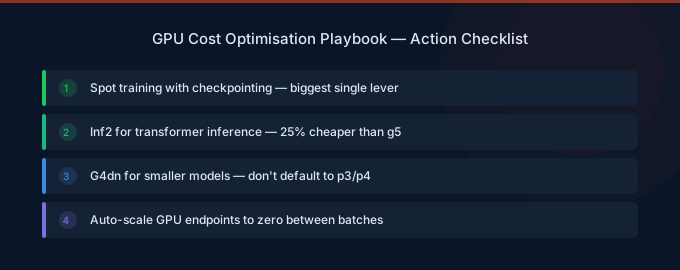
GPU instances are the highest-cost compute on AWS, but also the most optimizable. The playbook:
- Right-size first — Match GPU VRAM and count to actual model requirements
- Spot for training — 60-70% savings on all training workloads
- Inferentia2 for inference — 50-70% cheaper than NVIDIA GPUs for supported models
- Auto-scale everything — Never pay for idle GPU capacity
- Monitor utilization — GPU utilization below 50% means money is being wasted