Traditional FinOps was built for EC2 instances and S3 buckets. AI costs are a different animal. A single training run on p5.48xlarge instances can cost more than your entire monthly EC2 bill. Inference costs scale with user adoption — not server count. GPU instances have fundamentally different pricing dynamics than general compute. And the cost per token changes every time a new model launches.
FinOps needs to adapt. Organizations that apply traditional cost management to AI workloads miss the optimization opportunities unique to AI — model selection, token efficiency, GPU utilization, and the build-vs-buy decisions that determine whether you spend $500/month or $50,000/month on the same capability.
TL;DR: AI FinOps extends traditional FinOps with three new practices: (1) Model cost management — track cost per inference and implement multi-model routing. (2) GPU lifecycle management — optimize training clusters with Spot, right-size inference endpoints, scale to zero when idle. (3) AI cost allocation — attribute costs to teams, projects, and business outcomes, not just AWS services. Organizations that implement AI FinOps reduce AI spend 30-50% while maintaining or improving model performance.
Why Traditional FinOps Falls Short for AI
Different Cost Drivers
| Traditional Cloud | AI Workloads |
|---|---|
| Instance hours (time-based) | Token consumption (usage-based) |
| Predictable scaling patterns | Usage scales with adoption |
| Rightsizing = smaller instance | Rightsizing = different model |
| Savings Plans cover most compute | Per-token pricing limits commitment discounts |
| Costs visible in AWS bill | API costs distributed across services |
The AI Cost Visibility Gap
When an engineer provisions an m7g.xlarge EC2 instance, the cost shows up clearly in AWS Cost Explorer: $0.1632/hour, $119/month. The attribution is straightforward.
When the same engineer starts making Bedrock API calls, the costs are buried inside an aggregate "Amazon Bedrock" line item with no breakdown by team, project, or use case. When they use OpenAI's API, the costs don't appear in AWS at all — they're on a completely separate invoice. And when they spin up a SageMaker inference endpoint, the GPU instance cost looks like any other EC2 charge until you realize it's running 24/7 serving 50 requests per hour.
This visibility gap is why AI costs surprise organizations. Nobody's watching the meter because the meter is hard to read.
The AI FinOps Framework
Pillar 1: Inform — AI Cost Visibility
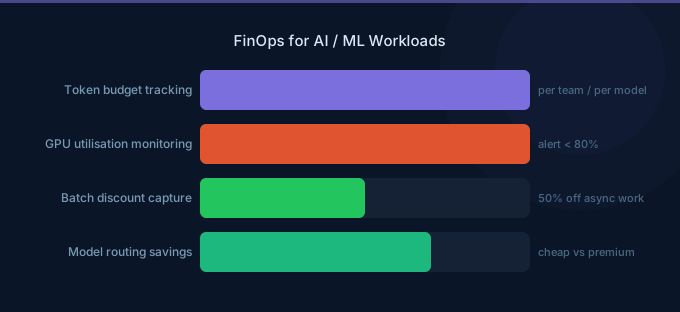
Unit cost tracking. The most important AI FinOps metric is cost per inference call — broken down by model, team, and business outcome.
| Metric | What It Measures | Why It Matters |
|---|---|---|
| Cost per inference | Price of a single API call | Unit economics baseline |
| Cost per conversation | Total cost of a multi-turn interaction | Customer-facing cost tracking |
| Cost per document processed | End-to-end processing cost | Pipeline economics |
| Cost per business outcome | Cost per resolved ticket, generated lead, etc. | ROI measurement |
| GPU utilization rate | Active compute vs idle time | Infrastructure efficiency |
| Token efficiency | Business value per token spent | Optimization progress |
Tagging and attribution. Tag every AI API call and GPU resource with:
team— Which team owns this workloadproject— Which product or featuremodel— Which model is being usedenvironment— Production, staging, experimentationtask-type— Classification, generation, analysis, etc.
Dashboard design. Create separate dashboards for:
- Executive view — Total AI spend, month-over-month trend, cost per business outcome
- Team view — Each team's AI spend by model and project
- Engineering view — Token counts, cache hit rates, model routing distributions, GPU utilization
Pillar 2: Optimize — AI Cost Reduction
Model optimization:
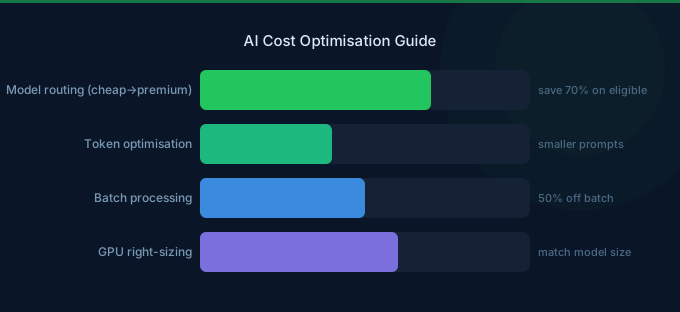
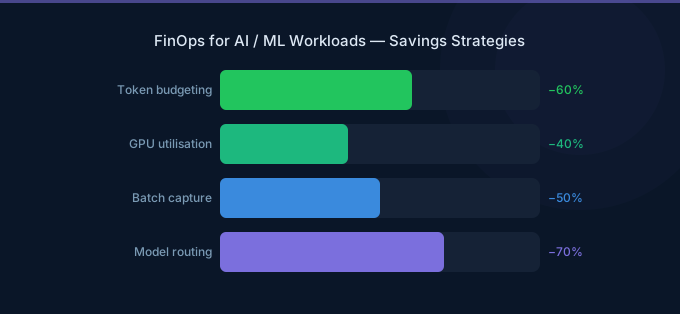
- Multi-model routing (40-60% savings) — Route by task complexity
- Prompt engineering (30-50% savings) — Reduce token consumption
- Batch processing (50% savings) — Async where possible
- Semantic caching (20-40% savings) — Avoid duplicate inference
GPU optimization:
- Spot instances for training (60-70% savings)
- Auto-scaling inference endpoints (match capacity to demand)
- Inferentia/Trainium for inference (50-70% cheaper than GPUs)
- Right-size GPU instances (match VRAM to model size)
- Scale to zero for dev/test endpoints
Commitment optimization:
- Bedrock Provisioned Throughput for consistent API usage (30-40% off)
- Reserved Instances for 24/7 GPU instances (30-60% off)
- Compute Savings Plans for baseline GPU compute
Pillar 3: Operate — Sustaining AI Cost Efficiency
Governance policies:
- Maximum model tier by environment (no Opus in development)
- Mandatory
max_tokenson all API calls - Required tagging for all AI resources
- Budget alerts per team and project
- Approval workflow for new GPU instances
Regular reviews:
- Weekly: Token consumption trends, anomaly review
- Monthly: Model routing effectiveness, cost per outcome trends
- Quarterly: Architecture review, build vs buy reassessment
AI Cost Allocation: The New Challenge
The Multi-Service Problem
A single AI feature might use five AWS services simultaneously:
| Service | Role | Cost |
|---|---|---|
| Bedrock | Model inference | $3,000/month |
| OpenSearch Serverless | Vector database for RAG | $800/month |
| S3 | Document storage | $50/month |
| Lambda | Orchestration | $30/month |
| CloudWatch | Monitoring | $20/month |
| Total | $3,900/month |
Traditional FinOps sees five separate service line items. AI FinOps sees one AI feature costing $3,900/month. The difference matters for ROI calculation.
Allocation Strategies
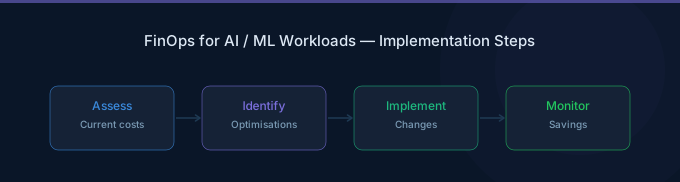
1. Cost center tagging. Tag all AI resources (Bedrock calls, GPU instances, vector DBs, storage) with a unified AI cost center tag. Aggregate in Cost Explorer for a complete picture.
2. Application-level tracking. Instrument your application to log costs per request, including all downstream service calls. This captures the true end-to-end cost of each AI interaction.
3. Team budgets with alerts. Assign each AI team a monthly budget based on their project's expected usage. Alert at 80% and pause non-critical workloads at 100%.
Building AI Cost Awareness
The Engineer's Role
In traditional cloud, engineers might not know what their infrastructure costs. With AI, they must — because every API call, every prompt design decision, and every model choice directly impacts costs.
Make costs visible:
- Show cost per API call in development logs
- Include cost estimates in pull request reviews for prompt changes
- Share weekly team cost reports
- Celebrate cost optimization wins (reduced cost per outcome)
Create incentives:
- Include cost efficiency in AI project evaluation criteria
- Run model selection bake-offs that include cost as a metric
- Reward teams that reduce cost per outcome while maintaining quality
- Make AI cost a standard metric alongside latency and accuracy
The FinOps Practitioner's Role
FinOps practitioners need to expand their toolkit for AI:
- Learn AI pricing models (per-token, per-ACU, GPU instance pricing)
- Understand the relationship between model quality and cost
- Build dashboards that show cost per business outcome
- Facilitate model selection discussions with engineering teams
- Track AI cost trends at the industry level (costs decrease rapidly)
Common AI Cost Mistakes
1. Using One Model for Everything
Running all tasks through Claude 3.5 Sonnet when 70% of those tasks could be handled by Haiku or GPT-4o-mini at 90% lower cost. Multi-model routing is the single highest-impact AI cost optimization.
2. 24/7 Inference Endpoints
SageMaker endpoints running GPU instances around the clock for workloads that peak during business hours. Auto-scale to minimum capacity (or zero) outside peak times.
3. Ignoring Token Waste
System prompts with 3,000 tokens when 500 would suffice. Full conversation histories sent with every request when a 200-token summary would work. Output tokens unrestricted when a 500-token limit would capture all needed information.
4. No Experimentation Guardrails
Researchers running training experiments on p5 instances without time limits or budget caps. A forgotten training job can cost $2,000+ per day. Implement automatic shutdown after configurable time limits.
5. Treating AI Costs Like Fixed Infrastructure
AI costs are usage-based and highly optimizable. Unlike a database that must run 24/7, inference calls can be routed, cached, batched, and compressed. Organizations that treat AI costs as fixed infrastructure miss 40-60% of available savings.
Related Guides
- What Is FinOps? Cloud Cost Management Guide
- AI Cost Optimization Guide
- LLM Inference Cost Optimization
- GPU Cost Optimization Playbook
- AWS Bedrock Cost Optimization Guide
Frequently Asked Questions
How do I track AI costs separately from other cloud costs?
Use consistent tagging across all AI resources (Bedrock, SageMaker, GPU instances, vector databases, S3 for AI data). Create a custom Cost Explorer report filtering by your AI cost tags. For external APIs (OpenAI, etc.), track spending in your application metrics and combine with AWS costs in a unified dashboard.
What's the most important AI FinOps metric?
Cost per business outcome. This could be cost per customer query resolved, cost per document processed, or cost per recommendation generated. Raw token costs or GPU hours are intermediate metrics — the business outcome metric tells you whether your AI spending is justified.
How do I set AI budgets for teams?
Start with current spend as baseline. Set budgets at current spend + 10% for growth headroom. Alert at 80% of budget. For new AI projects, estimate token volumes based on expected usage and multiply by model pricing. Review and adjust quarterly as usage patterns stabilize.
When should we start AI FinOps?
When AI costs exceed 10% of your total cloud bill or $5,000/month — whichever comes first. Below that threshold, basic cost monitoring suffices. Above it, the optimization opportunities are significant enough to justify a structured AI FinOps practice.
Start Your AI FinOps Practice
AI costs are growing faster than any other cloud category. The organizations that manage them well will have a significant competitive advantage — lower costs mean more budget for experimentation, faster iteration, and better unit economics.
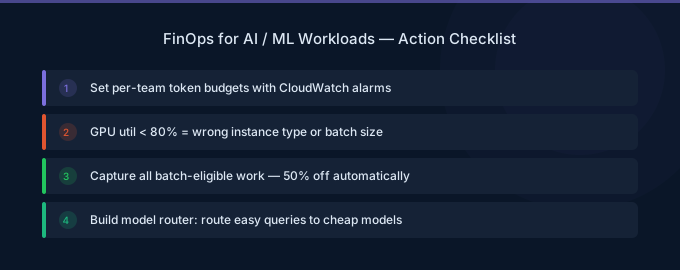
- Measure first — Instrument all AI calls with cost tracking and team attribution
- Route intelligently — Match tasks to the cheapest capable model
- Optimize aggressively — Prompts, caching, batching, GPU utilization
- Govern proactively — Budgets, alerts, environment-based model restrictions
- Review regularly — AI costs and model capabilities change rapidly
Lower Your Cloud Costs with Wring
Wring helps you access AWS credits and volume discounts to reduce your cloud bill. Through group buying power, Wring negotiates better per-unit rates across all AWS services.