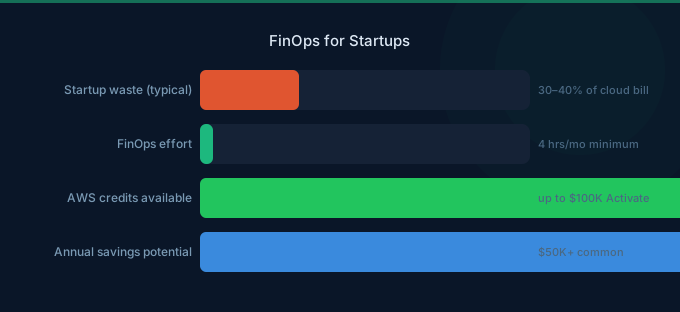
Startups don't need a FinOps team. They need one engineer who checks the AWS bill for 4 hours a month and a basic set of guardrails that prevent waste from compounding.
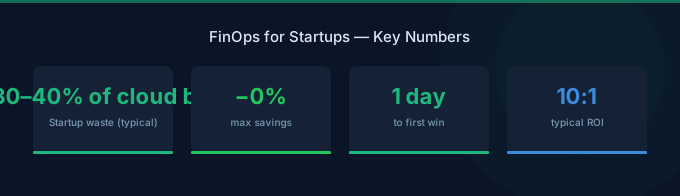
The math is straightforward: a startup spending $15K/month on AWS wastes the typical 30% — that's $4,500/month or $54,000/year. That's a junior engineer's salary burned on idle resources, over-provisioned instances, and missing commitment discounts. You don't need a FinOps platform to capture most of those savings. You need visibility, simple rules, and monthly check-ins.
TL;DR: Most startups overspend on AWS by 30-40%. Fix it with: (1) one person spending 4 hours/month reviewing costs, (2) basic tagging (environment + team), (3) AWS Budgets with alerts, (4) Graviton instances everywhere, (5) Savings Plans at 50% of baseline. This recovers $3-5K/month for a $15K/month AWS bill. No FinOps team required until you're spending $100K+/month.
Why Startups Waste More Than Enterprises
Enterprises waste cloud spend because of organizational complexity. Startups waste it for different reasons:
Speed Over Efficiency
Engineers are measured on shipping speed, not cost efficiency. When you need to launch by Friday, nobody's comparing instance types. The biggest available instance gets picked, and nobody comes back to rightsize after launch.
No Cost Visibility
The CTO might check the AWS bill monthly, but individual engineers never see the costs their services generate. Without visibility, there's no feedback loop. A $200/month RDS instance running idle goes unnoticed for months.
Credits Mask the Problem
Many startups run on AWS Activate credits ($5K-$100K). When credits cover the bill, there's zero incentive to optimize. Then the credits expire, and the real bill hits — often 2-3x what anyone expected.
"We'll Optimize Later"
This is the most dangerous phrase. Cloud waste compounds. A $500/month waste in month 1 becomes $6,000 by year-end if nobody catches it — and by then, there are 20 more waste sources just like it.
Minimum Viable FinOps: The 4-Hour Monthly Practice
You don't need a framework. You need a recurring calendar invite and a checklist.
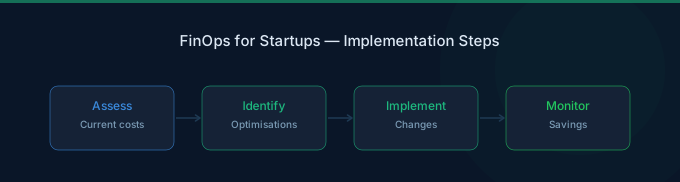
Hour 1: Review the Bill
Open AWS Cost Explorer. Answer these questions:
- What's the total spend vs last month? Why did it change?
- What are the top 5 cost categories?
- Are there any services that grew more than 20%?
- Any unexpected new services appearing?
Hour 2: Hunt Waste
Check for the five most common startup waste sources:
| Waste Source | How to Find It | Typical Savings |
|---|---|---|
| Idle RDS instances | CloudWatch → DatabaseConnections = 0 | $100-500/month each |
| Unattached EBS volumes | EC2 → Volumes → Unattached | $40-80/month per 500GB |
| Over-provisioned instances | Compute Optimizer recommendations | 20-40% of instance cost |
| Old snapshots | EC2 → Snapshots → age over 90 days | $10-50/month |
| Unused Elastic IPs | EC2 → Elastic IPs → unassociated | $3.65/month each |
Hour 3: Check Commitments
Review Savings Plans coverage:
- Are you covered? If not, should you buy a plan?
- Are existing plans being utilized?
- Has your baseline spend changed enough to justify additional plans?
Review Reserved Instances for databases:
- Any production RDS/Aurora instances running On-Demand that should be Reserved?
Hour 4: Set Up Guardrails
Implement one new guardrail per month:
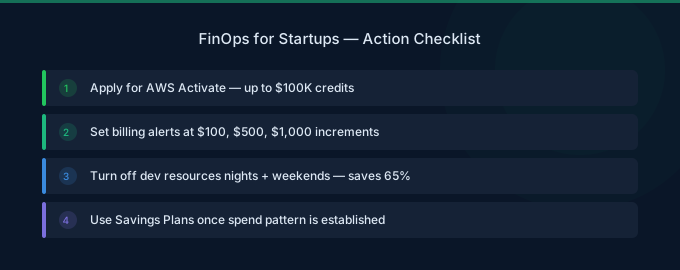
- Month 1: Set up AWS Budgets with email alerts
- Month 2: Implement basic tagging (environment, team)
- Month 3: Schedule dev/test instance shutdown after hours
- Month 4: Deploy S3 lifecycle policies
- Month 5: Switch dev instances to Graviton
- Month 6: Purchase first Savings Plans
The Startup Cost Optimization Stack
Free Tools (Start Here)
| Tool | What It Does | Setup Time |
|---|---|---|
| AWS Cost Explorer | Visualize and analyze spending | 5 minutes |
| AWS Budgets | Alert when spend exceeds threshold | 10 minutes |
| Cost Anomaly Detection | ML-powered spike alerts | 5 minutes |
| Compute Optimizer | Right-sizing recommendations | Enable in console |
Quick Wins (First Month)
These actions require minimal effort and deliver immediate savings:
-
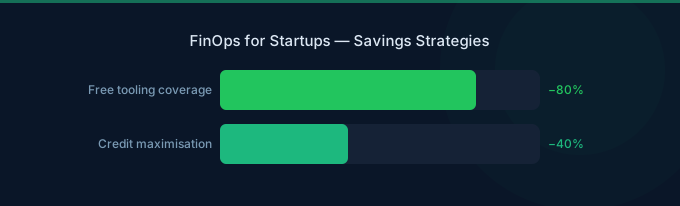
Switch to Graviton everywhere — 20% savings on EC2, RDS, Lambda, ElastiCache. Most workloads need zero code changes.
-
Stop dev/test outside business hours — Schedule instances to stop at 7 PM, start at 8 AM weekdays. Saves 65% on those resources.
-
Delete idle resources — Unattached EBS volumes, stopped-but-not-terminated instances, orphaned snapshots, unused load balancers.
-
Enable S3 Intelligent-Tiering — Automatic cost optimization for S3 buckets with mixed access patterns.
-
Set CloudWatch log retention — Default "Never Expire" accumulates forever. Set 30-day retention for most log groups.
Month 2-3: Commitment Optimization
Once you understand your baseline spend:
-
Compute Savings Plans — Commit to 50-60% of your On-Demand baseline. Start with 1-year No Upfront for flexibility. Saves 30-40%.
-
RDS Reserved Instances — If a production database has run for 3+ months and will continue, reserve it. 30-60% savings.
-
Fargate Savings Plans — If running containers on Fargate consistently, Compute Savings Plans cover this too.
Credit Strategy: Don't Waste Your Credits
AWS credits are a ticking clock. Maximize their value:
Before Credits Expire
- Track credit balance and expiration — AWS Billing → Credits. Know your exact expiration date.
- Pre-purchase Reserved Instances — Use credits to pay for 1-year All Upfront RIs. The credits pay for the reservation, and you get discounted rates after credits expire.
- Run experiments while credits last — Test expensive services (SageMaker, Bedrock) during the credit period.
- Don't optimize too early — During the credit period, focus on shipping product. Start optimization 2-3 months before credits expire.
After Credits Expire
The first bill without credits is always a shock. Prepare by:
- Estimating your true On-Demand cost (Cost Explorer → exclude credits)
- Having Savings Plans in place before credits expire
- Cleaning up waste that was invisible during the credit period
Scaling FinOps as You Grow
$0-$10K/month: No Dedicated Person
- CTO reviews bill monthly (1 hour)
- Basic tagging (environment tag only)
- AWS Budgets alerts
- Graviton + quick waste cleanup
$10K-$50K/month: FinOps Champion
- One engineer spends 4-8 hours/month
- Tagging: environment + team + project
- Savings Plans for baseline compute
- Monthly cost review meeting (30 min)
$50K-$100K/month: Part-Time FinOps Role
- Senior engineer dedicates 20% time to cost optimization
- Team-level cost dashboards (showback)
- Comprehensive tagging and compliance monitoring
- Regular rightsizing program
- Spot instances for stateless workloads
Over $100K/month: Dedicated FinOps Hire
At this point, a dedicated FinOps practitioner (or service like Wring) pays for itself 5-10x over. They focus on:
- Cross-service optimization
- Commitment portfolio management
- Architecture reviews for cost efficiency
- Building cost-aware engineering culture
Related Guides
- What Is FinOps? Cloud Cost Management Guide
- AWS Credits for Startups
- Cloud Costs for SaaS: Benchmarks and COGS
- Cloud Cost Optimization Checklist
Frequently Asked Questions
When should a startup start thinking about cloud costs?
Start basic visibility from day one (AWS Budgets, tagging). Begin active optimization 2-3 months before credits expire, or when monthly spend exceeds $5K — whichever comes first. The sooner you build cost awareness, the less waste accumulates.
How much can a startup save on AWS?
Startups typically save 30-40% through basic optimization: 15-20% from rightsizing and waste elimination, 10-15% from Graviton migration, and 5-10% from commitment discounts. On a $15K/month bill, that's $4,500-$6,000/month.
Should we hire a FinOps person?
Not until you're spending over $100K/month. Below that threshold, a part-time FinOps champion (an existing engineer spending 4-8 hours/month) captures 80% of the available savings. The remaining 20% doesn't justify a full-time hire.
Are AWS credits worth optimizing around?
Yes, strategically. Don't optimize aggressively during the credit period — focus on product. But 2-3 months before expiration, start: pre-purchase Reserved Instances with credits, clean up waste, and implement Savings Plans. The transition from credits to real billing shouldn't be a surprise.
Your 30-Day FinOps Starter Plan
You don't need a framework, a platform, or a team. You need 4 hours and this plan:
Week 1: Enable Cost Explorer, set AWS Budgets at current spend + 10%, enable Cost Anomaly Detection.
Week 2: Tag all resources with environment (prod/dev/staging). Delete obvious waste: unattached volumes, unused IPs, idle RDS.
Week 3: Switch dev/test instances to Graviton. Schedule dev environments to stop after hours.
Week 4: Review Savings Plans recommendations. Purchase first plan at 50% of baseline.
Expected result: 20-35% reduction in next month's bill.
Lower Your Cloud Costs with Wring
Wring helps you access AWS credits and volume discounts to reduce your cloud bill. Through group buying power, Wring negotiates better per-unit rates across all AWS services.