
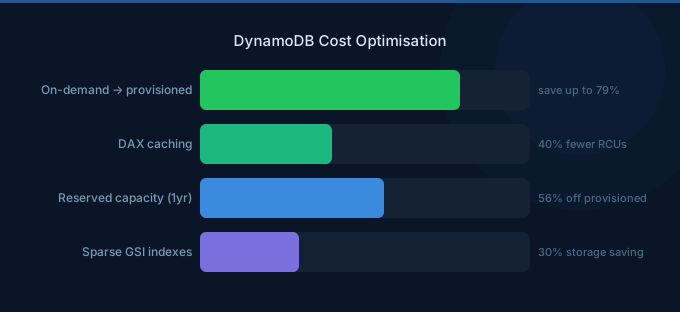
DynamoDB costs catch many teams off-guard. The per-request pricing seems cheap until you're processing billions of reads and writes monthly. The difference between a well-optimized and a naive DynamoDB setup can be 5-10x in cost. Capacity mode choice, item size, read consistency, and secondary indexes are the four biggest cost levers.
TL;DR: The three biggest DynamoDB savings: (1) Switch steady-state tables to provisioned capacity with auto-scaling — 5-7x cheaper than on-demand for predictable workloads. (2) Use eventually consistent reads (default) — they cost half of strongly consistent reads. (3) Minimize item size and avoid scanning — DynamoDB charges per RCU/WCU based on item size, so smaller items and precise queries directly reduce costs.
Capacity Mode: On-Demand vs Provisioned
This single decision has the largest cost impact.
On-Demand Pricing
| Operation | Cost |
|---|---|
| Write request | $1.25 per million WRUs |
| Read request | $0.25 per million RRUs |
Provisioned Pricing
| Operation | Cost |
|---|---|
| Write capacity unit (WCU) | $0.00065 per hour ($0.4745/month) |
| Read capacity unit (RCU) | $0.00013 per hour ($0.0949/month) |
Cost Comparison
| Workload (per second) | On-Demand/month | Provisioned/month | Savings |
|---|---|---|---|
| 100 writes + 500 reads | $360 | $75 | 79% |
| 1,000 writes + 5,000 reads | $3,600 | $750 | 79% |
| 10,000 writes + 50,000 reads | $36,000 | $7,500 | 79% |
Rule: If your traffic is predictable within 2-3x range, provisioned with auto-scaling is dramatically cheaper. On-demand is best for unpredictable, spiky workloads or new tables where patterns aren't established.
Strategy 1: Right-Size Capacity with Auto-Scaling
Set provisioned capacity with auto-scaling:
- Target utilization: 70%
- Minimum capacity: your baseline traffic
- Maximum capacity: 2-3x baseline for peaks
Auto-scaling adjusts within minutes. The cost savings vs on-demand are 70-80% while still handling traffic spikes.
Strategy 2: Use Eventually Consistent Reads
| Read Type | RCU per 4 KB | Cost Factor |
|---|---|---|
| Eventually consistent | 0.5 RCU | 1x |
| Strongly consistent | 1.0 RCU | 2x |
| Transactional | 2.0 RCU | 4x |
Eventually consistent reads cost half of strongly consistent. For most use cases (dashboards, product listings, user profiles), eventual consistency is acceptable — data is typically consistent within milliseconds.
Strategy 3: Minimize Item Size
DynamoDB charges per 4 KB (reads) and 1 KB (writes) chunks. A 4.1 KB item costs 2 RCUs to read, same as an 8 KB item.
Optimization tactics:
- Use short attribute names (
pkinstead ofpartitionKey) - Remove null/empty attributes (DynamoDB charges for stored nulls)
- Compress large string attributes with gzip
- Store large objects in S3 and reference them in DynamoDB
Strategy 4: Use Reserved Capacity
| Term | Savings vs Provisioned |
|---|---|
| 1-year | ~25% |
| 3-year | ~50% |
Reserved capacity applies to provisioned WCUs/RCUs. Combined with provisioned mode (79% savings vs on-demand) and reserved capacity (additional 50%), total savings reach 89% vs on-demand.
Strategy 5: Optimize Global Secondary Indexes
Each GSI is essentially a separate table with its own capacity charges. Projected attributes determine GSI storage costs.
Cost reducers:
- Project only needed attributes (not ALL)
- Delete unused GSIs — each consumes WCUs for every write to the base table
- Use sparse indexes (only items with the indexed attribute get written to the GSI)
Strategy 6: Enable TTL for Expiring Data
DynamoDB TTL deletes expired items for free — no write capacity consumed. For session data, cache entries, temporary tokens, or event logs with retention periods, TTL eliminates manual cleanup jobs and their associated WCU costs.
Strategy 7: Use DAX for Read-Heavy Workloads
DynamoDB Accelerator (DAX) caches reads in memory:
| DAX Node | Cost/hr | Monthly |
|---|---|---|
| dax.t3.small | $0.04 | $29 |
| dax.r5.large | $0.269 | $196 |
A dax.t3.small node at $29/month can replace millions of RCUs worth of reads. For read-heavy workloads with repeated access patterns, DAX pays for itself many times over.
Strategy 8: Use Batch Operations
BatchWriteItem and BatchGetItem process up to 25 items per request. While DynamoDB still charges per item, batching reduces overhead, latency, and retry logic — indirectly reducing costs from over-provisioning to handle individual request latency.
Strategy 9: Avoid Table Scans
A scan reads every item in the table, consuming RCUs proportional to the total table size. A 10 GB table scan consumes 2,560 RCUs regardless of how many results match your filter.
Alternatives:
- Design proper partition keys and sort keys for query access
- Use GSIs for additional access patterns
- Use
PartiQLSELECT with WHERE clauses that map to key conditions
Strategy 10: Monitor with CloudWatch
Track these metrics in AWS Cost Management to identify waste:
ConsumedReadCapacityUnitsvsProvisionedReadCapacityUnits— if consumed is consistently under 30% of provisioned, downsizeThrottledRequests— if zero, you may be over-provisionedReturnedItemCountvsScannedCount— a large gap indicates inefficient queries
Related Guides
- AWS DynamoDB Pricing: On-Demand vs Provisioned
- Cloud Rightsizing Guide
- Cloud Tagging Strategy Guide
- AWS RDS Cost Optimization Guide
FAQ
When should I use on-demand vs provisioned?
Use on-demand for new tables, development environments, and highly unpredictable workloads. Switch to provisioned with auto-scaling once you have 2+ weeks of traffic data showing a consistent pattern. Provisioned saves 70-80%.
Can I switch between on-demand and provisioned?
Yes, once every 24 hours. You can start with on-demand, observe traffic patterns, then switch to provisioned. This is a zero-downtime operation.
How do I estimate DynamoDB costs for a new application?
Estimate reads per second, writes per second, and average item size. Use provisioned pricing: monthly cost = (writes/s x $0.4745) + (reads/s x $0.0949 / 2 for eventual consistency). Add 20% for GSI overhead.
Lower Your DynamoDB Costs with Wring
Wring helps you access AWS credits and volume discounts to lower your DynamoDB costs. Through group buying power, Wring negotiates better rates so you pay less per request.


