
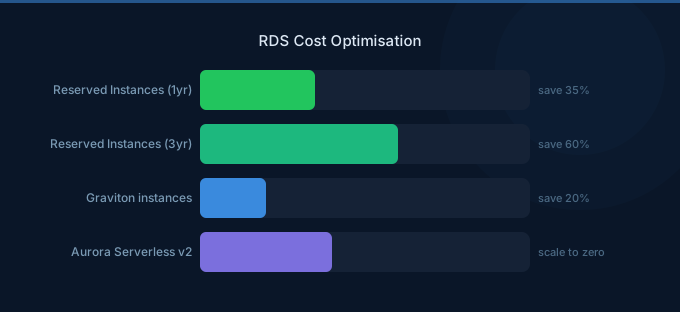
RDS is typically the second-largest AWS cost after EC2. The optimization challenge: databases are harder to rightsize than compute because downsizing risks performance degradation, and production databases feel risky to change. This leads to persistent over-provisioning — the average RDS instance runs at 20-40% utilization.
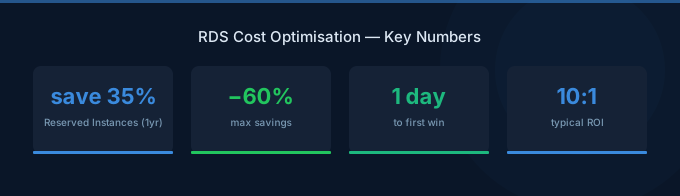
The saving opportunities are substantial. Graviton instances save 20%, Reserved Instances save 30-60%, and switching dev databases to Aurora Serverless v2 can save 50-70%. Combined, these strategies reduce database costs 30-60%.
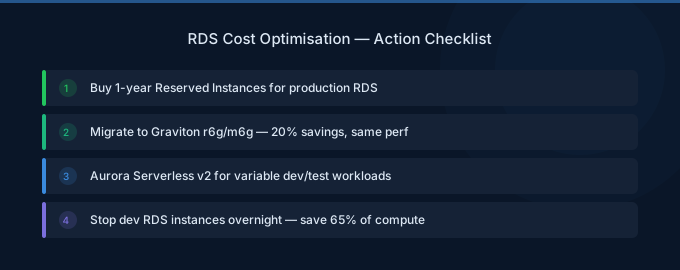
TL;DR: RDS optimization priorities: (1) Graviton instances for 20% savings (db.r7g over db.r7i). (2) Reserved Instances for production databases running 24/7 (30-60% off). (3) Aurora Serverless v2 for dev/test and variable workloads (50-70% off). (4) Rightsize based on CloudWatch metrics (CPU, memory, connections). (5) Stop idle dev/staging databases. (6) Optimize storage — use gp3 over gp2, set appropriate IOPS.
RDS Cost Anatomy
| Component | Typical % of RDS Bill | Optimization Lever |
|---|---|---|
| Instance compute | 55-70% | Rightsizing, Graviton, RIs |
| Storage (gp3/io2) | 10-20% | Volume type, right-size capacity |
| I/O charges (Aurora Standard) | 5-20% | I/O-Optimized mode |
| Backup storage | 3-5% | Retention policy |
| Data transfer | 2-5% | Read replicas in same AZ |
| Multi-AZ (standby) | 0-30% | Only for production |
Strategy 1: Graviton Instances (20% Savings)
Every RDS instance family has a Graviton equivalent. 20% cheaper with comparable or better performance.
| Intel Instance | Graviton Equivalent | Monthly Savings |
|---|---|---|
| db.r7i.large ($227/mo) | db.r7g.large ($190/mo) | $37 |
| db.r7i.xlarge ($454/mo) | db.r7g.xlarge ($380/mo) | $74 |
| db.r7i.2xlarge ($908/mo) | db.r7g.2xlarge ($759/mo) | $149 |
How: Modify the RDS instance, change to Graviton instance class. Apply during maintenance window. Minimal risk — same engine, same data, different CPU architecture.
Strategy 2: Reserved Instances for Production (30-60% Savings)
Production databases that run 24/7 should be reserved. RDS Reserved Instances provide significant savings:
| Term | Payment | Savings vs On-Demand |
|---|---|---|
| 1-year No Upfront | Monthly payments | ~30% |
| 1-year All Upfront | Lump sum | ~40% |
| 3-year All Upfront | Lump sum | ~60% |
Start conservative: 1-year No Upfront for production databases that have run for 3+ months and will continue. The 30% savings with no upfront commitment and easy exit make this a low-risk optimization.
When NOT to reserve: Databases that might be decommissioned, migrated to Aurora, or significantly resized in the next year.
Strategy 3: Aurora Serverless v2 for Variable Workloads (50-70% Savings)
Dev/staging databases and applications with variable query patterns waste money on provisioned instances. Aurora Serverless v2 scales compute to match demand.
| Scenario | Provisioned (db.r7g.large) | Serverless v2 (avg usage) | Savings |
|---|---|---|---|
| Dev database (10% utilization) | $190/month | $44/month | 77% |
| Staging (25% utilization) | $190/month | $88/month | 54% |
| Variable production (40%) | $190/month | $135/month | 29% |
Rule of thumb: If database utilization averages under 40%, Serverless v2 is cheaper.
Strategy 4: Rightsize Based on Metrics
Check CloudWatch for these RDS metrics over 14+ days:
| Metric | Over-Provisioned Signal | Action |
|---|---|---|
| CPUUtilization | Under 30% average | Downsize one tier |
| FreeableMemory | Over 60% of total | Consider smaller instance |
| DatabaseConnections | Under 20% of max | May not need current size |
| ReadIOPS/WriteIOPS | Consistently low | May not need io2 storage |
Rightsize approach: Downsize one tier at a time. Monitor for 2 weeks. If performance is acceptable, consider downsizing again.
Strategy 5: Stop Idle Databases
Dev and staging databases running 24/7 with zero connections during nights and weekends waste 65% of their compute cost.
Options:
- Stop manually — RDS allows stopping instances for up to 7 days (auto-restarts after 7 days)
- Aurora Serverless v2 — Scales to minimum 0.5 ACU ($44/month) during idle periods
- Snapshot and restore — For databases needed only occasionally, snapshot, delete, and restore when needed
Strategy 6: Optimize Storage
Switch gp2 to gp3
Every gp2 volume should be gp3. No downtime required. 20% cheaper with better baseline performance (3,000 IOPS and 125 MiB/s included).
Right-Size Storage Allocation
RDS storage auto-scaling can grow volumes but never shrinks them. Periodically review:
- Is allocated storage significantly more than used storage?
- For Aurora: storage is billed per GB used (no over-allocation waste)
Choose the Right Storage Type
| Storage Type | Cost | Best For |
|---|---|---|
| gp3 | $0.08/GB/mo + IOPS above 3K | Most workloads |
| io2 | $0.125/GB/mo + $0.065/IOPS | High-performance OLTP |
| Aurora Standard | $0.10/GB/mo + I/O charges | Low-medium I/O workloads |
| Aurora I/O-Optimized | $0.225/GB/mo, no I/O charges | High-I/O workloads |
Strategy 7: Optimize Multi-AZ and Read Replicas
Multi-AZ: Doubles compute cost for a standby replica. Required for production (high availability). Not needed for dev/staging — disable it.
Read replicas: Can offload reads from the primary, but each replica costs the same as an additional instance. Only add read replicas when the primary can't handle read traffic, not as a default.
Right-size replicas independently: A read replica doesn't need to match the primary instance size. If reads are lighter, use a smaller instance.
Aurora-Specific Optimizations
I/O-Optimized vs Standard
Aurora charges $0.20/million I/O operations on Standard. For read-heavy workloads, this adds up fast:
| Monthly I/O Volume | I/O Cost (Standard) | Switch to I/O-Optimized? |
|---|---|---|
| 100M | $20 | No (under 25% of compute) |
| 1B | $200 | Maybe (check vs compute cost) |
| 5B | $1,000 | Yes (exceeds compute cost) |
Rule: If I/O charges exceed 25% of your compute charges, switch to I/O-Optimized. You pay 30% more for compute and 125% more for storage, but I/O is free.
Aurora Global Database
Charges for cross-region replication. Only use for multi-region applications that require sub-second read latency globally. Not needed for disaster recovery alone — standard Aurora backups to S3 are sufficient for most DR requirements.
Related Guides
- AWS RDS Pricing: Instance Costs and Savings
- AWS Aurora Pricing Guide
- Savings Plans vs Reserved Instances: Which Saves More?
- Cloud Rightsizing Guide
Frequently Asked Questions
How much can I save on RDS?
Most organizations save 30-60% through systematic optimization: 20% from Graviton migration, 30-60% from Reserved Instances on production, 50-70% from Aurora Serverless v2 on dev/test, and 10-20% from rightsizing. The combined effect depends on your current waste level.
Should I use RDS or Aurora?
Aurora costs about 20% more for compute but includes built-in high availability, faster failover, and distributed storage. For production databases requiring high availability, Aurora's total cost is often comparable to RDS Multi-AZ. For simple dev/test databases, standard RDS is cheaper.
When should I buy RDS Reserved Instances?
When a production database has run for 3+ months and you expect it to continue for at least 12 more months. Start with 1-year No Upfront for flexibility. Apply to your largest databases first for maximum savings.
How do I handle RDS for dev/test?
Three options ranked by cost: (1) Aurora Serverless v2 — scales to near-zero during idle time. (2) Smallest RDS instance stopped outside business hours. (3) RDS on smallest instance running 24/7. Option 1 is usually cheapest for databases used intermittently.
Optimize Your Database Costs
Database optimization is high-impact because databases run 24/7 and represent 15-25% of most AWS bills:
- Graviton first — 20% savings, minimal risk, immediate impact
- Reserve production — 30-60% off your largest, most stable databases
- Serverless for dev — Stop paying full price for idle databases
- Rightsize actively — Check metrics quarterly, downsize when over-provisioned
- Optimize Aurora I/O — Switch to I/O-Optimized if I/O charges exceed 25% of compute
Lower Your RDS Costs with Wring
Wring helps you access AWS credits and volume discounts to lower your RDS costs. Through group buying power, Wring negotiates better rates so you pay less per instance hour.


