
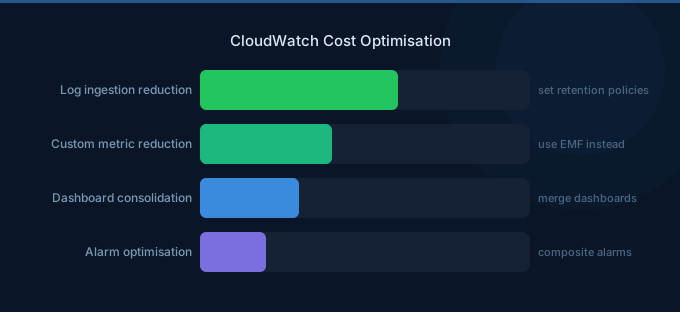
CloudWatch is often one of the most surprising costs on an AWS bill. What seems like a basic monitoring service can quietly accumulate thousands of dollars monthly through verbose logging, excessive custom metrics, and default retention policies that keep data forever. The solution isn't to monitor less — it's to monitor smarter.
TL;DR: Three changes that save the most: (1) Set log retention periods — CloudWatch Logs stores data indefinitely by default, costing $0.03/GB/month forever. Set 30-day retention for most log groups. (2) Use metric filters instead of custom metrics where possible — avoid the $0.30/metric/month charge. (3) Send verbose logs to S3 ($0.023/GB/month) instead of CloudWatch Logs ($0.50/GB ingested + $0.03/GB stored).
CloudWatch Cost Components
| Component | Cost |
|---|---|
| Log ingestion | $0.50 per GB |
| Log storage | $0.03 per GB/month |
| Custom metrics | $0.30/metric/month (first 10K) |
| Dashboards | $3.00/month per dashboard |
| Alarms | $0.10/alarm/month (standard) |
| High-resolution alarms | $0.30/alarm/month |
| API requests | $0.01 per 1,000 GetMetricData calls |
| Contributor Insights | $0.02 per rule per match |
| Container Insights | Custom metrics pricing per node |
| Logs Insights queries | $0.0057 per GB scanned |
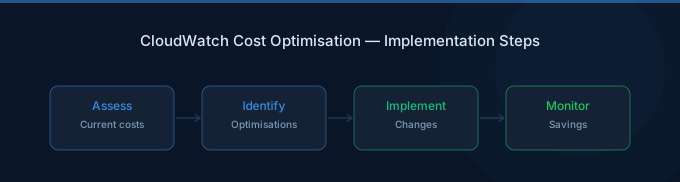
Strategy 1: Set Log Retention Policies
CloudWatch Logs default retention is never expire. This means every log group you've ever created is still storing data and incurring monthly charges.
| Log Type | Recommended Retention |
|---|---|
| Application debug logs | 7-14 days |
| Application info/error logs | 30 days |
| Access/audit logs | 90 days |
| Compliance/regulatory logs | 365 days or export to S3 |
Impact: A team generating 100 GB/day of logs with no retention policy accumulates 36 TB in a year, costing $1,080/month in storage alone. Setting 30-day retention limits storage to 3 TB ($90/month).
Strategy 2: Filter Logs Before Ingestion
Every byte ingested costs $0.50/GB. Reduce log volume before it reaches CloudWatch:
- Set application log levels to WARN or ERROR in production (not DEBUG or INFO)
- Use subscription filters to route only important logs to CloudWatch
- Filter out health check logs from ALB/NLB — these can be 50%+ of web server log volume
- Exclude routine cron job success output
Strategy 3: Route Verbose Logs to S3
For logs that need long-term storage but not real-time search, use CloudWatch Logs subscriptions to stream to S3 via Kinesis Data Firehose.
| Storage Option | Ingestion | Storage/GB/month |
|---|---|---|
| CloudWatch Logs | $0.50/GB | $0.03 |
| S3 Standard | $0.00 (via Firehose) | $0.023 |
| S3 Glacier | $0.00 | $0.004 |
For 1 TB/month of logs stored for 1 year, CloudWatch costs $6,360 vs S3 at $276 — a 96% reduction.
Strategy 4: Reduce Custom Metrics
Each custom metric costs $0.30/month (first 10,000). Teams using detailed monitoring or custom dimensions often create thousands of metrics without realizing it.
Common over-creation patterns:
- Per-customer metrics (1,000 customers = $300/month in metrics alone)
- Per-endpoint metrics with multiple dimensions
- High-resolution (1-second) metrics when 1-minute suffices
Alternatives:
- Use CloudWatch Embedded Metric Format (EMF) — publish metrics through logs at log ingestion rates
- Aggregate metrics before publishing (per-service instead of per-instance)
- Use metric math instead of publishing calculated metrics
Strategy 5: Optimize Container Insights
Container Insights publishes custom metrics for every ECS task/EKS pod. For clusters with hundreds of pods, this creates thousands of custom metrics.
Cost control:
- Disable Container Insights on dev/staging clusters
- Use enhanced observability selectively — only for namespaces that need it
- Consider third-party tools (Prometheus + Grafana) for large clusters — they're often cheaper than Container Insights at scale
- Review recommendations from AWS Cost Management for additional monitoring savings
Strategy 6: Right-Size Alarms
| Alarm Type | Cost/month | When to Use |
|---|---|---|
| Standard resolution (60s) | $0.10 | Most production monitoring |
| High resolution (10s) | $0.30 | Only for latency-critical services |
| Composite alarms | $0.50 | Reduce alarm noise |
Audit alarms quarterly. Delete alarms for decommissioned services and resources.
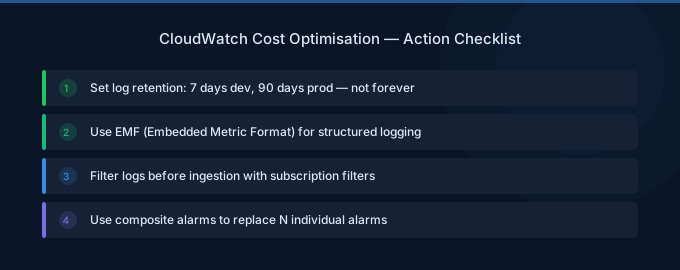
Related Guides
- AWS CloudWatch Pricing: Metrics, Logs, and Costs
- Cloud Cost Optimization Checklist
- Cloud Tagging Strategy Guide
- AWS EC2 Cost Optimization: 12 Proven Strategies
FAQ
How can I find which log groups cost the most?
In the CloudWatch console, go to Log Groups and sort by stored bytes. Or use the AWS CLI: aws logs describe-log-groups --query 'sort_by(logGroups, &storedBytes)[-10:]' to find the top 10 largest log groups.
Is CloudWatch Logs cheaper than Datadog or Splunk?
For ingestion, CloudWatch at $0.50/GB is comparable to Datadog ($0.10/GB ingested + higher retention costs). For small volumes under 100 GB/month, CloudWatch is simpler and cheaper. For large volumes, S3 + Athena is the cheapest option.
Should I use CloudWatch Logs Insights or Athena for log analysis?
Logs Insights ($0.0057/GB scanned) is best for ad-hoc queries on recent logs. For routine analysis on large historical datasets, export to S3 and query with Athena ($5/TB scanned with partition pruning) — it's cheaper for large-scale analysis.
Lower Your CloudWatch Costs with Wring
Wring helps you access AWS credits and volume discounts to lower your CloudWatch costs. Through group buying power, Wring negotiates better rates so you pay less per metric and log GB ingested.


