
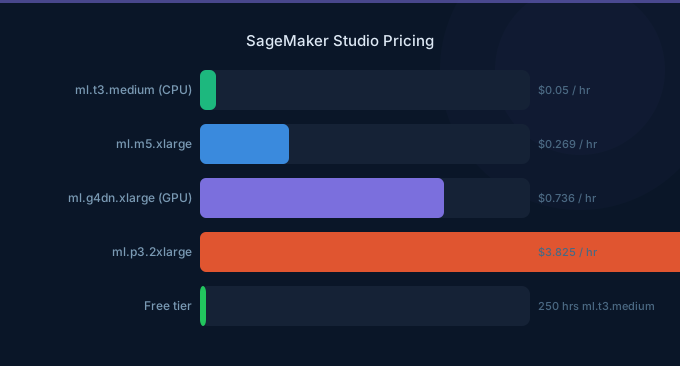
Amazon SageMaker Studio is a web-based IDE for machine learning that provides JupyterLab notebooks, a visual code editor, and integrated ML tools. Studio billing is based on the compute instance running your notebook kernel — and it keeps running until you explicitly shut it down. An idle ml.g5.xlarge notebook left running over a weekend costs $48.19. Understanding Studio's pricing model and configuring auto-shutdown policies is essential for keeping costs under control. This guide covers every Studio pricing component.
TL;DR: Studio notebook instances range from $0.05/hr (ml.t3.medium) to $28.152/hr (ml.p3.16xlarge). Free tier includes 250 hours of ml.t3.medium per month. EBS storage costs $0.14/GB-month (higher than standard EBS). The biggest cost risk is idle notebooks — configure auto-shutdown lifecycle policies to prevent waste.
Studio Notebook Instance Pricing
CPU Instances
| Instance | vCPUs | RAM | Price/hr | Monthly (8 hrs/day, 22 days) |
|---|---|---|---|---|
| ml.t3.medium | 2 | 4 GB | $0.05 | $8.80 |
| ml.t3.large | 2 | 8 GB | $0.10 | $17.60 |
| ml.t3.xlarge | 4 | 16 GB | $0.20 | $35.20 |
| ml.t3.2xlarge | 8 | 32 GB | $0.40 | $70.40 |
| ml.m5.xlarge | 4 | 16 GB | $0.23 | $40.48 |
| ml.m5.2xlarge | 8 | 32 GB | $0.46 | $80.96 |
| ml.m5.4xlarge | 16 | 64 GB | $0.92 | $161.92 |
| ml.m5.12xlarge | 48 | 192 GB | $2.76 | $485.76 |
| ml.c5.xlarge | 4 | 8 GB | $0.20 | $35.20 |
| ml.c5.2xlarge | 8 | 16 GB | $0.41 | $72.16 |
GPU Instances
| Instance | GPU | GPU Memory | Price/hr | Monthly (8 hrs/day, 22 days) |
|---|---|---|---|---|
| ml.g4dn.xlarge | 1x T4 | 16 GB | $0.74 | $130.24 |
| ml.g4dn.2xlarge | 1x T4 | 16 GB | $0.94 | $165.44 |
| ml.g5.xlarge | 1x A10G | 24 GB | $1.41 | $248.16 |
| ml.g5.2xlarge | 1x A10G | 24 GB | $1.69 | $297.44 |
| ml.g5.4xlarge | 1x A10G | 24 GB | $2.27 | $399.52 |
| ml.p3.2xlarge | 1x V100 | 16 GB | $3.825 | $673.20 |
| ml.p3.8xlarge | 4x V100 | 64 GB | $14.688 | $2,585.09 |
| ml.p3.16xlarge | 8x V100 | 128 GB | $28.152 | $4,954.75 |
Free Tier
SageMaker's free tier includes Studio resources for the first two months after account creation:
| Resource | Free Allowance | Duration |
|---|---|---|
| ml.t3.medium notebook | 250 hours/month | First 2 months |
| EBS storage | 5 GB | First 2 months |
At 250 hours per month, you get roughly 8 hours per day for a full month on the smallest instance. This is enough for learning, prototyping, and small-scale data exploration.
Storage Pricing
EBS Volumes
Every Studio user profile gets an EBS volume for persistent storage that survives kernel restarts.
| Component | Cost | Notes |
|---|---|---|
| EBS storage | $0.14/GB-month | Higher than standard EBS gp3 ($0.08) |
| Default volume size | 5 GB | Can be increased |
| Maximum volume size | 16,384 GB (16 TB) | Per user profile |
Studio EBS pricing is 75% more expensive than standard EC2 EBS gp3 volumes. For large datasets, store data in S3 and load it into your notebook rather than keeping it on the EBS volume.
S3 Integration
Most Studio workflows involve loading data from S3:
| Component | Cost | Notes |
|---|---|---|
| S3 Standard storage | $0.023/GB-month | Training datasets |
| S3 GET requests | $0.0004/1K requests | Loading data into notebooks |
| Data transfer (same region) | Free | S3 to SageMaker |
JupyterLab Spaces
Studio organizes compute into "spaces" — isolated environments that can run JupyterLab, Code Editor, or custom applications.
| Space Type | Description | Billing |
|---|---|---|
| JupyterLab | Notebook environment | Instance hours while running |
| Code Editor | VS Code-based editor | Instance hours while running |
| Custom | Custom container applications | Instance hours while running |
Each space runs on its own compute instance. Running three JupyterLab spaces simultaneously on ml.t3.medium costs 3x ($0.15/hr total). Spaces can be stopped independently.
Studio Classic vs New Studio
AWS has been transitioning from Studio Classic to the redesigned Studio experience.
| Feature | Studio Classic | New Studio |
|---|---|---|
| Architecture | Single notebook instance | Spaces-based |
| Kernel management | Multiple kernels on one instance | One instance per space |
| Idle shutdown | Lifecycle configuration | Built-in idle timeout |
| Cost control | Lifecycle scripts | Native idle settings + budgets |
| Availability | Being deprecated | Current default |
The new Studio is the recommended experience. Studio Classic is being phased out, and AWS recommends migrating to the new Studio.
Idle Notebook Costs
The biggest cost risk in Studio is idle notebooks. A notebook running an active kernel continues billing even when you are not executing code.
Cost of Idle Notebooks
| Instance | Cost if Left Running 24/7 for 1 Month | Idle Weekend Cost (Fri 6pm - Mon 9am) |
|---|---|---|
| ml.t3.medium | $36.50 | $3.15 |
| ml.t3.xlarge | $146.00 | $12.60 |
| ml.g4dn.xlarge | $540.20 | $46.62 |
| ml.g5.xlarge | $1,029.30 | $88.83 |
| ml.p3.2xlarge | $2,792.25 | $240.98 |
A team of 10 data scientists each running ml.g5.xlarge notebooks and forgetting to shut them down over weekends costs $888/weekend in waste.
Auto-Shutdown Configuration
Lifecycle Configuration (Recommended)
Configure lifecycle configurations to automatically stop idle notebooks.
Recommended settings:
| Setting | Value | Rationale |
|---|---|---|
| Idle timeout | 60 minutes | Catches forgotten notebooks |
| Auto-shutdown on kernel idle | Enabled | Stops billing when no code runs |
| Default instance type | ml.t3.medium | Prevents accidental GPU launches |
Budget Alerts
Set up AWS Budgets to monitor Studio spending:
| Alert Level | Action |
|---|---|
| 80% of monthly budget | Email notification |
| 100% of monthly budget | SNS notification + auto-stop script |
| Per-user tracking | Tag-based cost allocation |
Cost Optimization Tips
-
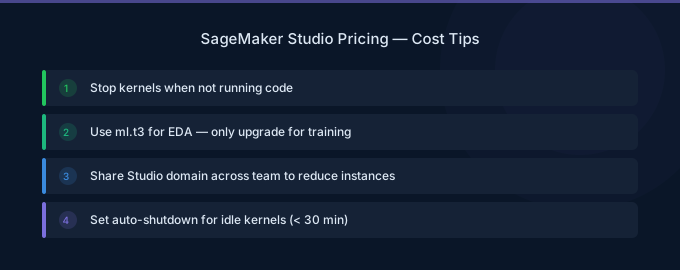
Configure auto-shutdown lifecycle policies — Set a 60-minute idle timeout on all Studio spaces. This single configuration change prevents the most common source of Studio cost waste.
-
Use ml.t3.medium as the default instance — Start with the cheapest instance ($0.05/hr) and upgrade only when a specific notebook needs more compute. Most data exploration and visualization work runs fine on 4 GB RAM.
-
Store data in S3, not EBS — Studio EBS costs $0.14/GB-month versus $0.023/GB-month for S3. Load datasets into your notebook session from S3 rather than storing copies on the EBS volume.
-
Switch to GPU instances only for training cells — Start your notebook on a CPU instance, do all data preparation and exploration, then switch to a GPU instance only for the model training cells. Switch back after training completes.
-
Use SageMaker Training Jobs instead of notebook training — For training runs longer than 30 minutes, launch a SageMaker Training Job from your notebook instead of running training in the notebook kernel. Training Jobs terminate automatically when complete.
-
Set domain-level instance restrictions — As an admin, restrict which instance types users can launch. Prevent accidental launches of ml.p3.16xlarge ($28.152/hr) by limiting available instances to what your team actually needs.
-
Monitor per-user costs with tags — Enable tag-based cost allocation to track Studio spending by team or individual. This visibility alone often reduces costs by 20-30% through accountability.
Related Guides
FAQ
Does Studio charge when my notebook is open but idle?
Yes. Studio bills for compute as long as the kernel is running, regardless of whether you are actively executing code. An open notebook with a running kernel on ml.g5.xlarge costs $1.41/hr even if you are away from your desk. Configure auto-shutdown lifecycle policies to stop idle kernels automatically.
Can I use Studio for free?
The free tier includes 250 hours of ml.t3.medium per month for the first two months, plus 5 GB of EBS storage. After the free tier expires or if you use larger instances, standard pricing applies. At 250 hours/month, you can run a notebook roughly 8 hours per day for a full month.
How does Studio pricing compare to running Jupyter on EC2?
Studio's ml.t3.medium costs $0.05/hr versus $0.042/hr for a standard t3.medium EC2 instance — a 19% premium. For GPU instances, the SageMaker surcharge is higher: ml.g5.xlarge at $1.41/hr versus g5.xlarge at $1.006/hr (40% premium). The premium buys managed authentication, persistent storage, integrated ML tools, and collaboration features.
Lower Your SageMaker Studio Costs with Wring
Wring helps you access AWS credits and volume discounts to lower your SageMaker Studio costs. Through group buying power, Wring negotiates better rates so you pay less per instance hour.


