
SageMaker Canvas lets business analysts build ML models without writing code. It sounds simple, but the pricing has multiple components: workspace session hours, model training compute, and optional Bedrock model usage. A casual user might spend $50/month. A power user training large models on big datasets can easily cross $500/month.
The key cost question with Canvas is whether the no-code convenience justifies the price premium over SageMaker Studio or even spreadsheet-based alternatives. For many business teams, the answer is yes — but only if you understand and manage the cost components.
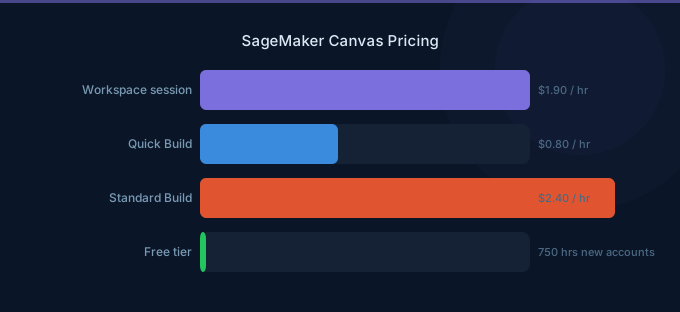
TL;DR: SageMaker Canvas costs $1.90/hr for workspace sessions, plus training costs that vary by dataset size and build type. Free tier includes 750 session hours in the first 2 months. Quick Build models train in 2-15 minutes (lower cost), Standard Build takes 2-4 hours (higher accuracy, higher cost). Most business users spend $100-300/month.
Canvas Pricing Components
Workspace Session Pricing
You are charged $1.90/hour for the time your Canvas workspace is active. The session starts when you log in and continues until you explicitly log out or the idle timeout triggers.
| Component | Price | Notes |
|---|---|---|
| Session hour | $1.90/hr | Billed per second |
| Idle timeout | Auto logout after 60 min | Configurable by admin |
| Monthly cap (typical user) | $76-152/month | 2-4 hrs/day, 20 workdays |
Free Tier: New AWS accounts get 750 workspace session hours free in the first 2 months. That is roughly 9 hours/day for 2 months — generous enough for a full evaluation.
Model Training Costs
Training costs depend on the build type and dataset size. Canvas uses SageMaker Autopilot under the hood.
| Build Type | Duration | Approx. Cost | Best For |
|---|---|---|---|
| Quick Build | 2-15 minutes | $2-10 | Rapid prototyping, small datasets |
| Standard Build | 2-4 hours | $10-50 | Production models, larger datasets |
Quick Build trains a subset of model candidates and returns results fast. Standard Build runs the full AutoML pipeline — trying dozens of algorithms and hyperparameter combinations — producing a more accurate model at higher cost.
Dataset size impact on Standard Build costs:
| Dataset Size | Rows | Estimated Training Cost |
|---|---|---|
| Small | Under 10,000 | $10-15 |
| Medium | 10,000-100,000 | $15-30 |
| Large | 100,000-1,000,000 | $30-50 |
| Very large | Over 1,000,000 | $50-100+ |
Ready-to-Use Models (Bedrock Integration)
Canvas integrates with Amazon Bedrock to provide access to foundation models for text generation, summarization, and extraction tasks. These are billed at standard Bedrock per-token pricing:
| Model | Input (per 1K tokens) | Output (per 1K tokens) |
|---|---|---|
| Claude 3 Haiku | $0.00025 | $0.00125 |
| Claude 3.5 Sonnet | $0.003 | $0.015 |
| Titan Text Express | $0.0002 | $0.0006 |
For most Canvas users, Bedrock usage adds $5-20/month for occasional text analysis tasks.
Canvas vs Studio vs Bedrock
Choosing between Canvas, Studio, and Bedrock depends on your team's technical skills and use case:
| Feature | Canvas | Studio | Bedrock |
|---|---|---|---|
| Target user | Business analysts | Data scientists | Developers |
| Coding required | No | Yes (Python) | Yes (API calls) |
| Model types | Tabular, time series, text, image | Any custom model | Foundation models only |
| Training | AutoML (Quick/Standard) | Full control, any algorithm | Fine-tuning only |
| Workspace cost | $1.90/hr | $0.05-1.21/hr (instance) | None |
| Deployment | One-click or share | Full endpoint control | Managed API |
| Best for | Business ML democratization | Custom ML development | GenAI applications |
When to choose Canvas:
- Business analysts need to build predictive models
- No ML engineering resources available
- Tabular prediction, time series forecasting, or basic NLP tasks
- Quick turnaround on model prototyping
When to choose Studio:
- Custom model architectures required
- Data scientists need full control over training
- Complex feature engineering or preprocessing
- Cost is a primary concern (cheaper compute options)
Data Import Options
Canvas can import data from multiple sources. Data import itself is free, but the source services may have transfer costs:
| Source | Import Cost | Notes |
|---|---|---|
| Local file upload | Free | Up to 5 GB per file |
| Amazon S3 | Free (in-region) | Standard S3 request charges apply |
| Amazon Redshift | Free (in-region) | Redshift cluster must be running |
| Snowflake | Free | Requires Snowflake connector setup |
| SaaS connectors | Free | Salesforce, SAP, Google Analytics, etc. |
Canvas supports CSV, Parquet, and JSON formats. Datasets are stored in S3 behind the scenes, so S3 storage costs apply (typically negligible for tabular data).
Real-World Cost Scenarios
Business Analyst (Occasional Use)
| Component | Monthly Cost |
|---|---|
| Canvas sessions (2 hrs/day, 15 days) | $57 |
| Quick Build models (4 per month) | $20 |
| Bedrock queries (light usage) | $5 |
| S3 storage | $1 |
| Total | $83 |
Analytics Team (3 Users, Regular Use)
| Component | Monthly Cost |
|---|---|
| Canvas sessions (3 users, 3 hrs/day, 20 days) | $342 |
| Standard Build models (8 per month) | $200 |
| Quick Build models (15 per month) | $60 |
| Bedrock queries (moderate usage) | $30 |
| S3 storage | $3 |
| Total | $635 |
Enterprise Deployment (10 Users)
| Component | Monthly Cost |
|---|---|
| Canvas sessions (10 users, 2 hrs/day, 20 days) | $760 |
| Standard Build models (20 per month) | $600 |
| Quick Build models (40 per month) | $160 |
| Bedrock queries (heavy usage) | $100 |
| S3 storage | $10 |
| Total | $1,630 |
Cost Optimization Tips
-
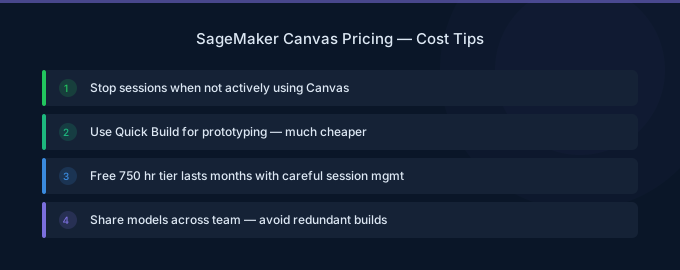
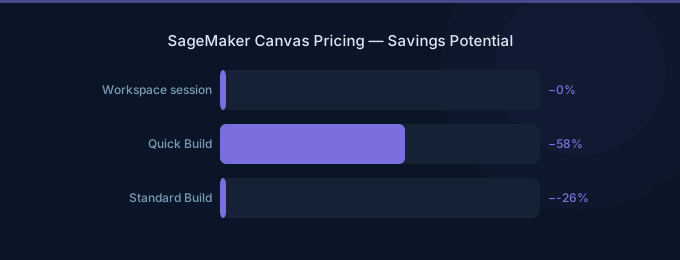
Use Quick Build first. Quick Build costs 80% less than Standard Build and often delivers 90%+ of the accuracy. Only use Standard Build when Quick Build accuracy is insufficient for your use case.
-
Log out when not actively working. Canvas charges $1.90/hr for idle sessions. Configure the idle timeout to 15-30 minutes instead of the default 60 minutes to reduce wasted session hours.
-
Leverage the free tier aggressively. New accounts get 750 free session hours. Run your full evaluation, build multiple models, and decide before the free period expires.
-
Downsample large datasets for exploration. Train Quick Build models on a 10% sample first. Only use the full dataset for Standard Build when you have confirmed the approach works.
-
Use Canvas for prototyping, Studio for production. Build proof-of-concept models in Canvas, then hand off to data scientists in Studio for production deployment at lower compute costs.
-
Monitor session hours with AWS Cost Explorer. Set billing alerts for Canvas usage to prevent unexpected charges from forgotten sessions.
Related Guides
- AWS SageMaker Pricing: Training, Inference, Studio
- AWS SageMaker Studio Pricing Guide
- AWS Bedrock Pricing Guide
FAQ
How much does SageMaker Canvas cost per month?
A typical single user spends $80-200/month, depending on session hours and training frequency. Light users (1-2 hours/day, a few Quick Build models) pay around $80/month. Heavy users running Standard Build models on large datasets can spend $300-500/month. The free tier covers 750 session hours in the first 2 months.
Is SageMaker Canvas free?
Canvas includes a free tier for new AWS accounts: 750 workspace session hours during the first 2 months. Model training costs and Bedrock usage are not included in the free tier. After the free period, workspace sessions cost $1.90/hr.
Can I deploy Canvas models to production?
Yes. Canvas models can be deployed to SageMaker endpoints with one click, shared with data scientists in Studio for further refinement, or used for batch predictions directly within Canvas. Deployed endpoints incur standard SageMaker inference costs based on the instance type selected.
Lower Your SageMaker Canvas Costs with Wring
Wring helps you access AWS credits and volume discounts to lower your SageMaker Canvas costs. Through group buying power, Wring negotiates better rates so you pay less per session hour.


