
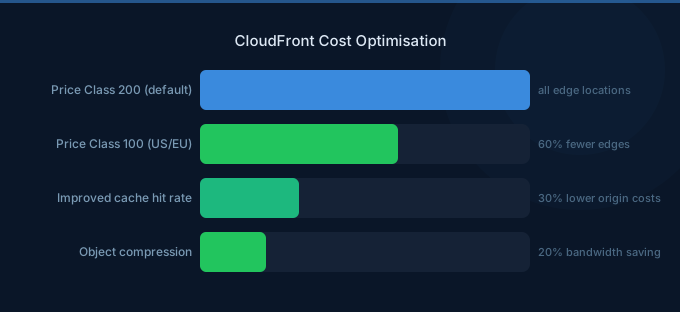
CloudFront costs scale directly with traffic volume and geographic distribution. While its per-GB pricing is already cheaper than direct EC2/S3 egress, there are significant optimization opportunities most teams miss. Cache hit ratio is the single most important metric — every cache miss costs you an origin fetch plus edge delivery.
TL;DR: Three high-impact optimizations: (1) Maximize cache hit ratio by normalizing query strings, headers, and cookies — target above 90%. (2) Use Price Class 100 or 200 if you don't serve traffic to South America, Australia, or Asia — saves 10-30%. (3) Enable compression for text-based content — reduces data transfer costs by 60-80% with zero performance penalty.
CloudFront Pricing Reminder
Data Transfer Out (per GB, US/Europe)
| Tier | Cost/GB |
|---|---|
| First 10 TB/month | $0.085 |
| Next 40 TB | $0.080 |
| Next 100 TB | $0.060 |
| Next 350 TB | $0.040 |
HTTP/HTTPS Request Pricing
| Region | HTTP (per 10K) | HTTPS (per 10K) |
|---|---|---|
| US/Europe | $0.0075 | $0.0100 |
| Asia Pacific | $0.0090 | $0.0120 |
| South America | $0.0160 | $0.0220 |
Origin Fetches
| Origin Type | Cost |
|---|---|
| S3 origin | Free data transfer (same region) |
| EC2/ALB origin | Standard data transfer rates |
| Origin Shield | Incremental per request |
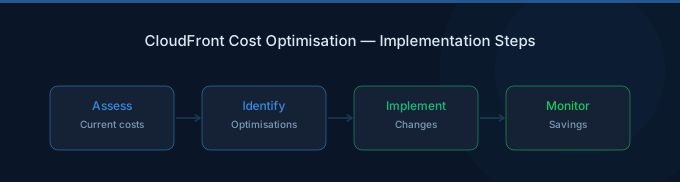
Strategy 1: Maximize Cache Hit Ratio
Every cache miss requires an origin fetch, doubling your effective cost. Target above 90% cache hit ratio.
Common cache-busting culprits:
- Forwarding unnecessary query strings (analytics parameters like
utm_source) - Forwarding all cookies when only session cookies matter
- Forwarding all headers to origin
- Setting TTL too low
Fixes:
- Whitelist only query strings your origin needs
- Whitelist only cookies your origin requires
- Forward only necessary headers (Host, Authorization if needed)
- Set default TTL to at least 86400 (24 hours) for static content
| Cache Hit Ratio | Origin Requests (1M total) | Effective Cost Multiplier |
|---|---|---|
| 50% | 500,000 | 1.5x |
| 80% | 200,000 | 1.2x |
| 90% | 100,000 | 1.1x |
| 95% | 50,000 | 1.05x |
Strategy 2: Use Price Class Restrictions
CloudFront distributes content globally by default, including expensive regions. If your users are primarily in North America and Europe, restrict edge locations.
| Price Class | Regions Included | Relative Cost |
|---|---|---|
| Price Class 100 | US, Canada, Europe | Lowest |
| Price Class 200 | + Asia, Middle East, Africa | Medium |
| Price Class All | + South America, Australia | Highest |
Savings: Price Class 100 is approximately 15-30% cheaper than Price Class All, depending on traffic distribution.
Strategy 3: Enable Compression
CloudFront automatically compresses text-based content (HTML, CSS, JS, JSON, XML) when the viewer supports it.
| Content Type | Typical Compression | Data Transfer Savings |
|---|---|---|
| JavaScript | 70-80% | 70-80% |
| CSS | 75-85% | 75-85% |
| HTML | 65-80% | 65-80% |
| JSON | 80-90% | 80-90% |
Enable both gzip and Brotli compression in your distribution settings. Brotli provides 15-20% better compression than gzip for text content.
Strategy 4: Use Origin Shield
Origin Shield adds a centralized caching layer between edge locations and your origin. It reduces origin requests by consolidating cache fills from multiple edge locations.
| Without Origin Shield | With Origin Shield |
|---|---|
| Each edge location fetches from origin independently | All edges fetch from Shield, Shield fetches from origin once |
| High origin load during cache invalidation | Single origin request per object |
Cost: Incremental per-request charge, but typically saves 30-50% on origin requests. Worth it when origin costs are significant (EC2, ALB backends).
Strategy 5: Optimize Invalidation Patterns
Invalidation costs $0 for the first 1,000 paths per month, then $0.005 per path. Using wildcard invalidations (/images/*) counts as one path.
Cheaper alternative: Use versioned filenames (style.v2.css) and set long TTLs. This eliminates invalidation entirely — new content gets a new URL and is cached fresh.
Strategy 6: Use CloudFront Functions Instead of Lambda@Edge
| Feature | CloudFront Functions | Lambda@Edge |
|---|---|---|
| Cost per million | $0.10 | $0.60 |
| Execution location | All edge locations | Regional edge caches |
| Max duration | 1 ms | 5-30 seconds |
For simple tasks (URL rewrites, header manipulation, A/B testing), CloudFront Functions are 6x cheaper than Lambda@Edge.
Related Guides
- AWS CloudFront Pricing: CDN Costs and Savings
- AWS Data Transfer Cost Optimization Guide
- AWS S3 Cost Optimization Guide
- AWS Data Transfer Pricing: The Hidden Cost
FAQ
How do I check my CloudFront cache hit ratio?
In the CloudFront console, go to Popular Objects report or enable real-time logs. Look for the x-edge-result-type metric. Hit = cache served, Miss = origin fetch, Error = failure. Target above 90% hit rate.
Is CloudFront cheaper than Cloudflare?
For traffic under 1 TB/month, Cloudflare's free tier wins. For traffic over 10 TB/month on paid Cloudflare plans, CloudFront becomes competitive, especially with AWS origin integration (free S3 transfer). CloudFront's advantage is tight AWS ecosystem integration.
Should I use CloudFront in front of an ALB?
Yes, almost always. CloudFront caches static responses, offloads SSL termination, provides DDoS protection (Shield Standard, free), and reduces origin load. Even for fully dynamic APIs, CloudFront adds security and global reach at minimal extra cost.
Lower Your CloudFront Costs with Wring
Wring helps you access AWS credits and volume discounts to lower your CloudFront costs. Through group buying power, Wring negotiates better rates so you pay less per GB transferred.


