
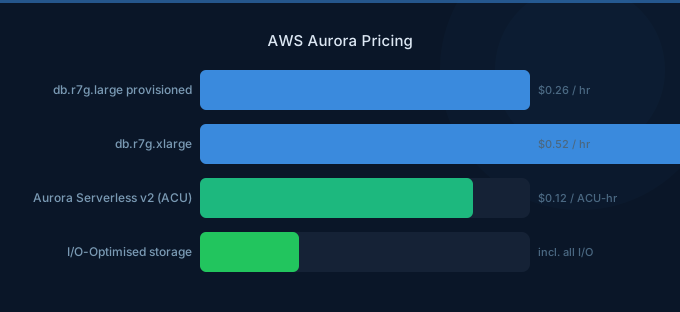
Aurora pricing is more complex than standard RDS because you're paying for a distributed storage system, not just a database instance. The compute is separate from storage, I/O charges can dominate your bill, and choosing between Provisioned, Serverless v2, and I/O-Optimized modes changes the cost structure entirely.
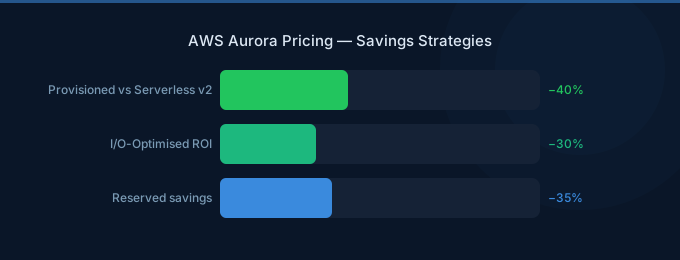
The biggest Aurora pricing mistake: running Provisioned Standard with high I/O workloads when I/O-Optimized would save 30-40%.
TL;DR: Aurora Provisioned db.r7g.large costs ~$190/month for compute alone. Storage is $0.10/GB/month. Standard I/O charges $0.20 per million requests — which adds up fast for read-heavy workloads. I/O-Optimized eliminates per-I/O charges for a 30% compute premium. Serverless v2 at $0.12/ACU-hour is ideal for variable workloads. Pick your mode based on workload pattern, not defaults.
Aurora Pricing Modes Compared
Provisioned Instance Pricing
Compute Costs (MySQL and PostgreSQL Compatible)
| Instance | vCPU | RAM | On-Demand/hr | Monthly |
|---|---|---|---|---|
| db.r7g.large | 2 | 16 GiB | $0.26 | $189.80 |
| db.r7g.xlarge | 4 | 32 GiB | $0.52 | $379.60 |
| db.r7g.2xlarge | 8 | 64 GiB | $1.04 | $759.20 |
| db.r7g.4xlarge | 16 | 128 GiB | $2.08 | $1,518.40 |
Graviton (r7g) instances are 20% cheaper than Intel (r7i) equivalents with comparable performance. Always use Graviton for Aurora unless you have specific x86 requirements.
Storage Costs
| Component | Standard | I/O-Optimized |
|---|---|---|
| Storage | $0.10/GB/month | $0.225/GB/month |
| I/O reads | $0.20/million | Free |
| I/O writes | $0.20/million | Free |
| Backtrack | $0.012/million change records | $0.012/million |
I/O Costs: The Hidden Bill Killer
Standard Aurora charges $0.20 per million I/O operations. This sounds tiny until you calculate real-world volumes:
| Workload | Monthly I/Os | I/O Cost | % of Compute |
|---|---|---|---|
| Light (blog, CMS) | 100M | $20 | ~10% |
| Medium (SaaS app) | 1B | $200 | ~50% |
| Heavy (analytics, reporting) | 5B | $1,000 | ~130% |
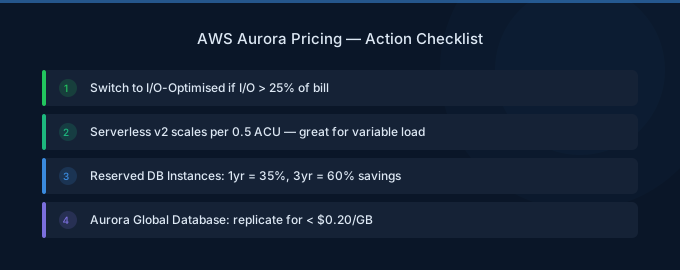
If your I/O costs exceed 25% of your compute costs, switch to I/O-Optimized. You pay 30% more for compute and 125% more for storage, but I/O becomes free — saving 30-40% overall for read-heavy workloads.
Serverless v2 Pricing
Aurora Serverless v2 scales compute automatically based on demand, charging per ACU-hour:
| Component | Price |
|---|---|
| Compute | $0.12/ACU-hour |
| Storage | $0.10/GB/month |
| I/O | $0.20/million (Standard) |
| Minimum capacity | 0.5 ACU |
| Maximum capacity | 256 ACU |
1 ACU ≈ 2 GiB RAM. The minimum 0.5 ACU costs $0.06/hour ($43.80/month) — cheaper than any provisioned instance when the database is idle or lightly loaded.
When Serverless v2 Saves Money
| Scenario | Provisioned (db.r7g.large) | Serverless v2 |
|---|---|---|
| Always busy (100% utilization) | $190/month | $263/month (4 ACU avg) |
| Business hours only (35% active) | $190/month | $135/month |
| Dev/test (10% active) | $190/month | $57/month |
| Weekend batch (15% active) | $190/month | $83/month |
Rule of thumb: If your database utilization is under 40%, Serverless v2 is cheaper. Above 60%, provisioned is cheaper. Between 40-60%, it depends on your I/O patterns.
Real-World Cost Examples
SaaS Application (Steady Production)
| Component | Specification | Monthly Cost |
|---|---|---|
| Writer | db.r7g.xlarge | $379.60 |
| Reader replica | db.r7g.large | $189.80 |
| Storage (200GB) | I/O-Optimized | $45.00 |
| I/O | Free (I/O-Optimized) | $0.00 |
| Backups | 7-day retention | ~$10.00 |
| Total | $624.40 |
With Standard I/O at 2B reads/month: $400 in I/O alone. I/O-Optimized saves ~$300/month here.
Dev/Test Database
| Component | Specification | Monthly Cost |
|---|---|---|
| Serverless v2 | 0.5-4 ACU, avg 1 ACU | $87.60 |
| Storage (50GB) | Standard | $5.00 |
| I/O | 50M requests | $10.00 |
| Total | $102.60 |
vs Provisioned db.r7g.large: $200+/month. Serverless saves 50% for dev workloads.
Optimization Strategies
1. Choose the Right Pricing Mode
- Standard: I/O costs under 25% of compute → stay on Standard
- I/O-Optimized: I/O costs over 25% of compute → switch to I/O-Optimized
- Serverless v2: Utilization under 40% → use Serverless
Check your current I/O costs in Cost Explorer under "Aurora I/O" to determine your mode.
2. Use Graviton Instances
All Aurora instance families have Graviton equivalents (r7g). 20% cheaper with equivalent performance. Migration is a modify operation during maintenance window.
3. Right-Size Reader Replicas
Reader replicas don't need to match the writer size. If reads are lighter, use smaller instances. A db.r7g.large reader behind a db.r7g.2xlarge writer is perfectly fine.
4. Reserved Instances for Production
Aurora Reserved Instances save 30-60% on compute for databases that run 24/7. 1-year No Upfront saves ~35%.
5. Monitor and Archive Old Data
Aurora storage grows continuously — it doesn't automatically shrink. Archive old data to S3 to reduce storage costs and I/O volume.
Related Guides
- AWS RDS Pricing Guide
- AWS DynamoDB Pricing Guide
- AWS RDS Cost Optimization Guide
- AWS Savings Plans vs Reserved Instances
Frequently Asked Questions
How much does Aurora cost per month?
A small production Aurora cluster (writer + reader, 200GB storage) costs $600-800/month depending on the pricing mode. Dev/test on Serverless v2 can be as low as $50-100/month.
Is Aurora more expensive than standard RDS?
Aurora compute costs about 20% more than equivalent RDS instances, but Aurora's distributed storage provides built-in replication and faster failover. For production workloads requiring high availability, Aurora's total cost is often comparable to RDS Multi-AZ.
Should I use Aurora Standard or I/O-Optimized?
Check your AWS bill: if Aurora I/O charges exceed 25% of your compute charges, switch to I/O-Optimized. You can switch between modes with no downtime.
When should I use Aurora Serverless v2?
Use Serverless v2 for databases with variable utilization: dev/test environments, applications with business-hours-only traffic, weekend batch processing, or any workload where provisioned capacity sits idle more than 40% of the time.
Right-Size Your Aurora Deployment
Aurora is powerful but expensive when misconfigured. The key decisions:
- Pick the right mode — Standard for low I/O, I/O-Optimized for heavy reads, Serverless for variable loads
- Use Graviton — 20% cheaper, zero migration complexity
- Size readers independently — They don't need to match the writer
- Reserve production instances — 30-60% savings on 24/7 databases
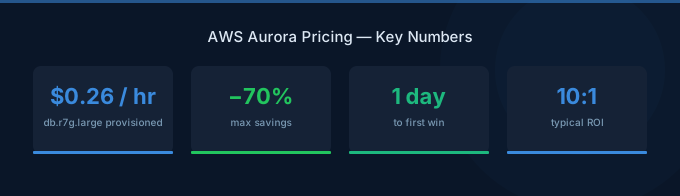
Lower Your Aurora Costs with Wring
Wring helps you access AWS credits and volume discounts to lower your Aurora costs. Through group buying power, Wring negotiates better rates so you pay less per database instance hour.


