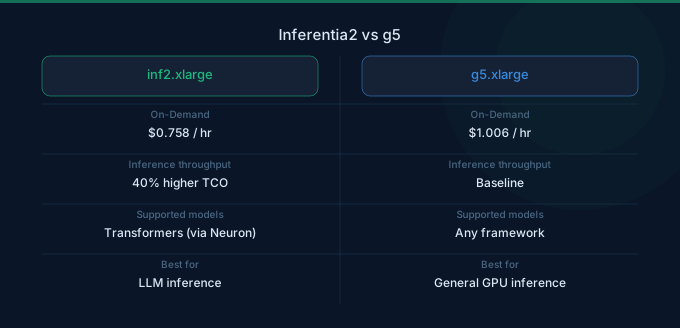
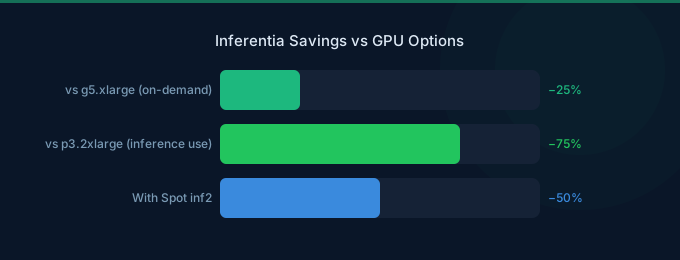
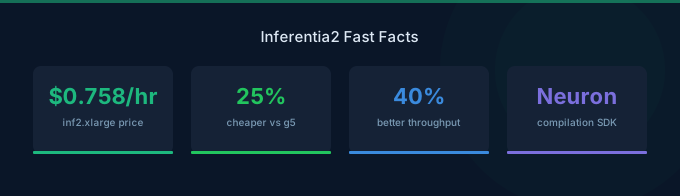
Choosing between AWS Inferentia2 and NVIDIA GPUs for ML inference comes down to one question: does your model run on the Neuron SDK? If it does, Inferentia2 offers 25-40% lower cost per inference compared to equivalent GPU instances. If it does not, you are limited to NVIDIA GPUs. This guide breaks down the pricing, performance, and compatibility tradeoffs for every inference scenario on AWS.
Instance Pricing Comparison
Small-Scale Inference (Single Accelerator)
Medium-Scale Inference (Multi-Accelerator)
Large-Scale Inference (Maximum Configuration)
Cost-Per-Inference Analysis
Raw hourly pricing tells only part of the story. What matters is cost per inference — the total cost divided by the number of inferences processed per hour.
Text Generation (Llama 2 7B, batch size 1)
Text Generation (Llama 2 70B, tensor parallel)
BERT Base (Classification, batch size 32)
Model Compatibility
The biggest tradeoff with Inferentia2 is model compatibility. The AWS Neuron SDK compiles models for the Inferentia2 hardware, but not all models and operations are supported.
Fully Supported on Inferentia2
Limited or Unsupported on Inferentia2
When Inferentia Wins
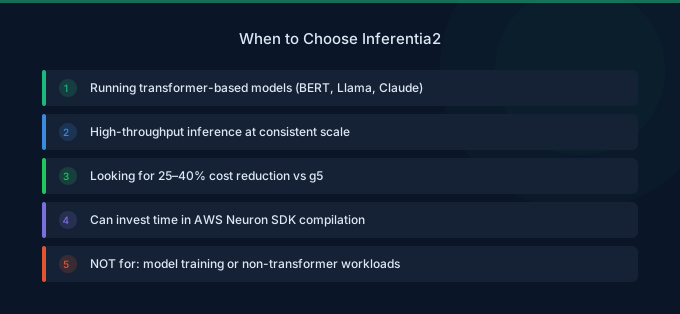
Inferentia2 is the better choice when:
- 1Your model is supported by Neuron SDK — Llama, Mistral, BERT, ViT, and Stable Diffusion models all work well.
- 2You run high-volume, steady-state inference — Predictable workloads let you optimize batch sizes and configuration for Inferentia's architecture.
- 3Cost is the primary concern — 25-40% lower cost per inference makes a significant difference at scale.
- 4You run on SageMaker — SageMaker's Inf2 endpoints handle Neuron compilation and deployment automatically.
When GPUs Win
NVIDIA GPUs are the better choice when:
- 1Your model uses custom CUDA kernels — Research models, custom operators, and cutting-edge architectures often require CUDA.
- 2You need maximum flexibility — GPUs support virtually every ML framework and model architecture without modification.
- 3Your workload mixes training and inference — GPUs handle both, while Inferentia is inference-only (Trainium is the training counterpart).
- 4Latency is critical and batch sizes are small — GPUs often have lower single-request latency, especially for the first request after model loading.
Trainium for Training
If you choose Inferentia for inference, consider Trainium (Trn1 instances) for training to stay within the Neuron SDK ecosystem.
Real-World Cost Scenarios
Scenario 1: LLM Chatbot (7B model, 1M requests/month)
Scenario 2: Embedding Service (100M embeddings/month)
Scenario 3: Large LLM (70B model, 500K requests/month)
Cost Optimization Tips
- 1Start with Inferentia2 for supported models — If your model compiles successfully with the Neuron SDK, Inf2 will almost always be cheaper per inference than equivalent GPU instances.
- 2Use Spot instances for stateless inference — Both Inf2 and G5 Spot instances save 50-70%. Deploy behind a load balancer with multiple Spot pools for availability.
- 3Right-size your accelerator memory — A 7B model needs roughly 14 GB in FP16. Using an inf2.xlarge (32 GB) is appropriate, but an inf2.48xlarge (384 GB) wastes 96% of memory.
- 4Benchmark before committing — Run your specific model on both Inf2 and G5/G6, measuring tokens per second and latency at your target batch size. Published benchmarks may not reflect your exact workload.
- 5Consider total cost of ownership — Inferentia requires Neuron SDK expertise and may add development time. Factor in engineering costs when the GPU ecosystem offers a faster path to production.
- 6Use model compilation caching — Neuron model compilation can take 15-30 minutes. Cache compiled models in S3 to avoid recompilation on every deployment.
FAQ
Is Inferentia2 always cheaper than GPUs for inference?
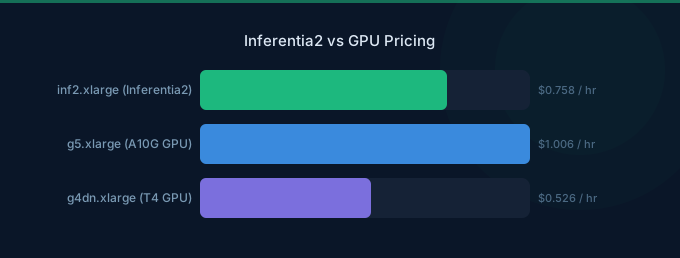
Not always. Inferentia2 is cheaper per inference for most supported models, but if your model requires extensive padding for dynamic shapes, the effective throughput advantage shrinks. Very small models with low compute requirements may also see similar costs on g4dn.xlarge ($0.526/hr), which is cheaper per hour than inf2.xlarge ($0.758/hr).
Can I use Inferentia2 with PyTorch and Hugging Face?
Yes. The Neuron SDK integrates with PyTorch via torch-neuronx and with Hugging Face Transformers via optimum-neuron. You compile your model using these tools, and the compiled model runs on Inferentia2 hardware. The workflow is similar to ONNX conversion — export once, run many times.
How does Inferentia2 compare to NVIDIA T4 (G4dn) for budget inference?
G4dn.xlarge is cheaper per hour ($0.526 vs $0.758), but Inferentia2 delivers 2-3x the throughput for transformer models. The cost per inference is typically 40-50% lower on Inferentia2. G4dn is better only for very small models where the T4's 16 GB memory is sufficient and per-hour cost matters more than throughput.