
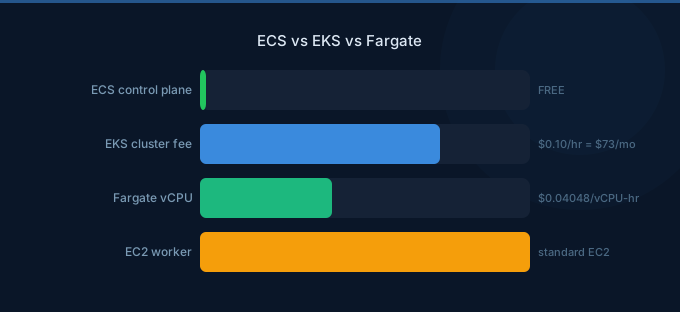
AWS offers three ways to run containers, and they're not mutually exclusive — ECS and EKS are orchestration platforms, while Fargate is a compute engine that works with both. The confusion between these services leads to overspending, unnecessary complexity, and architecture choices that are hard to reverse.
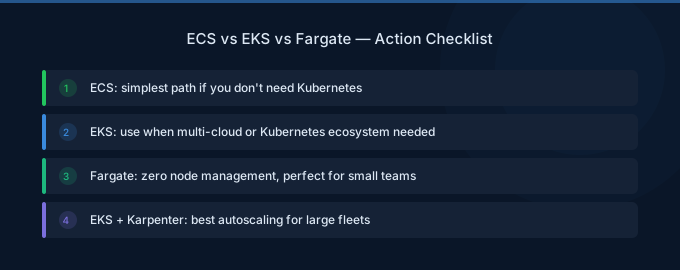
The decision framework is simpler than it looks: Do you need Kubernetes? If yes, EKS. If no, ECS. Then: Do you want to manage nodes? If no, add Fargate. If yes, use EC2 launch type with Spot and Savings Plans.
TL;DR: ECS + EC2 is the cheapest option (free control plane, bin-packing efficiency, full Spot/SP support). ECS + Fargate is simplest (free control plane, no nodes to manage, 40-60% more expensive). EKS + EC2 costs $73/month more than ECS for the control plane but gives you the Kubernetes ecosystem. EKS + Fargate is the most expensive but simplest Kubernetes option. Choose based on team skills, portability needs, and cost tolerance.
Quick Comparison
| Feature | ECS + EC2 | ECS + Fargate | EKS + EC2 | EKS + Fargate |
|---|---|---|---|---|
| Control plane cost | Free | Free | $73/month | $73/month |
| Node management | You manage | AWS manages | You manage | AWS manages |
| Cost efficiency | Highest | Medium | High | Lowest |
| Operational complexity | Medium | Low | High | Medium |
| Kubernetes ecosystem | No | No | Yes | Yes |
| Multi-cloud portability | No | No | Yes | Yes |
| Spot support | Full | Fargate Spot (70% off) | Full (Karpenter) | Fargate Spot |
| Savings Plans | Full | Full | Full | Full |
| Learning curve | Low | Lowest | High | Medium |
Cost Comparison: Real Numbers
Small Deployment (5 services, 2 tasks each, 1 vCPU/2GB per task)
| Option | Monthly Cost | Notes |
|---|---|---|
| ECS + EC2 (3x m7g.large + SP) | $125 | Cheapest with Savings Plans |
| ECS + Fargate ARM | $262 | Simple, no nodes |
| EKS + EC2 (3x m7g.large + SP) | $198 | Adds $73 control plane |
| EKS + Fargate ARM | $335 | Most expensive |
Medium Deployment (15 services, 3 tasks each, mixed sizes)
| Option | Monthly Cost | Notes |
|---|---|---|
| ECS + EC2 (Spot/On-Demand mix + SP) | $680 | Best value at scale |
| ECS + Fargate ARM | $1,180 | 73% more than EC2 |
| EKS + EC2 (Karpenter + Spot + SP) | $780 | Karpenter offsets $73 fee |
| EKS + Fargate ARM | $1,253 | Premium for simplicity |
Large Deployment (50 services, 5 tasks each, production)
| Option | Monthly Cost | Notes |
|---|---|---|
| ECS + EC2 (optimized) | $3,200 | Lowest at scale |
| ECS + Fargate ARM | $5,800 | Fargate premium hurts at scale |
| EKS + EC2 (Karpenter optimized) | $3,400 | $73 fee is negligible at scale |
| EKS + Fargate ARM | $5,873 | Most expensive |
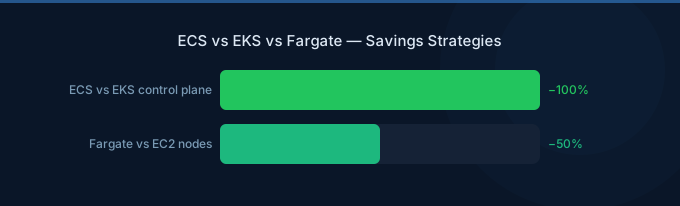
Key takeaway: At scale, the EKS $73/month control plane fee becomes negligible. The real cost difference is between EC2 (managed nodes) and Fargate (serverless) — a 40-80% premium for Fargate's simplicity.
When to Choose Each Option
Choose ECS + EC2 When:
- Cost is a top priority — Free control plane + bin-packing = lowest cost
- Team is AWS-native — No Kubernetes expertise needed
- Workloads are steady — Predictable demand suits EC2 + Savings Plans
- You want Spot instances — Full EC2 Spot support through capacity providers
- No multi-cloud requirement — ECS is AWS-only
Choose ECS + Fargate When:
- Simplicity over cost — Zero node management
- Small to medium scale — Cost premium is manageable under 20 services
- Variable workloads — Pay-per-task scales naturally
- Small team — No capacity for EC2 instance management
- Dev/test environments — Quick to spin up and tear down
Choose EKS + EC2 When:
- Team knows Kubernetes — Existing K8s expertise and tooling
- Multi-cloud or hybrid — Need portability across providers
- K8s ecosystem tools — Helm, ArgoCD, Istio, Prometheus, etc.
- Large scale — Karpenter + Spot + Savings Plans offset control plane fee
- Complex service mesh — Kubernetes-native networking
Choose EKS + Fargate When:
- Need Kubernetes API — For ecosystem compatibility
- Don't want to manage nodes — Fargate handles compute
- Variable Kubernetes workloads — Fargate scales per-pod
- Budget allows premium — Convenience over cost
- Limited K8s operations expertise — Fargate removes node complexity
Hidden Cost Considerations
Networking Costs (Same for All Options)
| Component | Monthly Cost | Notes |
|---|---|---|
| Application Load Balancer | $22 + LCU charges | Per ALB, not per service |
| NAT Gateway (2 AZs) | $65 + data processing | $0.045/GB processed |
| VPC endpoints | $15-30 | For ECR, S3, etc. |
| Cross-AZ traffic | $0.01/GB each direction | Task-to-task communication |
NAT Gateway is often the hidden cost killer for container deployments. Every container image pull through NAT costs $0.045/GB. Deploy VPC endpoints for ECR to eliminate this.
Storage Costs
| Storage | ECS EC2 | ECS Fargate | EKS EC2 | EKS Fargate |
|---|---|---|---|---|
| Container storage | Instance EBS | 20GB included, $0.000111/GB-hr after | Instance EBS | 20GB included |
| Persistent volumes | EBS via Docker | EFS only | EBS CSI driver | EFS only |
Fargate doesn't support EBS persistent volumes directly — use EFS for shared storage (more expensive but fully managed).
Monitoring Costs
| Tool | Cost |
|---|---|
| CloudWatch Container Insights | $0.30/hour per node (EC2 only) |
| CloudWatch Logs | $0.50/GB ingested |
| X-Ray tracing | $5/million traces |
Container Insights is valuable but adds $219/month for a 10-node cluster. Consider third-party alternatives or CloudWatch Logs with custom dashboards for cost-conscious deployments.
Migration Paths
ECS to EKS
Task definitions map loosely to Kubernetes Pod specifications. The migration requires rewriting deployment configurations, networking (security groups to Network Policies), and service discovery. Plan 2-4 weeks per service for production migrations.
EKS to ECS
Possible but unusual. The main driver is cost reduction (eliminate $73/month control plane) or simplification (drop Kubernetes complexity). Kubernetes-specific features (CRDs, operators, service mesh) need AWS-native replacements.
EC2 to Fargate (Either Platform)
The simpler migration. Task/pod definitions stay mostly the same — remove instance-specific configurations, adjust resource limits to Fargate's supported combinations, and update networking to awsvpc mode.
Related Guides
- AWS ECS Pricing Guide
- AWS EKS Pricing Guide
- AWS Fargate Pricing Guide
- Kubernetes Cost Optimization Guide
- AWS Fargate Cost Optimization Guide
Frequently Asked Questions
Which is cheaper, ECS or EKS?
ECS is cheaper by $73/month per cluster (the EKS control plane fee). The underlying compute costs (EC2 or Fargate) are identical. For organizations running 3+ clusters (dev, staging, production), ECS saves $219+/month in control plane fees alone.
Should I use Fargate or EC2 for containers?
EC2 is 40-60% cheaper per task at scale due to bin-packing efficiency and full Spot/Savings Plans support. Fargate is simpler — zero node management, patching, or scaling. Use Fargate for small/variable workloads and dev/test. Use EC2 for production workloads where cost optimization matters.
Can I use both Fargate and EC2 on the same cluster?
Yes, both ECS and EKS support mixed compute. Run baseline production on EC2 (with Savings Plans) and burst traffic on Fargate. Many organizations use EC2 capacity providers for steady-state and Fargate for auto-scaling beyond provisioned capacity.
Do I need Kubernetes?
Only if you need: multi-cloud portability, Kubernetes-native tools (Helm, ArgoCD, Istio), or your team already has Kubernetes expertise. For AWS-only deployments without specific K8s requirements, ECS is simpler and cheaper.
Choose Based on Your Priorities
The right choice depends on what matters most to your team:
- Lowest cost → ECS + EC2 with Spot and Savings Plans
- Simplest operations → ECS + Fargate
- Kubernetes ecosystem → EKS + EC2 with Karpenter
- Kubernetes without node management → EKS + Fargate
- Best cost/simplicity balance → ECS + Fargate for small, ECS + EC2 for large
Lower Your Container Costs with Wring
Wring helps you access AWS credits and volume discounts to lower your container costs. Through group buying power, Wring negotiates better rates so you pay less per compute hour.


