
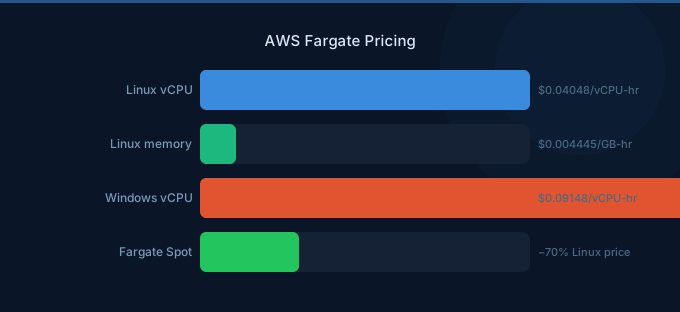
Fargate lets you run containers without managing servers. The trade-off: you pay a premium for that convenience. A container running 1 vCPU and 4GB RAM costs $42/month on Fargate versus $30/month on a t3.medium EC2 instance — a 40% markup for not having to patch, scale, or manage the underlying infrastructure.
But here's what most guides miss: Fargate Spot cuts that cost by 70%, and Compute Savings Plans cut it by 52%. With the right configuration, Fargate can actually be cheaper than self-managed EC2 when you factor in ops overhead.
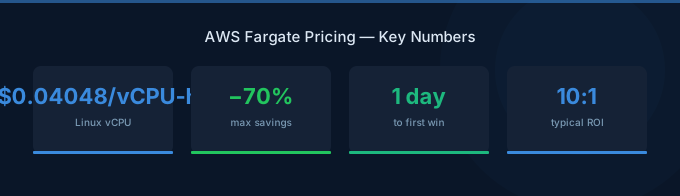
TL;DR: Fargate charges per vCPU-hour ($0.04048) and per GB-hour ($0.004445) in US East. A 1 vCPU / 4GB task running 24/7 costs ~$42/month On-Demand. Fargate Spot saves up to 70% for interruptible workloads. Compute Savings Plans save up to 52% with a 1-3 year commitment. Ephemeral storage (first 20GB free) and data transfer are additional costs.
How Fargate Pricing Works
Unlike EC2 where you choose an instance type, Fargate lets you specify exact CPU and memory for each task. See the Fargate pricing page for current rates. You pay per second (1-minute minimum) for the resources your task consumes.
Base Pricing (US East — N. Virginia)
| Resource | On-Demand Price |
|---|---|
| Per vCPU per hour | $0.04048 |
| Per GB memory per hour | $0.004445 |
| Ephemeral storage (over 20GB) | $0.000111 per GB per hour |
Pricing Formula
Monthly cost = (vCPU × $0.04048 × hours) + (GB memory × $0.004445 × hours)
Example: 1 vCPU, 4GB RAM, running 24/7 for 30 days (720 hours):
- CPU: 1 × $0.04048 × 720 = $29.15
- Memory: 4 × $0.004445 × 720 = $12.80
- Total: $41.95/month
Valid CPU/Memory Combinations
Fargate doesn't let you pick arbitrary values. The allowed combinations:
| vCPU | Memory Options |
|---|---|
| 0.25 | 0.5, 1, 2 GB |
| 0.5 | 1, 2, 3, 4 GB |
| 1 | 2, 3, 4, 5, 6, 7, 8 GB |
| 2 | 4–16 GB (1GB increments) |
| 4 | 8–30 GB (1GB increments) |
| 8 | 16–60 GB (4GB increments) |
| 16 | 32–120 GB (8GB increments) |
Fargate Spot: Up to 70% Off
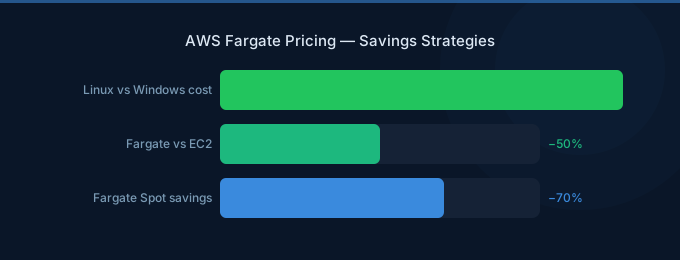
Fargate Spot runs tasks on spare AWS capacity at a steep discount. The trade-off: AWS can reclaim your task with a 2-minute warning.
| Resource | On-Demand | Spot Price | Savings |
|---|---|---|---|
| Per vCPU per hour | $0.04048 | $0.01254 | ~69% |
| Per GB per hour | $0.004445 | $0.001377 | ~69% |
Same 1 vCPU / 4GB task on Spot: ~$13/month instead of $42/month.
Best for:
- Batch processing and data pipelines
- CI/CD build tasks
- Queue-based workers
- Dev/test environments
- Any workload that handles graceful interruption
Not suitable for:
- Stateful services without checkpointing
- Real-time user-facing APIs (unless behind a load balancer with On-Demand fallback)
The hybrid approach: Run your minimum baseline tasks on On-Demand (or with Savings Plans), and use Fargate Spot for burst capacity. ECS capacity providers can automatically mix On-Demand and Spot tasks. A 50/50 split gives you ~35% savings with high availability.
Compute Savings Plans for Fargate
Compute Savings Plans apply to Fargate (not just EC2). You commit to a $/hour spend for 1 or 3 years:
| Commitment | Savings vs On-Demand |
|---|---|
| 1-Year, No Upfront | Up to 36% |
| 1-Year, All Upfront | Up to 40% |
| 3-Year, No Upfront | Up to 46% |
| 3-Year, All Upfront | Up to 52% |
1 vCPU / 4GB task with 3-Year All Upfront: ~$20/month instead of $42/month.
Savings Plans are more flexible than Reserved Instances — they apply across EC2, Fargate, and Lambda automatically.
Fargate vs EC2: The Real Cost Comparison
The raw per-hour cost of Fargate is 30-40% higher than equivalent EC2. But the total cost of ownership (TCO) tells a different story:
| Cost Factor | EC2 Self-Managed | Fargate |
|---|---|---|
| Compute cost | Lower per unit | Higher per unit |
| Ops overhead | Patching, AMI updates, scaling | Zero server management |
| Cluster utilization | 60-70% typical | 100% (pay per task) |
| Scaling speed | Minutes (ASG) | Seconds |
| Over-provisioning | Common (pay for idle capacity) | None |
The utilization gap: EC2 clusters typically run at 60-70% utilization because you need headroom for spikes. A $30/month EC2 instance at 65% utilization effectively costs $46/month per used unit — more than Fargate. If your cluster utilization is below 70%, Fargate is likely cheaper when you account for idle waste.
Additional Costs
Ephemeral Storage
Each Fargate task gets 20GB of free ephemeral storage. Beyond that:
| Storage | Price |
|---|---|
| First 20 GB | Free |
| Additional (up to 200 GB) | $0.000111/GB/hour (~$0.08/GB/month) |
Data Transfer
Fargate data transfer follows standard AWS pricing:
| Route | Price |
|---|---|
| Inbound | Free |
| Outbound to internet | $0.09/GB (first 10TB) |
| Cross-AZ (within VPC) | $0.01/GB each way |
| To S3, DynamoDB (same region) | Free via VPC endpoint |
ECS vs EKS Fargate Pricing
The Fargate compute pricing is the same whether you use ECS or EKS. But EKS adds a cluster control plane fee:
| Platform | Fargate Compute | Additional Fee |
|---|---|---|
| ECS | Per vCPU/GB hour | None |
| EKS | Per vCPU/GB hour | $0.10/hour for EKS cluster ($73/month) |
Real-World Cost Examples
Microservices API (3 services, production)
| Component | Configuration | Monthly Cost |
|---|---|---|
| API Gateway service | 1 vCPU, 2GB, 3 tasks | $48 |
| Worker service | 0.5 vCPU, 1GB, 2 tasks | $12 |
| Background jobs (Spot) | 1 vCPU, 2GB, 1 task | $5 |
| Data transfer | ~50 GB out | $5 |
| Total | $70 |
With Compute Savings Plan (3yr): ~$40/month
Data Pipeline (batch processing)
| Component | Configuration | Monthly Cost |
|---|---|---|
| ETL tasks (Spot) | 4 vCPU, 16GB, 8hr/day | $17 |
| Aggregation (Spot) | 2 vCPU, 8GB, 4hr/day | $4 |
| Ephemeral storage | 50GB extra per task | $3 |
| Total | $24 |
Cost Optimization Strategies
1. Right-Size CPU and Memory
Fargate charges per vCPU and GB separately. Monitor actual usage with CloudWatch Container Insights and reduce allocations. Many tasks request 1 vCPU but use less than 0.25 vCPU — that's 4x overspend on CPU.
2. Use Fargate Spot for Non-Critical Workloads
70% savings for anything that can handle interruption. Set up ECS capacity providers to automatically fallback to On-Demand when Spot isn't available.
3. Buy Compute Savings Plans
If you're running Fargate 24/7, Compute Savings Plans are a no-brainer. They apply across Fargate, EC2, and Lambda — so unused commitment isn't wasted.
4. Schedule Non-Production Tasks
Stop dev/test tasks outside business hours. A task running 10 hours/day instead of 24 saves 58%.
5. Use ARM64 (Graviton) Tasks
Fargate on ARM64 (Graviton) costs 20% less than x86:
| Resource | x86 Price | ARM64 Price | Savings |
|---|---|---|---|
| Per vCPU/hour | $0.04048 | $0.03238 | 20% |
| Per GB/hour | $0.004445 | $0.003556 | 20% |
If your containers support ARM architecture, this is free savings.
Related Guides
- AWS Fargate Cost Optimization Guide
- AWS ECS Pricing Guide
- ECS vs EKS vs Fargate Comparison
- AWS Lambda Pricing Guide
Frequently Asked Questions
How much does Fargate cost per month?
A small task (0.5 vCPU, 1GB) running 24/7 costs about $9/month On-Demand. A typical production task (1 vCPU, 4GB) costs ~$42/month. With Savings Plans, that drops to ~$20/month. With Spot, ~$13/month.
Is Fargate more expensive than EC2?
On a pure per-hour basis, yes — about 30-40% more. But Fargate eliminates server management overhead and unused capacity waste. If your EC2 cluster runs below 70% utilization, Fargate may be cheaper overall.
Does Fargate have a free tier?
No permanent free tier, but new AWS accounts get a 12-month free trial with specific usage limits.
Can I use Savings Plans with Fargate?
Yes. Compute Savings Plans apply to Fargate automatically — same commitment covers EC2, Fargate, and Lambda. Up to 52% savings with a 3-year All Upfront commitment.
What's the minimum Fargate task duration?
You're billed for a minimum of 1 minute per task, then per second after that. Short-lived tasks (under 1 minute) still pay for the full minute.
Control Your Container Costs
Fargate pricing is straightforward once you understand the per-vCPU and per-GB model. The key decisions that determine your bill:
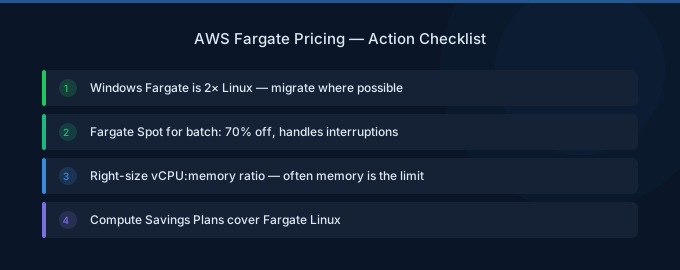
- Right-size tasks — Monitor actual CPU/memory usage, not requested
- Use Fargate Spot — 70% off for fault-tolerant workloads
- Buy Savings Plans — 36-52% off for steady-state workloads
- Switch to ARM64 — 20% off with Graviton
- Schedule dev/test — Stop tasks outside work hours
Lower Your Fargate Costs with Wring
Wring helps you access AWS credits and volume discounts to lower your Fargate costs. Through group buying power, Wring negotiates better rates so you pay less per vCPU-hour.


