Kubernetes on EKS is the most expensive way to run containers if you're not paying attention to costs. The abstraction that makes K8s powerful — pods requesting resources from a shared pool — is also what hides waste. When a developer sets requests.cpu: 1000m for a pod that uses 150m, 85% of that reserved CPU is wasted. Multiply that across hundreds of pods and dozens of nodes, and you're burning 30-40% of your cluster budget on idle capacity.
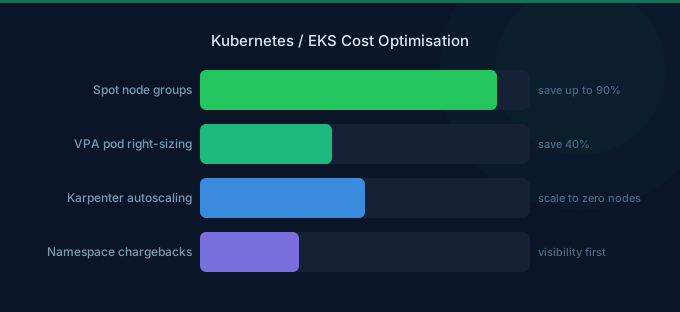
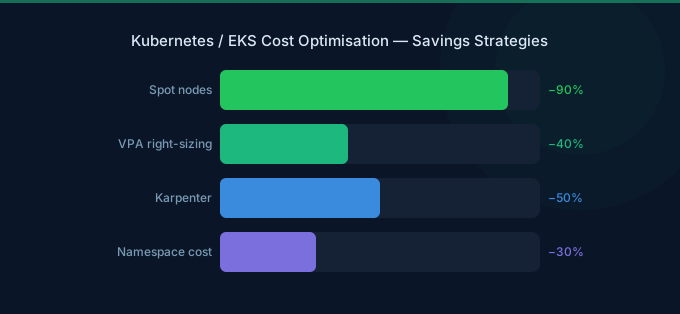
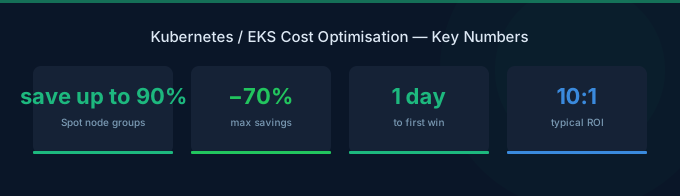
The good news: Kubernetes also has the best tools for cost optimization. Pod rightsizing, intelligent autoscaling with Karpenter, Spot nodes for stateless workloads, and namespace-level cost allocation make it possible to cut EKS costs 40-60% without affecting performance.
TL;DR: Kubernetes waste comes from three sources: over-provisioned pods (30-40% CPU/memory requested but unused), idle node capacity (15-25% of node resources unallocated), and On-Demand pricing for interruptible workloads (60-90% savings missed). Fix it with: (1) VPA recommendations for pod rightsizing, (2) Karpenter for intelligent node provisioning, (3) Spot instances for stateless pods, (4) namespace resource quotas, (5) cost allocation tagging. Combined savings: 40-60%.
Where Kubernetes Costs Hide
Pod Rightsizing: The Biggest Savings Lever
Pod resource requests are the foundation of all Kubernetes costs. Nodes are provisioned to satisfy pod requests — if pods over-request, nodes are over-provisioned, and money is wasted at every layer.
The Over-Provisioning Problem
Developers set resource requests defensively. Nobody wants their pod OOMKilled in production, so they pad the numbers:
| Metric | Typical Request | Actual Usage | Waste |
|---|---|---|---|
| CPU | 1000m | 150m | 85% |
| Memory | 1 GiB | 350 MiB | 66% |
Across a 20-pod deployment, that 850m CPU waste per pod adds up to 17 full vCPUs of wasted capacity — roughly 4 unnecessary m7g.xlarge nodes ($314/month).
How to Rightsize Pods
Step 1: Measure actual usage. Deploy metrics-server and observe real CPU/memory consumption over 7-14 days. Use kubectl top pods for quick checks or Prometheus/Grafana for historical data.
Step 2: Use Vertical Pod Autoscaler (VPA) recommendations. VPA analyzes historical usage and recommends optimal requests:
Set VPA to updateMode: "Off" first — this gives recommendations without automatically changing pod specs. Review recommendations, then apply the ones that make sense.
Step 3: Set requests AND limits correctly.
- Requests: Set to P95 of actual usage (covers 95% of normal operation)
- Limits: Set to 2-3x requests for burst headroom
- Never set requests = limits for CPU — this prevents pods from bursting when capacity is available
Step 4: Implement Guaranteed QoS for critical pods. For databases and stateful workloads, set requests = limits to get Guaranteed QoS class. For everything else, use Burstable.
Expected Savings
Rightsizing pods from defensive defaults to measured actuals typically reduces total cluster compute by 25-40%. On a $5,000/month EKS cluster, that's $1,250-$2,000/month.
Node Optimization with Karpenter
Karpenter is AWS's open-source node provisioner for Kubernetes. It replaces Cluster Autoscaler with a smarter system that provisions exactly the right instance types based on pending pod requirements.
Why Karpenter Over Cluster Autoscaler
| Feature | Cluster Autoscaler | Karpenter |
|---|---|---|
| Instance selection | Fixed node groups | Dynamic, per-pod matching |
| Scaling speed | Minutes | Seconds |
| Bin-packing efficiency | Moderate | High (considers pod shapes) |
| Spot support | Per node group | Per pod, mixed instances |
| Node consolidation | No | Yes (removes underutilized nodes) |
| Cost reduction | 10-15% | 25-35% |
Karpenter Cost Optimization Features
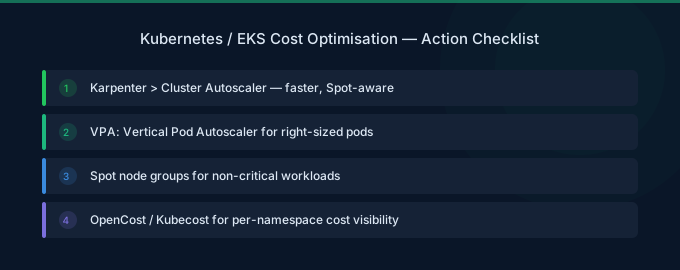
1. Right-sized node selection. Karpenter picks the smallest instance type that fits pending pods. If you need 3 vCPU and 6 GiB RAM, it provisions an m7g.xlarge (4 vCPU, 16 GiB) instead of a Cluster Autoscaler node group's default m7g.2xlarge.
2. Automatic consolidation. Karpenter continuously evaluates whether pods on underutilized nodes can be packed onto fewer nodes. If so, it cordons, drains, and terminates the extra nodes automatically.
3. Spot instance diversification. Karpenter can select from dozens of instance types across multiple families and sizes, maximizing Spot availability and minimizing interruptions.
4. Graviton preference. Configure Karpenter to prefer Graviton (ARM64) instances for 20% cost savings. It automatically falls back to x86 if your workloads require it.
Spot Instances for Kubernetes (60-90% Savings)
Spot instances are the single biggest cost reduction opportunity for Kubernetes -- 60-90% off On-Demand pricing. The key is matching workloads to Spot tolerance.
What Can Run on Spot
| Workload Type | Spot Suitable | Why |
|---|---|---|
| Stateless web servers | Yes | Load balancer handles instance replacement |
| Background workers | Yes | Job queues retry automatically |
| Batch processing | Yes | Checkpointing handles interruptions |
| CI/CD runners | Yes | Pipelines retry failed jobs |
| Databases | No | Data loss risk on interruption |
| Message queues (Kafka, Redis) | No | Stateful, interruption causes data issues |
| Controllers, operators | No | Cluster health depends on uptime |
Spot Best Practices for EKS
-
Diversify instance types — Use 10+ instance types across 3+ families. Karpenter does this automatically. More instance pools mean fewer interruptions.
-
Use pod disruption budgets — Set
minAvailableormaxUnavailableto ensure Spot interruptions don't take down too many replicas simultaneously. -
Separate node pools — Run Spot and On-Demand as separate Karpenter NodePools. Critical pods get On-Demand via node affinity; everything else gets Spot.
-
Handle interruption gracefully — Implement pod preStop hooks for graceful shutdown. The 2-minute Spot interruption notice gives time to drain connections and save state.
-
Keep On-Demand baseline — Run 20-30% of capacity as On-Demand for stability, 70-80% as Spot for savings.
Namespace Cost Allocation
You can't optimize what you can't attribute. Namespace-level cost allocation assigns costs to teams, projects, or environments.
Tagging Strategy for EKS
Tag every namespace and workload with:
| Tag | Purpose | Example Values |
|---|---|---|
team | Cost ownership | platform, backend, data |
environment | Separate prod/dev costs | production, staging, development |
project | Track project-level spend | search-api, recommendations |
cost-center | Finance reporting | eng-001, data-002 |
Cost Allocation Methods
1. Request-based allocation: Assign costs based on resource requests. Simple and predictable — each team pays for what they reserve, regardless of actual usage. Incentivizes rightsizing.
2. Usage-based allocation: Assign costs based on actual resource consumption (CPU-seconds, memory-hours). Fairer but more complex. Requires good monitoring infrastructure.
3. Shared cost distribution: Cluster overhead (control plane, system pods, networking) is distributed proportionally across teams based on their share of total resource usage.
Resource Quotas
Prevent cost overruns by setting namespace resource quotas:
- CPU/Memory limits — Cap total requests per namespace
- Pod count limits — Prevent runaway deployments
- Storage limits — Control PersistentVolumeClaim allocation
- Object count limits — Limit ConfigMaps, Secrets, Services
Storage and Networking Cost Optimization
Storage Costs
| Component | Cost Driver | Optimization |
|---|---|---|
| EBS gp3 volumes | Per-GB provisioned | Use gp3 over gp2 (20% cheaper). Right-size volume size. |
| EBS snapshots | Accumulate over time | Set retention policies. Delete orphaned snapshots. |
| EFS | Per-GB stored + throughput | Use EFS IA for infrequent access. Avoid EFS for high-throughput. |
Networking Costs
| Component | Cost Driver | Optimization |
|---|---|---|
| NAT Gateway | $0.045/GB processed | Deploy VPC endpoints for S3, ECR, DynamoDB (free). |
| Cross-AZ traffic | $0.01/GB each way | Pin pods to same AZ as their data when possible. |
| Load Balancers | $22/month + LCU charges | Consolidate ALBs. Use shared IngressController. |
| ECR pulls | Data transfer through NAT | Use VPC endpoints for ECR (eliminates NAT charges). |
NAT Gateway is the hidden EKS cost killer. Every container image pull, every S3 access, every external API call flows through NAT Gateway at $0.045/GB. For a cluster pulling images frequently, this adds $50-200/month. VPC endpoints for ECR and S3 eliminate most of this.
Kubernetes Cost Optimization Checklist
Quick Wins (This Week)
- Review pod resource requests vs actual usage for top 10 deployments
- Enable VPA in recommendation mode
- Check for idle/orphaned PersistentVolumeClaims
- Deploy VPC endpoints for S3 and ECR
- Consolidate load balancers with shared Ingress
Medium Effort (This Month)
- Deploy Karpenter (or upgrade from Cluster Autoscaler)
- Configure Spot NodePools for stateless workloads
- Implement namespace resource quotas
- Switch node groups to Graviton instances
- Set up namespace-level cost reporting
Strategic (This Quarter)
- Implement pod rightsizing based on VPA recommendations
- Purchase Compute Savings Plans for On-Demand baseline
- Deploy cost monitoring with namespace attribution
- Establish team-level cost accountability
- Review multi-cluster strategy (consolidate where possible)
Related Guides
- AWS EKS Pricing Guide
- AWS ECS vs EKS vs Fargate
- AWS Fargate Cost Optimization Guide
- Cloud Rightsizing Guide: Stop Paying for Waste
Frequently Asked Questions
How much can I save on Kubernetes costs?
Most organizations reduce EKS costs 40-60% through systematic optimization: 25-40% from pod rightsizing, 10-15% from improved bin-packing (Karpenter), 20-30% from Spot instances on stateless workloads, and 5-10% from networking optimizations. The exact savings depend on current waste levels.
What's the biggest source of Kubernetes waste?
Pod over-provisioning. Developers set CPU/memory requests 2-5x higher than actual usage to avoid resource constraints. This cascades into over-provisioned nodes. Measure actual pod usage with metrics-server and rightsize requests to P95 of observed consumption.
Should I use Karpenter or Cluster Autoscaler?
Karpenter for new clusters and any cluster where cost optimization is a priority. It provisions better-fit instances, consolidates underutilized nodes, and diversifies Spot instances more effectively. Cluster Autoscaler works but leaves 15-25% more node capacity unused.
How do I allocate Kubernetes costs to teams?
Tag namespaces with team ownership and use request-based or usage-based cost allocation. Tools like Kubecost, OpenCost, or AWS Split Cost Allocation Data provide namespace-level cost breakdowns. Start with request-based allocation — it's simpler and incentivizes rightsizing.
Is Fargate cheaper than EC2 nodes for EKS?
No — Fargate is 40-60% more expensive per pod than well-optimized EC2 nodes. But Fargate eliminates node management overhead and scales to zero automatically. Use Fargate for variable, low-volume workloads and EC2 nodes for baseline production capacity.
Start Cutting Kubernetes Costs
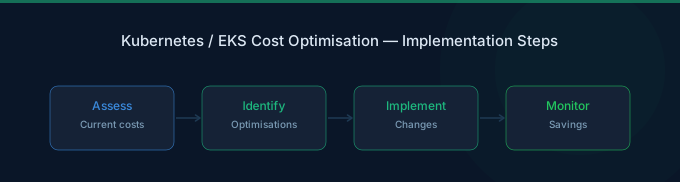
Kubernetes cost optimization is a continuous practice, not a one-time project. The biggest returns come from:
- Rightsize pods — Match requests to actual usage (25-40% savings)
- Deploy Karpenter — Intelligent node provisioning and consolidation
- Use Spot for stateless — 60-90% off for workloads that tolerate interruption
- Tag and allocate — Make teams accountable for their cluster costs
- Fix networking — VPC endpoints and shared ingress eliminate hidden costs
Lower Your Cloud Costs with Wring
Wring helps you access AWS credits and volume discounts to reduce your cloud bill. Through group buying power, Wring negotiates better per-unit rates across all AWS services.