
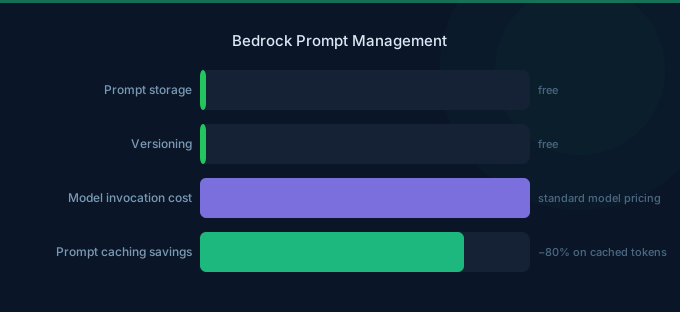
Prompts are the most important yet most fragile part of any AI application. A small wording change can dramatically improve or degrade output quality. Bedrock Prompt Management provides tools to create, version, test, and deploy prompts systematically — treating prompts as code rather than ad-hoc text strings buried in application logic.
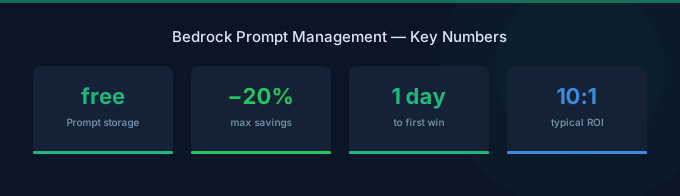
TL;DR: Bedrock Prompt Management lets you create reusable prompt templates with variables, version prompts with immutable snapshots, test prompts across multiple models, and deploy specific versions to production. There's no additional charge for prompt management — you only pay for model tokens during testing. Use prompt flows to chain multiple prompts into complex workflows. The key benefit is separating prompt iteration from code deployment.
Core Features
Prompt Templates
Create reusable templates with variable placeholders:
You are a {{role}} assistant for {{company}}.

Given the following customer inquiry:
{{customer_message}}

Respond in {{language}} following these guidelines:
- {{guideline_1}}
- {{guideline_2}}
Variables are filled at runtime, keeping the template clean and reusable across different contexts.
Prompt Versioning
| Feature | Details |
|---|---|
| Draft versions | Editable, for development |
| Published versions | Immutable snapshots for production |
| Version numbering | Automatic incremental |
| Rollback | Point production to any previous version |
Workflow: Edit a draft → test → publish as version N → deploy version N to production → iterate on new draft → publish version N+1.
Prompt Testing
Test prompts directly in the Bedrock console:
- Run the same prompt against multiple models simultaneously
- Compare output quality across Claude Haiku, Sonnet, Opus, Llama, etc.
- Measure token usage and latency per model
- Save test results for comparison
Prompt Flows
Chain multiple prompts into a workflow:
Input → Classify Intent (Prompt 1) → Route to:
  → Product Question → Answer with KB (Prompt 2a)
  → Support Request → Create Ticket (Prompt 2b)
  → Feedback → Summarize (Prompt 2c)
→ Format Output (Prompt 3) → Response
Prompt Flows provide a visual, no-code interface for building multi-step AI workflows.
Pricing
| Component | Cost |
|---|---|
| Prompt template storage | Free |
| Prompt versioning | Free |
| Prompt testing | Model token costs only |
| Prompt Flows execution | Model token costs only |
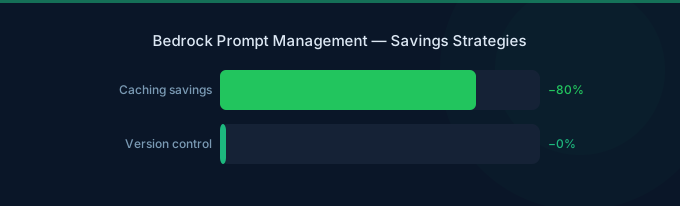
There is no additional charge for Prompt Management features. You pay only for the foundation model tokens consumed during testing and execution.
Prompt Engineering Best Practices
1. Be Specific About Output Format
Weak: "Summarize this document." Strong: "Summarize this document in exactly 3 bullet points. Each bullet should be one sentence. Start each bullet with an action verb."
Specific format instructions reduce output variability and make downstream parsing reliable.
2. Use System Prompts for Persistent Instructions
Place role definitions, guidelines, and constraints in the system prompt. Place task-specific instructions and user input in the user message. This separation enables prompt caching (system prompts are cached across requests).
3. Provide Examples for Complex Tasks
Include 2-3 examples of desired input-output pairs in your prompt. This dramatically improves consistency for:
- Classification tasks
- Structured data extraction
- Specific writing styles
4. Control Token Usage
| Technique | Token Savings |
|---|---|
Set explicit max_tokens | Prevents over-generation |
| Request concise responses | 30-50% reduction |
| Use structured output (JSON) | Eliminates prose overhead |
| Remove redundant instructions | 10-20% reduction |
| Use prompt caching | 90% on cached input |
5. Use Chain-of-Thought Selectively
Asking the model to "think step by step" improves reasoning quality but increases output tokens. Use it for complex reasoning tasks, skip it for simple extraction or classification.
Template Design Patterns
Pattern 1: Classification Template
Classify the following {{content_type}} into one of these categories:
{{categories}}

Content: {{content}}

Respond with only the category name, nothing else.
Pattern 2: Extraction Template
Extract the following information from the {{document_type}}:
{{fields_to_extract}}

Document:
{{document_content}}

Respond in JSON format with the specified fields.
Pattern 3: RAG Response Template
Answer the user's question using ONLY the provided context.
If the context doesn't contain the answer, say "I don't have enough information to answer that."

Context:
{{retrieved_documents}}

Question: {{user_question}}

Provide a concise answer with specific references to the source documents.
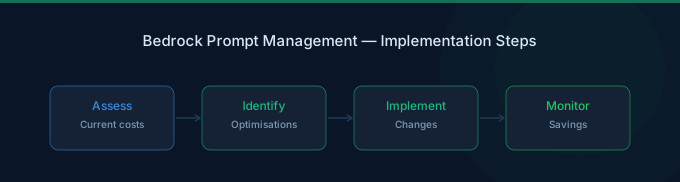
Prompt Optimization Workflow
Step 1: Establish Baseline
Create your initial prompt and test on 50-100 representative inputs. Score outputs on your quality criteria (accuracy, format compliance, helpfulness).
Step 2: Identify Failure Modes
Review low-scoring outputs. Common issues:
- Hallucinated information → Add "only use provided context" instruction
- Wrong format → Add explicit format examples
- Too verbose → Add "respond in under N words" instruction
- Missing edge cases → Add specific handling instructions
Step 3: Iterate and Compare
Create a new draft version with improvements. Test against the same inputs. Compare scores against the baseline. Publish the winning version.
Step 4: Monitor in Production
Track production outputs for quality regressions. Common causes:
- Input distribution shift (new types of user queries)
- Model updates (provider model version changes)
- Edge cases not covered in testing
Related Guides
- AWS Bedrock Pricing Guide
- AWS Bedrock Guardrails Guide
- AWS Bedrock Batch Inference Guide
- AWS Bedrock Knowledge Bases Guide
FAQ
Should I version prompts or hardcode them in my application?
Always version in Bedrock Prompt Management. This lets you iterate on prompts without deploying code, roll back quickly if quality degrades, and test new versions safely. Hardcoded prompts require a full deployment cycle for every change.
How many prompt versions should I keep?
Keep at least the current production version and the previous version (for rollback). Delete older versions to reduce clutter. Bedrock doesn't charge for stored versions, so there's no cost concern — just organizational clarity.
Can I share prompts across teams?
Yes. Prompt templates in Bedrock are account-level resources. Teams can reference the same template with different variable values. Use IAM policies to control who can create, edit, and publish prompt versions.
Lower Your Bedrock Costs with Wring
Wring helps you access AWS credits and volume discounts to lower your Bedrock costs. Through group buying power, Wring negotiates better rates so you pay less per model inference.


