
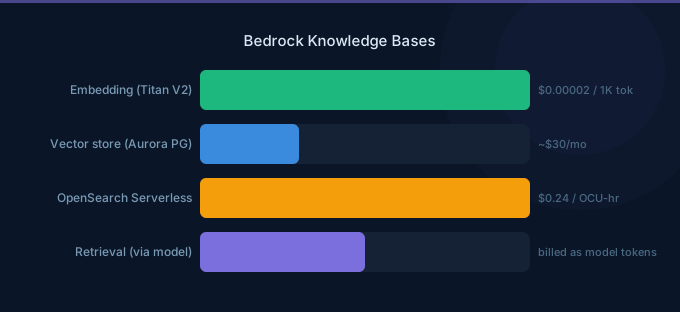
Bedrock Knowledge Bases let you build Retrieval-Augmented Generation (RAG) systems without managing vector databases, embedding pipelines, or retrieval logic yourself. You point Bedrock at your documents in S3, it automatically chunks, embeds, and indexes them, then retrieves relevant context for every query. The result: LLM responses grounded in your actual data instead of hallucinated answers.
TL;DR: Knowledge Bases automate the RAG pipeline: document ingestion, chunking, embedding, vector storage, and retrieval. You pay for embedding model tokens, vector store infrastructure (OpenSearch Serverless minimum $701/month, or Aurora PostgreSQL from ~$30/month), and the LLM model tokens for query + retrieved context. For production RAG, Knowledge Bases save weeks of custom development. For cost-sensitive setups, use Aurora PostgreSQL with pgvector instead of OpenSearch Serverless.
How Knowledge Bases Work
Documents (S3) → Chunking → Embedding (Titan/Cohere) → Vector Store → Query → Retrieve → LLM Response
- Ingest: Upload documents to S3 (PDF, TXT, HTML, CSV, DOCX, MD)
- Chunk: Bedrock splits documents into chunks (configurable size)
- Embed: Each chunk is converted to a vector using an embedding model
- Store: Vectors are stored in a vector database
- Query: User question is embedded and matched against stored vectors
- Retrieve: Top-K most relevant chunks are returned
- Generate: LLM generates an answer using retrieved chunks as context
Vector Store Options
| Vector Store | Minimum Cost | Best For |
|---|---|---|
| OpenSearch Serverless | $701/month (4 OCUs) | Large-scale, production |
| Aurora PostgreSQL (pgvector) | ~$30/month (db.t4g.medium) | Cost-sensitive, existing Aurora |
| Pinecone | $70/month (Starter) | Third-party managed |
| MongoDB Atlas | $57/month | Existing MongoDB users |
| Redis Enterprise | Varies | Low-latency requirements |
Cost warning: OpenSearch Serverless has a hard minimum of 4 OCUs (2 indexing + 2 search) at $0.24/OCU-hour = $701/month. For small knowledge bases, this is often the largest cost component.
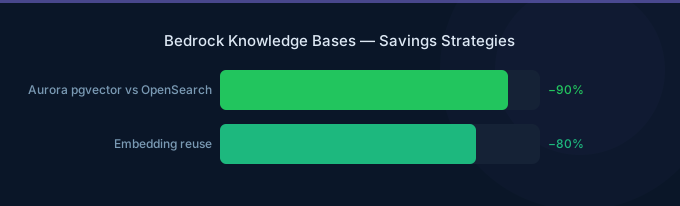
Cost-effective alternative: Aurora PostgreSQL with pgvector extension starts at ~$30/month for db.t4g.medium and handles millions of vectors efficiently.
Pricing Breakdown
Document Ingestion (One-Time)
| Component | Cost |
|---|---|
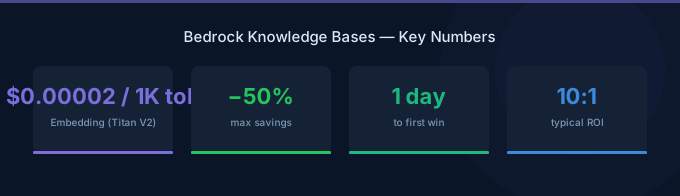
| Titan Embeddings V2 | $0.00002 per 1K tokens |
| Cohere Embed | $0.0001 per 1K tokens |
Embedding 10,000 documents (1,000 tokens average) with Titan: 10M tokens x $0.00002/1K = $0.20. Embedding is extremely cheap.
Vector Store (Ongoing)
| Store | 100K vectors | 1M vectors | 10M vectors |
|---|---|---|---|
| OpenSearch Serverless | $701/mo | $701/mo | $1,000+/mo |
| Aurora pgvector | ~$30/mo | ~$60/mo | ~$200/mo |
Query Costs
Each query incurs:
- Embedding the question: ~$0.000002 (negligible)
- Vector search: Included in vector store cost
- LLM generation: Model token cost for question + retrieved chunks
| Model | Cost per Query (500 token question + 2,000 token context + 500 token response) |
|---|---|
| Claude Haiku | $0.004 |
| Claude Sonnet | $0.016 |
| Llama 70B | $0.003 |
At 100,000 queries/month with Claude Haiku: $400/month in model costs + vector store.
Chunking Strategies
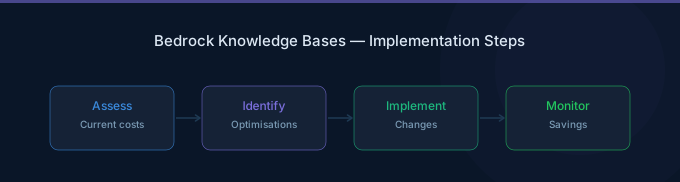
The chunking configuration directly affects retrieval quality and cost.
| Strategy | Chunk Size | Overlap | Best For |
|---|---|---|---|
| Fixed size (default) | 300 tokens | 10% | General purpose |
| Semantic | Variable | N/A | High-quality retrieval |
| Sentence-based | 1-3 sentences | 1 sentence | FAQ, short documents |
| Hierarchical | Parent + child chunks | N/A | Long documents, reports |
Recommendations:
- Start with 300-500 token chunks for general documents
- Use hierarchical chunking for long technical documents
- Set overlap to 10-20% to preserve context at boundaries
- Larger chunks increase LLM token costs but improve context quality
Architecture Patterns
Pattern 1: Simple Document Q&A
User → Bedrock KB API → Vector Search → Claude Haiku → Response
Best for: Internal knowledge bases, documentation search, FAQ systems. Cost: $400-800/month for moderate usage.
Pattern 2: Multi-Source RAG
User → Bedrock Agent → KB1 (Product docs) + KB2 (Policies) + KB3 (FAQ) → Claude Sonnet → Response
Each knowledge base can have its own data source and vector store. The Agent orchestrates which KB to query based on the question.
Pattern 3: RAG with Guardrails
User → Guardrails (input) → Bedrock KB → Claude → Guardrails (output) → Response
Guardrails filter harmful inputs and ensure outputs don't contain sensitive information from your knowledge base.
Performance Optimization
Improve Retrieval Quality
- Increase Top-K: Retrieve more chunks (5-10 instead of default 3) for complex questions
- Use metadata filters: Tag documents with categories and filter at query time
- Hybrid search: Combine vector similarity with keyword matching (OpenSearch supports this natively)
- Reranking: Enable the built-in reranker to improve relevance ordering
Reduce Costs
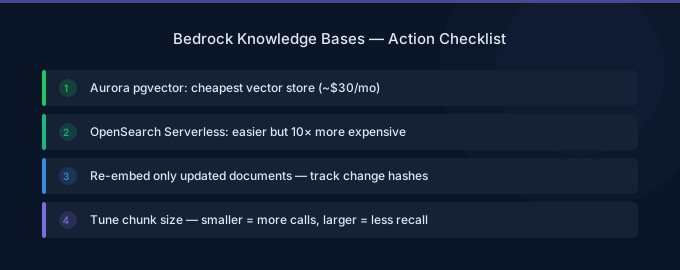
- Use Aurora pgvector instead of OpenSearch Serverless for small-medium knowledge bases
- Choose Claude Haiku for straightforward Q&A tasks
- Cache frequent queries using DynamoDB or ElastiCache to avoid repeated LLM calls
- Limit retrieved chunks — fewer chunks = fewer input tokens to the LLM
Common Pitfalls
- Choosing OpenSearch Serverless for a small KB — $701/month minimum for a knowledge base that could run on a $30/month Aurora instance
- Chunks too large — 1,000+ token chunks waste LLM tokens on irrelevant content
- Chunks too small — 50-token chunks lose context and reduce answer quality
- No metadata filtering — forcing the model to process irrelevant documents
- Ignoring ingestion sync — forgetting to re-sync after adding new documents to S3
Related Guides
- AWS Bedrock Embeddings Guide
- AWS Bedrock Agents Guide
- AWS Bedrock Pricing Guide
- AWS Bedrock Enterprise Guide
FAQ
How does Bedrock Knowledge Bases compare to building custom RAG?
Knowledge Bases save 2-4 weeks of development for the ingestion, chunking, embedding, and retrieval pipeline. The trade-off is less flexibility in chunking strategies, embedding models, and retrieval logic. For most production use cases, Knowledge Bases are sufficient.
Can I use Knowledge Bases with non-Bedrock models?
Knowledge Bases retrieval (the vector search part) can be used standalone via the Retrieve API. You can then pass the retrieved chunks to any model — including models hosted on SageMaker or external APIs.
How often should I re-sync my knowledge base?
Set up automatic sync using S3 event notifications or schedule syncs based on how frequently your documents change. For static documentation, weekly syncs are sufficient. For dynamic content, consider event-driven syncs.
Lower Your Bedrock Knowledge Bases Costs with Wring
Wring helps you access AWS credits and volume discounts to lower your Bedrock Knowledge Bases costs. Through group buying power, Wring negotiates better rates so you pay less per knowledge base query.


