
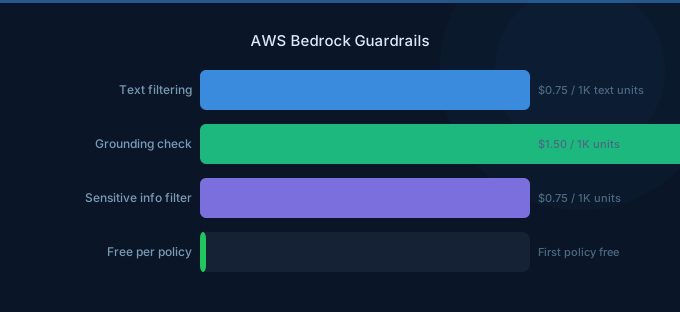
Bedrock Guardrails provide configurable safety controls that filter inputs and outputs of your AI applications. They intercept harmful content, block restricted topics, redact PII, check response grounding, and enforce custom word filters — all without modifying your application code. For any production AI application handling user input, guardrails are essential.
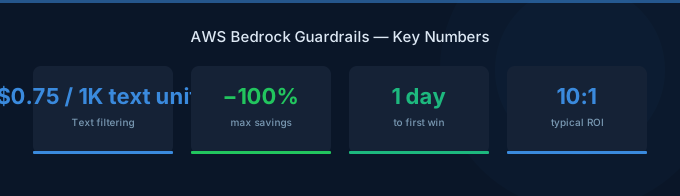
TL;DR: Guardrails apply four types of protection: content filters (hate, violence, sexual, misconduct), denied topics (custom restrictions), PII detection/redaction, and contextual grounding checks. Pricing is $0.75 per 1,000 text units (1 unit = 1,000 characters) for text, $1.00 per image. Guardrails run on both input and output, so each request is evaluated twice. For high-volume applications, guardrail costs can exceed model costs — apply them selectively.
Guardrail Components
1. Content Filters
Block content across four categories with configurable strength:
| Category | What It Catches | Strength Levels |
|---|---|---|
| Hate | Discrimination, slurs, bias | None, Low, Medium, High |
| Insults | Personal attacks, derogatory language | None, Low, Medium, High |
| Sexual | Explicit content, sexual references | None, Low, Medium, High |
| Violence | Graphic violence, threats, harm | None, Low, Medium, High |
| Misconduct | Illegal activities, self-harm | None, Low, Medium, High |
Strength levels:
- Low: Blocks only clearly harmful content
- Medium: Blocks moderate and clearly harmful content
- High: Blocks borderline, moderate, and clearly harmful content
2. Denied Topics
Custom topic restrictions specific to your application:
Examples:
- A financial advisor bot that should not give specific stock picks
- A healthcare bot that should not provide diagnoses
- A customer support bot that should not discuss competitor products
You define topics with a natural language description, and the guardrail uses the foundation model to detect when conversations drift into denied areas.
3. Sensitive Information Filters
Detect and handle PII and custom sensitive patterns:
| PII Type | Action Options |
|---|---|
| Email addresses | Block or Anonymize |
| Phone numbers | Block or Anonymize |
| SSN/Tax IDs | Block or Anonymize |
| Credit card numbers | Block or Anonymize |
| Names | Block or Anonymize |
| Addresses | Block or Anonymize |
| Custom regex patterns | Block or Anonymize |
Anonymize replaces the PII with a placeholder ([EMAIL], [PHONE]) while keeping the rest of the response.
4. Word Filters
Block specific words, phrases, or profanity. Useful for:
- Brand protection (blocking competitor names)
- Compliance (blocking regulated terms)
- Custom profanity lists
5. Contextual Grounding Check
Verifies that model responses are grounded in the provided source material (Knowledge Base results). This reduces hallucinations by flagging responses that make claims not supported by the retrieved documents.
| Component | What It Checks |
|---|---|
| Grounding | Is the response supported by source documents? |
| Relevance | Is the response relevant to the user's query? |
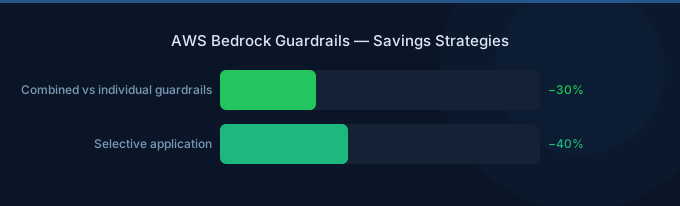
Pricing
| Component | Cost |
|---|---|
| Text guardrails | $0.75 per 1,000 text units |
| Image guardrails | $1.00 per image |
| Contextual grounding | $0.10 per 1,000 text units |
| Text unit | 1,000 characters |
Important: Guardrails evaluate both input and output. A request with 2,000 characters input and 3,000 characters output = 5 text units = $0.00375 per request.
Cost Examples
| Scenario | Monthly Volume | Guardrail Cost |
|---|---|---|
| Chatbot: 100K conversations | 500M characters | $375/month |
| Content moderation: 1M posts | 100M characters | $75/month |
| Document Q&A: 50K queries | 250M characters | $188/month |
Implementation Patterns
Pattern 1: Apply to All Requests
Attach the guardrail to your Bedrock model invocation. Every request is filtered on input and output.
Best for: Customer-facing applications where any harmful content is unacceptable.
Pattern 2: Selective Application
Apply guardrails only to specific endpoints or user types:
- User-generated input: Full guardrails
- Internal tools: Minimal or no guardrails
- Batch processing: Skip guardrails for cost savings
Pattern 3: Guardrails with Agents
Attach guardrails to Bedrock Agents. The guardrail evaluates:
- Initial user input
- Each intermediate agent response
- Final output to the user
Cost impact: Agent conversations with 5 tool calls may trigger guardrail evaluation 6+ times per conversation.
Configuration Best Practices
Start Permissive, Then Tighten
Begin with Low strength content filters and monitor what gets through. Gradually increase to Medium or High based on actual harmful content patterns. Starting at High blocks too much legitimate content.
Define Denied Topics Precisely
Vague denied topics cause false positives. Instead of "Don't discuss politics," use "Do not provide opinions on political candidates, parties, or elections. Factual information about government policies related to our product is acceptable."
Use Anonymize Over Block for PII
Blocking a response entirely when PII is detected creates a poor user experience. Anonymizing replaces PII with placeholders, allowing the response to still be useful.
Monitor Guardrail Metrics
Track in CloudWatch:
GuardrailsInvocations— total evaluationsGuardrailsTextUnitsProcessed— for cost trackingGuardrailsIntervened— how often guardrails blocked content
High intervention rates may indicate either effective protection or overly aggressive filtering.
Related Guides
- AWS Bedrock Enterprise Guide
- AWS Bedrock Agents Guide
- AWS Bedrock LLM Models Guide
- AWS Bedrock Pricing Guide
FAQ
Do guardrails add latency to responses?
Yes, approximately 100-300ms per evaluation. For streaming responses, guardrails evaluate chunks, which can add visible latency. For latency-sensitive applications, consider applying guardrails only on input (not output) or using asynchronous post-evaluation.
Can I use guardrails without Bedrock models?
Yes. The ApplyGuardrail API lets you evaluate any text against your guardrail configuration — even text from non-Bedrock models. This is useful for content moderation of user-generated content regardless of source.
How do guardrails compare to model-level safety training?
Guardrails are a complementary layer. Model-level safety (built into Claude, Llama, etc.) provides baseline protection. See the Bedrock overview for more on available models. Guardrails add application-specific rules (denied topics, custom PII patterns, brand protection) that no model training covers. Use both for defense-in-depth.
Lower Your Bedrock Guardrails Costs with Wring
Wring helps you access AWS credits and volume discounts to lower your Bedrock Guardrails costs. Through group buying power, Wring negotiates better rates so you pay less per guardrail evaluation.


