
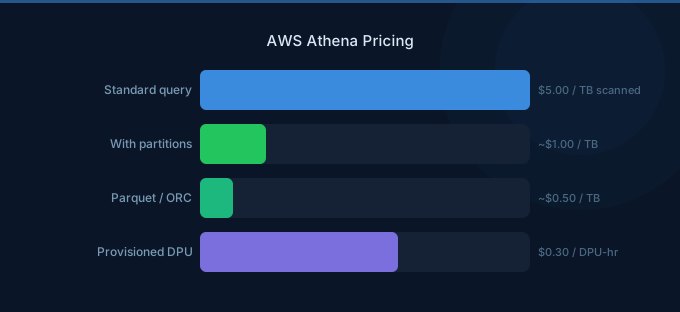
AWS Athena is a serverless interactive query service that lets you analyze data in S3 using standard SQL. With pay-per-query pricing at $5 per TB of data scanned, costs can vary wildly depending on how you structure your data and write your queries. A well-optimized Athena setup can reduce costs by up to 90%.
TL;DR: Athena charges $5 per TB of data scanned with a 10 MB minimum per query. DDL statements and failed queries are free. Convert data to Parquet or ORC format and partition your tables to reduce scanned data by 90%. For predictable workloads, Provisioned Capacity starts at $0.40 per DPU-hour (minimum 24 DPUs).
Per-Query Pricing
| Component | Free Tier | Price |
|---|---|---|
| Data scanned | None | $5.00 per TB |
| Minimum charge per query | N/A | 10 MB ($0.00005) |
| DDL statements (CREATE, ALTER, DROP) | Free | $0.00 |
| Failed queries | Free | $0.00 |
| Cancelled queries | Charged | Based on data scanned before cancellation |
How Scanning Works
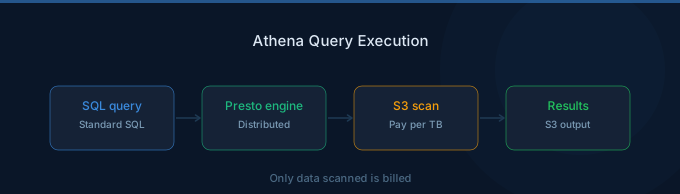
Athena charges based on the amount of data your query reads from S3, not the result set size. A SELECT * on a 100 GB CSV file costs $0.50 even if it returns only 10 rows. Cancelled queries are billed for the data scanned up to the point of cancellation.
Athena automatically recognizes compressed files and columnar formats, scanning only the columns and partitions your query references.
Provisioned Capacity
| Component | Price |
|---|---|
| DPU-hour | $0.40 per DPU-hour |
| Minimum DPUs | 24 DPUs |
| Minimum reservation | No minimum time commitment |
| Minimum hourly cost | $9.60/hour (24 DPUs) |
Provisioned Capacity is designed for teams running heavy, predictable query workloads. Instead of per-query billing, you reserve Data Processing Units (DPUs) and run unlimited queries against that capacity. Each DPU provides 4 vCPUs and 16 GB of memory.
When Provisioned Capacity Makes Sense
At $9.60 per hour (24 DPUs minimum), Provisioned Capacity breaks even at roughly 1.92 TB of scanning per hour. If your team consistently queries more than that, provisioned pricing saves money.
Data Format Impact on Costs
| Format | 1 TB Raw Data Size | Typical Scan Cost |
|---|---|---|
| CSV (uncompressed) | 1 TB | $5.00 |
| CSV (gzip compressed) | ~250 GB | $1.25 |
| Apache Parquet | ~130 GB | $0.65 (full scan) |
| Parquet + column pruning | ~15 GB | $0.075 |
| ORC compressed | ~100 GB | $0.50 (full scan) |
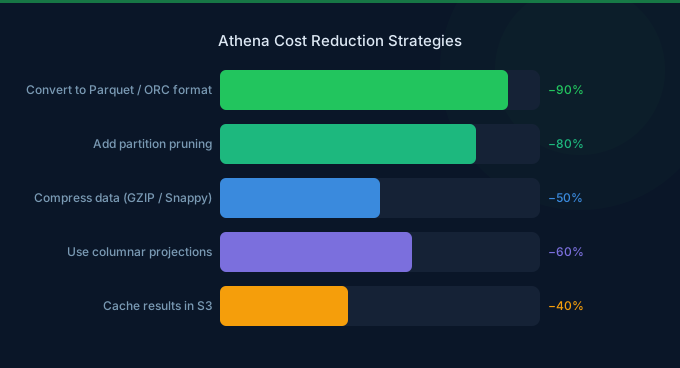
Converting from CSV to Parquet format alone typically reduces scan costs by 85-95% because Athena reads only the columns referenced in your query.
Real-World Cost Examples
| Use Case | Data Scanned/Month | Monthly Cost |
|---|---|---|
| Ad-hoc log analysis | 50 GB | $0.25 |
| Daily dashboards (10 queries, 5 GB each) | 1.5 TB | $7.50 |
| Analytics team (Parquet, partitioned) | 500 GB | $2.50 |
| Analytics team (CSV, unpartitioned) | 15 TB | $75.00 |
| Heavy ETL workloads (Provisioned) | Unlimited | $6,912 (24 DPUs) |
Athena vs Redshift Cost Comparison
| Factor | Athena | Redshift Serverless |
|---|---|---|
| Pricing model | $5/TB scanned | $0.375/RPU-hour |
| Minimum cost | $0.00 (no queries) | $0.00 (no queries) |
| Best for | Ad-hoc queries, low frequency | Frequent queries, complex joins |
| Idle cost | $0.00 | $0.00 (serverless) |
| Data format impact | Huge (use Parquet) | Moderate (data is pre-loaded) |
For infrequent, ad-hoc queries on S3 data, Athena is cheaper. For dashboards and repeated analytical queries, Redshift Serverless often costs less because it processes pre-loaded, optimized data.
Cost Optimization Tips
1. Use Columnar Formats (Parquet or ORC)
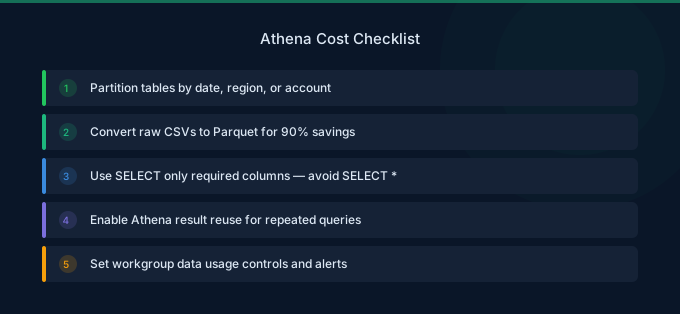
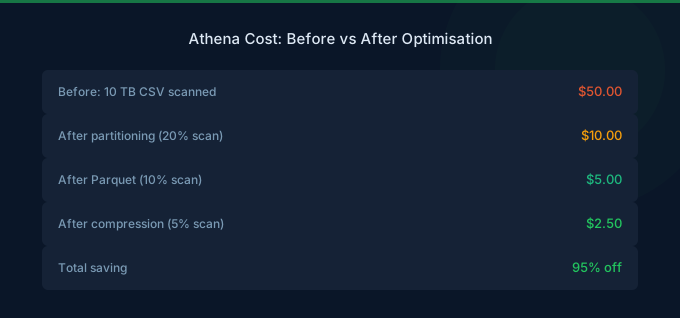
Convert CSV and JSON data to Apache Parquet or ORC using AWS Glue or Athena CTAS queries. Columnar formats compress 75-90% better and allow column pruning, which means Athena reads only the columns in your SELECT statement.
2. Partition Your Data
Partition tables by date, region, or other common filter columns. A query with WHERE year=2026 AND month=3 on a date-partitioned table scans only that month's data instead of the entire dataset.
3. Compress Your Files
Use gzip, Snappy, or ZSTD compression. Compressed CSV scans 60-75% less data than uncompressed. Combined with Parquet, compression reduces costs by up to 95%.
4. Avoid SELECT * Queries
Select only the columns you need. On Parquet data, SELECT user_id, event_type scans a fraction of what SELECT * scans.
5. Use LIMIT with CTAS for Large Explorations
When exploring unfamiliar datasets, use CREATE TABLE AS SELECT (CTAS) to materialize a small subset, then query the smaller table repeatedly instead of scanning the full dataset each time.
Related Guides
FAQ
Are DDL queries free in Athena?
Yes. CREATE TABLE, ALTER TABLE, DROP TABLE, and other DDL statements are free. You only pay when Athena scans data from S3, such as in SELECT, INSERT, or CTAS queries.
How does Athena bill for cancelled queries?
Cancelled queries are billed for the data scanned before the cancellation was processed. If Athena scanned 500 MB before you cancelled, you pay for 500 MB (rounded up to the 10 MB minimum).
Can I set a spending limit on Athena?
Athena does not have a built-in spending limit, but you can use workgroups to set per-query data scan limits (e.g., 1 GB maximum per query). Queries exceeding the limit are automatically cancelled.
Lower Your Athena Costs with Wring
Wring helps you access AWS credits and volume discounts to lower your Athena costs. Through group buying power, Wring negotiates better rates so you pay less per query.


