
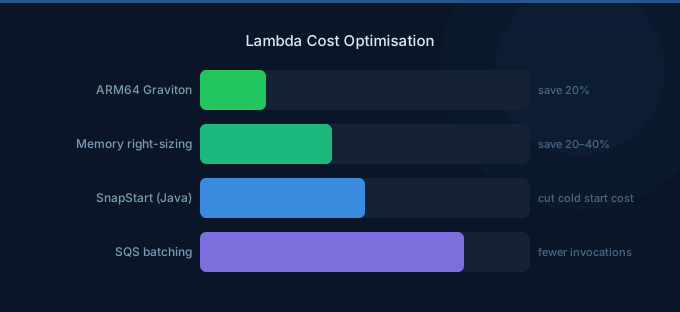
Lambda's pay-per-invocation model means you never pay for idle compute. But that doesn't mean Lambda is automatically cheap. At scale, inefficient functions — over-provisioned memory, unnecessary invocations, unoptimized code paths — add up to significant monthly spend. A function that costs $0.0001 per invocation becomes $3,000/month at 1 billion invocations.
The optimization approach for Lambda is different from EC2. You're not rightsizing instances — you're optimizing three variables: memory allocation (which determines CPU), execution duration, and invocation count.
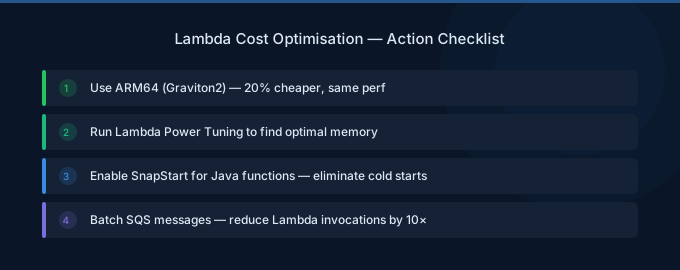
TL;DR: Lambda costs = (invocations x duration x memory price) + request charges. Optimize all three: (1) Use Power Tuning to find optimal memory — often lower memory is cheaper even if slower. (2) Switch to ARM64 for 20% savings. (3) Reduce cold starts with SnapStart (Java) instead of expensive provisioned concurrency. (4) Batch events to reduce invocations. (5) Optimize code to reduce duration. Typical savings: 30-50%.
Understanding Lambda Costs
| Component | Price | Example (1M invocations) |
|---|---|---|
| Requests | $0.20/million | $0.20 |
| Duration (x86, 512MB) | $0.0000083333/GB-second | $4.17 (at 1 sec avg) |
| Duration (ARM64, 512MB) | $0.0000066667/GB-second | $3.33 (at 1 sec avg) |
| Provisioned Concurrency | $0.0000041667/GB-second (idle) | Varies |
Key insight: Duration cost is proportional to memory allocated, not memory used. Allocating 1024MB when your function uses 256MB doubles the cost. But there's a catch — Lambda allocates CPU proportionally to memory, so sometimes more memory = faster execution = lower total cost.
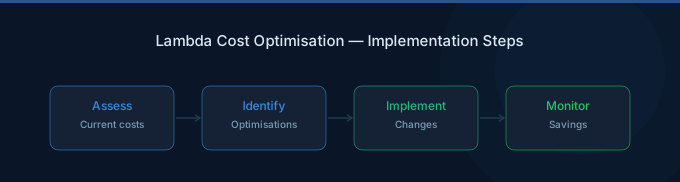
Strategy 1: Memory Right-Sizing with Power Tuning (15-40% Savings)
AWS Lambda Power Tuning is a Step Functions workflow that tests your function at different memory configurations and shows the cost-optimal setting.
How It Works
- Deploy the Power Tuning state machine (one-click from AWS SAR)
- Run it against your function with a realistic payload
- It tests 10+ memory configurations from 128MB to 10,240MB
- Returns a cost/performance curve showing the optimal setting
Common Findings
| Scenario | Default Memory | Optimal Memory | Savings |
|---|---|---|---|
| API handler (I/O bound) | 1024MB | 256MB | 75% on duration |
| Image processing (CPU bound) | 512MB | 1769MB | 40% (faster = cheaper) |
| Data transformation | 1024MB | 512MB | 50% |
| Simple webhook | 512MB | 128MB | 75% |
For I/O-bound functions (API calls, database queries): Less memory is cheaper because the function spends most time waiting, not computing. CPU speed doesn't matter.
For CPU-bound functions (image processing, data transformation): More memory can be cheaper because the function finishes faster, and the per-second cost of extra memory is offset by reduced duration.
Strategy 2: ARM64 Migration (20% Savings)
Lambda ARM64 (Graviton) is 20% cheaper per GB-second with comparable performance. Most Node.js, Python, and Go functions work on ARM64 without changes.
How: Change the architecture setting from x86_64 to arm64 in your function configuration. Test thoroughly — some native dependencies may need ARM64 binaries.
Compatibility:
- Node.js, Python, Go, Ruby, .NET 6+: Usually works immediately
- Java: Works, test native libraries
- Custom runtimes: Need ARM64 binaries
Strategy 3: Reduce Invocations (Variable Savings)
Every invocation costs $0.20 per million plus duration charges. Reducing unnecessary invocations directly cuts costs.
Batch SQS messages: Instead of processing one message per invocation, configure batch size of 10-100. One function invocation processes multiple messages.
Filter events at the source: Use EventBridge filtering or SQS message filtering to prevent Lambda from being invoked for events it will discard.
Consolidate scheduled functions: Instead of 10 Lambda functions each triggered every minute, consolidate into fewer functions with broader scope.
Use API Gateway caching: For Lambda-backed APIs, API Gateway's built-in cache prevents redundant invocations for identical requests.
Strategy 4: Optimize Code for Duration
Every millisecond of execution time costs money. Common optimization targets:
Initialize outside the handler: SDK clients, database connections, and configuration should be initialized in the global scope, not inside the handler. This code runs once per cold start, not on every invocation.
Reduce package size: Smaller deployment packages = faster cold starts = lower duration. Tree-shake dependencies, use Lambda layers for shared code.
Use connection pooling: Reuse database connections across invocations instead of creating new ones each time.
Parallelize I/O: Use Promise.all() (Node.js) or asyncio.gather() (Python) to make concurrent API/database calls instead of sequential ones.
Strategy 5: Optimize Provisioned Concurrency
Provisioned Concurrency eliminates cold starts but costs $0.0000041667/GB-second whether the function is handling requests or not. It's expensive for functions that don't need consistent sub-100ms latency.
Alternatives to Provisioned Concurrency:
- SnapStart (Java): Reduces cold starts from 5-10 seconds to under 200ms at no extra cost
- Warm-up pings: Schedule a CloudWatch Event to invoke the function every 5 minutes
- Higher memory: More memory = faster cold start initialization
If you must use Provisioned Concurrency: Use Application Auto Scaling to match provisioned concurrency to expected traffic patterns. Scale down to minimum during off-hours.
Strategy 6: Architecture-Level Optimizations
Move compute-heavy tasks off Lambda. Use AWS Cost Management to identify high-spend functions. Lambda is priced for short, event-driven tasks. Long-running or compute-heavy workloads are cheaper on Fargate or EC2.
Break-even comparison:
| Monthly Invocations | Lambda (512MB, 2s avg) | Fargate (0.25 vCPU) |
|---|---|---|
| 1M | $10 | $9 |
| 10M | $100 | $9 |
| 100M | $1,000 | $9 |
For high-volume, consistent workloads, a Fargate task running 24/7 is dramatically cheaper than Lambda.
Use Step Functions Express for orchestration. Express Workflows cost $25/million state transitions versus Standard at $25/thousand — a 1,000x difference for short-lived workflows.
Related Guides
- AWS Lambda Pricing Guide
- AWS API Gateway Pricing Guide
- AWS Fargate Cost Optimization Guide
- Cloud Rightsizing Guide
Frequently Asked Questions
How do I find the cheapest Lambda memory setting?
Use AWS Lambda Power Tuning. It tests your function at multiple memory configurations and shows the cost-optimal setting. For I/O-bound functions, lower memory is almost always cheaper. For CPU-bound functions, higher memory may be cheaper due to faster execution.
Is Lambda ARM64 always cheaper?
Yes, for supported runtimes. ARM64 is 20% cheaper per GB-second with comparable performance. The only exceptions: functions that depend on x86-only native binaries or custom runtimes without ARM64 support.
When is Lambda more expensive than Fargate?
When a function runs consistently at high volume. A Lambda function invoked millions of times per month with multi-second durations is almost always more expensive than a Fargate task running 24/7. The break-even depends on invocation count and duration, but generally: over 10M invocations/month at 1+ second duration, Fargate is cheaper.
Should I use Provisioned Concurrency?
Only if your function requires consistent sub-100ms response times AND cold starts cause unacceptable latency. Try alternatives first: SnapStart for Java, warm-up pings for other runtimes, or higher memory allocation for faster cold starts. Provisioned Concurrency is the most expensive cold start solution.
Optimize Your Lambda Costs
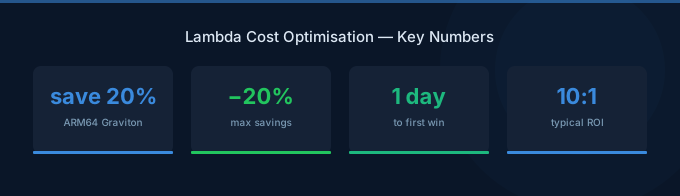
Lambda's per-invocation pricing makes every optimization impactful at scale:
- Power Tune every function — Find the cost-optimal memory setting
- Switch to ARM64 — 20% savings, usually zero code changes
- Batch and filter events — Reduce unnecessary invocations
- Optimize code — Faster execution = lower cost per invocation
- Evaluate alternatives — High-volume workloads may be cheaper on Fargate
Lower Your Lambda Costs with Wring
Wring helps you access AWS credits and volume discounts to lower your Lambda costs. Through group buying power, Wring negotiates better rates so you pay less per request.


