
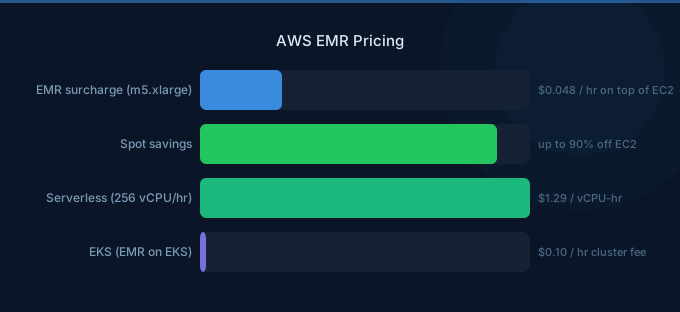
AWS EMR (Elastic MapReduce) is the primary AWS service for running Apache Spark, Hive, Presto, and other big data frameworks. EMR pricing depends on your deployment model: EMR on EC2 adds a surcharge on top of instance costs, EMR on EKS charges per vCPU and memory, and EMR Serverless bills per compute-hour. Choosing the right model and leveraging Spot instances can reduce costs by 60-90%.
TL;DR: EMR on EC2 adds a 15-25% surcharge over base EC2 pricing. An m5.xlarge costs $0.192/hr on EC2 but $0.048/hr extra for EMR (total $0.240/hr). EMR Serverless charges $0.052624/vCPU-hour and $0.0057785/GB-hour. Use Spot instances for task nodes to save 60-90% on compute costs.
EMR on EC2 Pricing
| Component | Price |
|---|---|
| EC2 instance cost | Standard EC2 On-Demand rates |
| EMR surcharge | 15-25% of EC2 instance price |
| EBS storage | Standard EBS rates |
| Data transfer | Standard AWS data transfer rates |
EMR Surcharge by Instance Family
| Instance | EC2 On-Demand/hr | EMR Surcharge/hr | Total/hr |
|---|---|---|---|
| m5.xlarge | $0.192 | $0.048 | $0.240 |
| m5.2xlarge | $0.384 | $0.096 | $0.480 |
| r5.xlarge | $0.252 | $0.063 | $0.315 |
| r5.2xlarge | $0.504 | $0.126 | $0.630 |
| c5.2xlarge | $0.340 | $0.085 | $0.425 |
| i3.xlarge | $0.312 | $0.078 | $0.390 |
The EMR surcharge covers the managed Hadoop/Spark cluster, automatic configuration, monitoring, and integration with AWS services. Instance pricing varies by region.
EMR on EKS Pricing
| Component | Price |
|---|---|
| vCPU per hour | $0.052624 |
| Memory per GB per hour | $0.0057785 |
| EKS cluster fee | $0.10/hour ($72/month) |
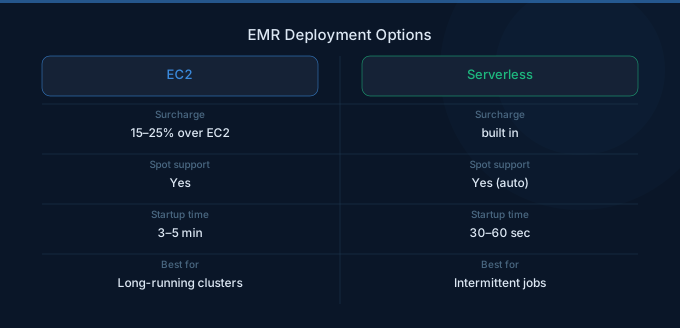
EMR on EKS runs Spark jobs on your existing EKS clusters. You pay the EMR compute charges plus the standard EKS cluster fee and underlying EC2 or Fargate costs. This model works best when you already run EKS for other workloads and want to share infrastructure.
EMR Serverless Pricing
| Component | Price |
|---|---|
| vCPU per hour | $0.052624 |
| Memory per GB per hour | $0.0057785 |
| Storage per GB per hour | $0.000111 |
| Minimum billing | 1 minute per worker |
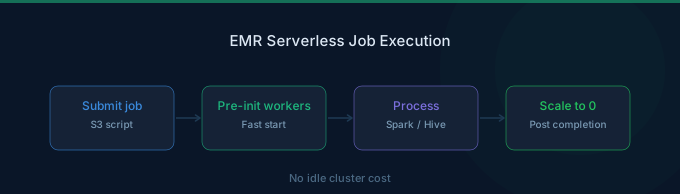
EMR Serverless automatically provisions and scales workers for your Spark and Hive jobs. There are no clusters to manage and you pay only for the resources your jobs consume, billed per second with a 1-minute minimum per worker.
EMR Serverless Cost Example
A Spark job using 10 workers with 4 vCPUs and 16 GB each for 30 minutes:
- vCPU: 10 workers x 4 vCPUs x 0.5 hours x $0.052624 = $1.05
- Memory: 10 workers x 16 GB x 0.5 hours x $0.0057785 = $0.46
- Total: $1.51
Spot Instance Savings
| Purchase Option | m5.xlarge Total/hr | Savings |
|---|---|---|
| On-Demand | $0.240 | Baseline |
| Spot (typical) | $0.090 - $0.120 | 50-63% |
| Spot (low demand) | $0.060 - $0.080 | 67-75% |
| Reserved (1-year) | $0.155 | 35% |
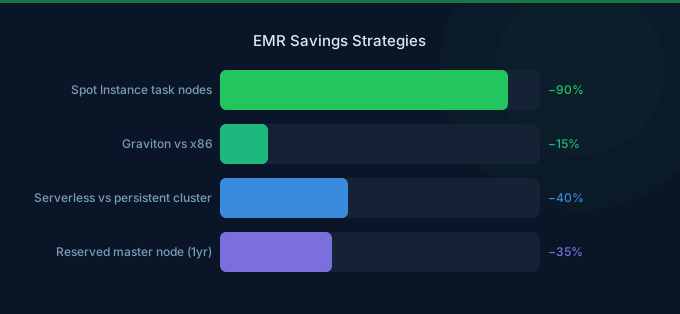
Spot instances are ideal for EMR task nodes (data processing workers). Keep the primary node and core nodes on On-Demand for cluster stability, and run task nodes on Spot with instance fleet configurations that spread across multiple instance types to reduce interruption risk.
Real-World Cost Examples
| Use Case | Configuration | Monthly Cost |
|---|---|---|
| Small ETL cluster | 1 primary + 2 core m5.xlarge, 8 hrs/day | $345 |
| Analytics cluster | 1 primary + 4 core r5.2xlarge, 24/7 | $3,024 |
| Batch Spark jobs (Serverless) | 20 vCPU, 80 GB, 4 hrs/day | $160 |
| Large Spot cluster | 1 primary + 10 task m5.2xlarge Spot, 6 hrs/day | $540 |
EMR vs Glue Cost Comparison
| Factor | EMR | AWS Glue |
|---|---|---|
| Pricing model | EC2 + surcharge or per-vCPU-hour | $0.44/DPU-hour |
| Minimum | 1 instance | 2 DPUs (10 min) |
| Best for | Long-running clusters, complex jobs | Simple ETL, catalog integration |
| Spot support | Yes (60-90% savings) | No |
| Management | More control, more effort | Fully managed |
For small, catalog-driven ETL jobs, Glue is simpler and often cheaper. For sustained Spark workloads, EMR with Spot instances typically costs 40-70% less than Glue.
Cost Optimization Tips
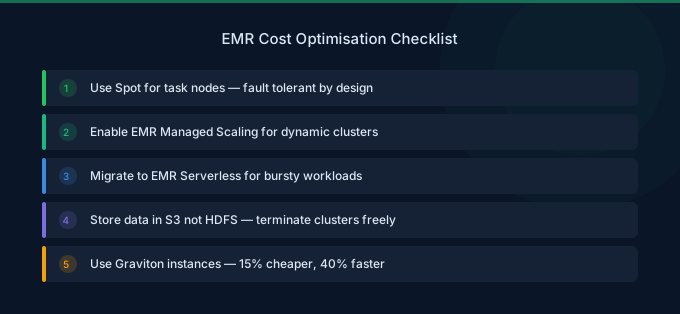
1. Use Spot Instances for Task Nodes
Run all task (data processing) nodes on Spot instances using instance fleets with 5-10 instance type alternatives. This reduces compute costs by 60-90% with minimal interruption risk.
2. Right-Size Your Cluster
Use EMR managed scaling to automatically add and remove nodes based on workload. Avoid over-provisioning by monitoring YARN memory and CPU utilization via CloudWatch.
3. Consider EMR Serverless for Batch Jobs
For jobs running less than 8 hours per day, EMR Serverless eliminates idle cluster costs. You pay only for the compute consumed during job execution.
4. Use Graviton Instances
EMR supports Graviton-based instances (m6g, r6g, c6g) that offer up to 20% better price-performance than equivalent Intel instances.
5. Optimize Storage with S3
Store data in S3 rather than HDFS on cluster EBS volumes. S3 storage costs $0.023/GB-month vs $0.10/GB-month for gp3 EBS, and decoupling storage from compute allows you to terminate clusters without losing data.
Related Guides
FAQ
Is there a free tier for AWS EMR?
There is no dedicated EMR free tier, but you can use EC2 free tier instances (t2.micro or t3.micro) as part of an EMR cluster during your first 12 months. However, these instances are too small for meaningful big data workloads.
How does EMR Serverless compare to EMR on EC2?
EMR Serverless is simpler (no cluster management) and cheaper for short-running jobs. EMR on EC2 is more cost-effective for long-running or 24/7 clusters, especially with Spot instances. EMR Serverless does not support Spot pricing.
Can I use Reserved Instances with EMR?
Yes. EC2 Reserved Instances apply to EMR clusters automatically. The EMR surcharge remains On-Demand, but the EC2 portion benefits from Reserved Instance discounts of 30-40%.
Lower Your EMR Costs with Wring
Wring helps you access AWS credits and volume discounts to lower your EMR costs. Through group buying power, Wring negotiates better rates so you pay less per compute hour.


