
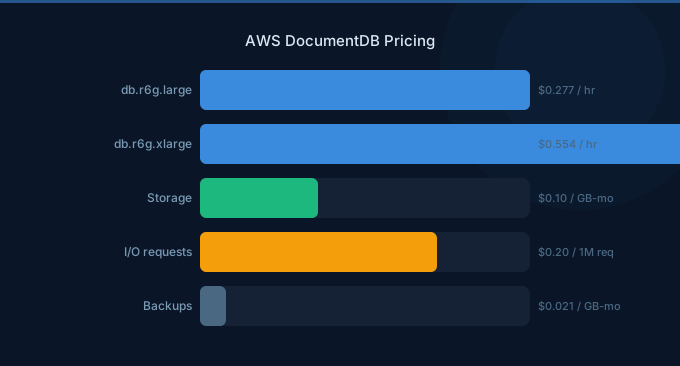
AWS DocumentDB is a fully managed, MongoDB-compatible document database designed for JSON workloads at scale. With pricing based on instances, storage, I/O, and backups, DocumentDB costs follow a similar model to Amazon Aurora. Elastic Clusters offer a newer, vCPU-based pricing option for workloads that need horizontal scaling.
TL;DR: DocumentDB instance-based pricing starts at $0.348/hr for db.r5.large (~$254/month). Storage costs $0.10/GB-month and I/O costs $0.20 per million requests. Elastic Clusters charge per vCPU-hour. For document workloads needing MongoDB compatibility with managed operations, DocumentDB is cost-effective compared to self-managed MongoDB on EC2.
Instance-Based Pricing
| Instance Type | vCPUs | Memory | Price/hr | Monthly Cost |
|---|---|---|---|---|
| db.r5.large | 2 | 16 GB | $0.348 | $254 |
| db.r5.xlarge | 4 | 32 GB | $0.696 | $508 |
| db.r5.2xlarge | 8 | 64 GB | $1.392 | $1,016 |
| db.r5.4xlarge | 16 | 128 GB | $2.784 | $2,032 |
| db.r6g.large (Graviton) | 2 | 16 GB | $0.312 | $228 |
| db.r6g.xlarge (Graviton) | 4 | 32 GB | $0.624 | $456 |
| db.t3.medium | 2 | 4 GB | $0.094 | $69 |
The db.t3.medium instance is the most affordable option for development and low-traffic workloads. For production use, r5 or r6g instances provide the memory needed for efficient document caching.
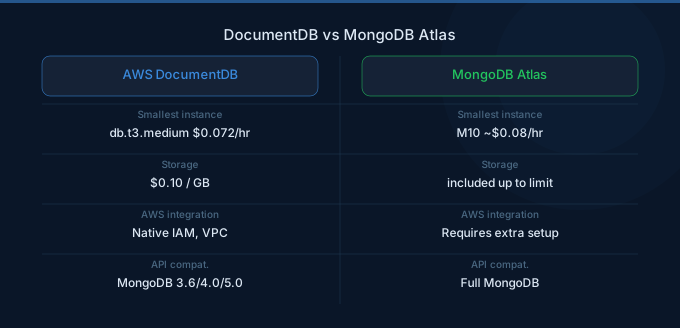
Elastic Clusters Pricing
| Component | Price |
|---|---|
| vCPU-hour | $0.1306/hr |
| Storage | $0.10/GB-month |
| I/O | $0.20 per million |
| Minimum vCPUs | 2 per shard |
| Maximum shards | 32 |
Elastic Clusters provide sharding capability for DocumentDB, distributing data across multiple shards for horizontal scaling. Pricing is based on vCPU-hours rather than instance types, giving more granular control over costs.
Elastic Clusters Cost Example
A cluster with 4 shards, each with 4 vCPUs:
- Compute: 16 vCPUs x 730 hours x $0.1306 = $1,525/month
- Storage (500 GB): $50/month
- I/O (500M requests): $100/month
- Total: ~$1,675/month
Storage and I/O Pricing
| Component | Price |
|---|---|
| Storage | $0.10/GB-month |
| I/O requests | $0.20 per million |
| Backup storage (within retention) | Free |
| Backup storage (beyond retention) | $0.021/GB-month |
| Snapshot export to S3 | $0.011/GB |
Storage Details
DocumentDB storage grows automatically in 10 GB increments up to 128 TB. Storage is replicated six ways across three Availability Zones. Unlike traditional MongoDB, you do not need to pre-allocate or manage storage volumes.
I/O Considerations
Every read and write against the storage layer generates I/O operations. Document reads, index lookups, and writes all count as I/O. For read-heavy workloads, I/O costs can become significant. Efficient indexing and query patterns minimize I/O charges.
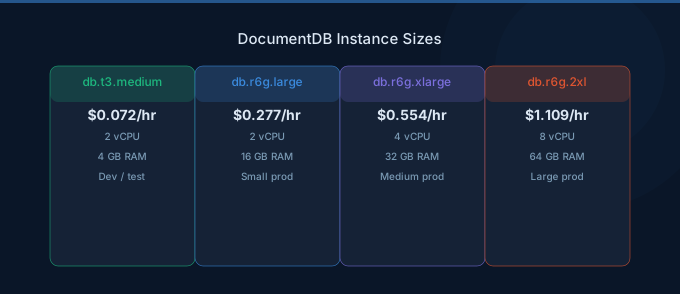
DocumentDB vs DynamoDB
| Factor | DocumentDB | DynamoDB |
|---|---|---|
| Data model | JSON documents (MongoDB API) | Key-value and document |
| Query language | MongoDB query language | DynamoDB API, PartiQL |
| Minimum monthly cost | ~$69 (db.t3.medium) | $0.00 (on-demand, free tier) |
| Scaling | Vertical (instances) or sharding | Automatic horizontal |
| Best for | Complex queries, aggregation | Simple access patterns |
| Free tier | None | 25 GB + 25 WCU/RCU |
For applications with complex queries, aggregation pipelines, and existing MongoDB code, DocumentDB provides compatibility without rewriting. For simple CRUD operations with predictable access patterns, DynamoDB offers better pricing flexibility and a free tier.
Real-World Cost Examples
| Use Case | Configuration | Monthly Cost |
|---|---|---|
| Dev/test | 1x db.t3.medium, 20 GB | $71 |
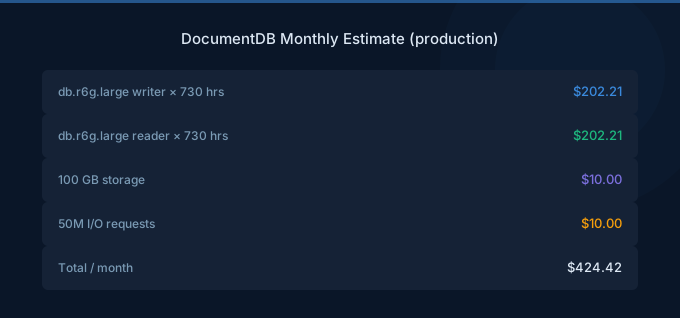
| Small production | 1x db.r6g.large + 1 replica, 100 GB | $466 |
| Content management | 1x db.r5.2xlarge + 2 replicas, 500 GB | $3,148 |
| High-throughput (Elastic) | 4 shards, 4 vCPUs each, 1 TB | $3,275 |
| Enterprise | 1x db.r5.4xlarge + 3 replicas, 2 TB | $8,528 |
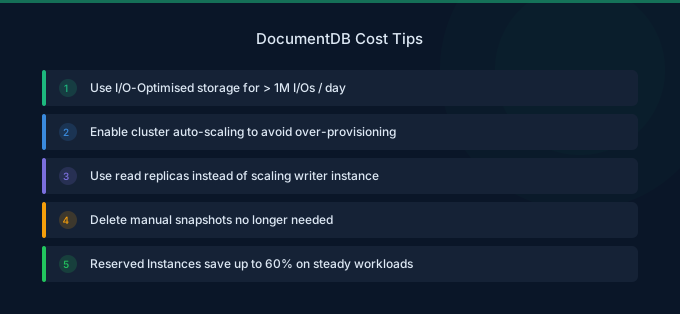
Cost Optimization Tips
1. Use Graviton Instances
Graviton r6g instances offer approximately 10% lower pricing than r5 equivalents with comparable performance. DocumentDB fully supports Graviton-based instances with no application changes required.
2. Right-Size Instances Based on Working Set
DocumentDB performs best when the working set (frequently accessed documents and indexes) fits in memory. Monitor the BufferCacheHitRatio metric. If it is consistently above 95%, you may be able to downsize. If below 90%, consider upsizing.
3. Optimize Indexes
Create indexes for your query patterns to reduce I/O. An unindexed query performs a collection scan, reading every document and generating maximum I/O charges. Review slow query logs to identify missing indexes.
4. Use Read Replicas Effectively
Distribute read traffic across up to 15 read replicas. Replicas share the same storage volume, so you pay only for additional compute, not duplicate storage.
5. Apply Reserved Instance Pricing
For stable production deployments, Reserved Instances offer up to 40% savings with 1-year commitments and up to 55% with 3-year commitments compared to On-Demand pricing.
Related Guides
- AWS RDS Pricing Guide
- AWS DynamoDB Pricing Guide
- AWS Aurora Pricing Guide
- AWS ElastiCache Pricing Guide
FAQ
Is DocumentDB fully compatible with MongoDB?
DocumentDB is compatible with MongoDB 3.6, 4.0, and 5.0 APIs. Most applications using these MongoDB versions work with DocumentDB with minimal changes. However, some advanced MongoDB features like client-side field-level encryption and change streams with full document lookup have differences. Review the AWS compatibility documentation before migrating.
Does DocumentDB have a free tier?
No. DocumentDB does not offer a free tier. The minimum cost is approximately $69/month for a db.t3.medium instance plus storage and I/O charges. For experimentation, consider using MongoDB Atlas free tier instead.
When should I use Elastic Clusters vs standard DocumentDB?
Use Elastic Clusters when your data volume or throughput exceeds what a single writer instance can handle, typically above 64 TB of data or when write throughput needs horizontal distribution across shards. Standard DocumentDB is simpler and cheaper for workloads that fit within a single instance's capacity.
Lower Your DocumentDB Costs with Wring
Wring helps you access AWS credits and volume discounts to lower your DocumentDB costs. Through group buying power, Wring negotiates better rates so you pay less per instance hour.


