
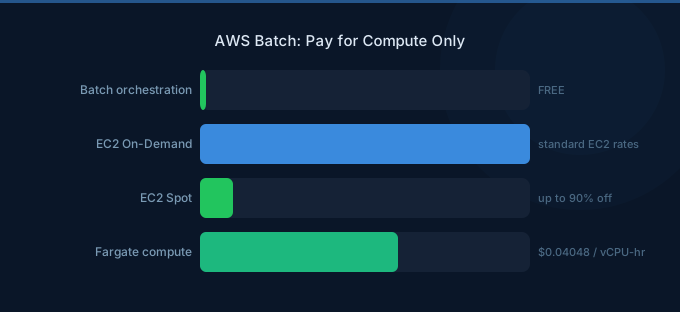
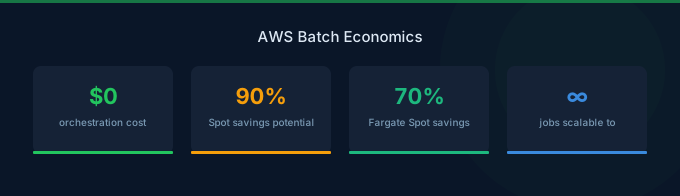
AWS Batch is a fully managed batch processing service that dynamically provisions compute resources based on your job requirements. The key pricing advantage is that AWS Batch itself is free with no additional charges. You only pay for the underlying compute resources (EC2, Fargate, or EKS) that run your jobs.
TL;DR: AWS Batch has no service fee. You pay only for EC2 or Fargate compute used by your jobs. Using Spot instances for fault-tolerant batch workloads can save 60-90% compared to On-Demand pricing. Right-size job definitions and use managed compute environments for automatic optimization.
EC2 Compute Environment Pricing
| Purchase Option | Example (c5.xlarge) | Savings vs On-Demand |
|---|---|---|
| On-Demand | $0.17/hour | Baseline |
| Spot Instances | $0.05-$0.07/hour | 60-70% |
| Reserved Instances (1-year) | $0.11/hour | 35% |
| Savings Plans (1-year) | $0.11/hour | 35% |
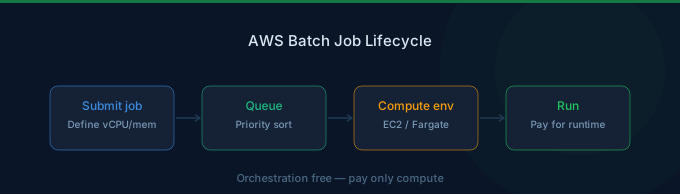
When you create a managed compute environment backed by EC2, AWS Batch automatically launches and terminates instances based on the number and resource requirements of submitted jobs. You pay standard EC2 pricing for the instances while they run.
Spot Instance Integration
AWS Batch has native Spot instance support that is ideal for batch workloads. You can set a maximum percentage of On-Demand pricing you are willing to pay (for example, 60%), and Batch will provision Spot instances across multiple instance types and availability zones to maximize capacity while minimizing cost.
For fault-tolerant jobs like data processing, rendering, or genomics analysis, Spot instances typically provide 60-90% savings. AWS Batch automatically retries jobs interrupted by Spot reclamation if you configure retry strategies.
Fargate Compute Environment Pricing
| Resource | Price |
|---|---|
| vCPU per hour | $0.04048 |
| GB memory per hour | $0.004445 |
| Ephemeral storage | $0.000111 per GB per hour (above 20 GB) |
Fargate compute environments eliminate the need to manage EC2 instances entirely. AWS Batch launches individual Fargate tasks for each job, and you pay per-second for the vCPU and memory consumed. Fargate is ideal for smaller, variable workloads where managing an EC2 fleet would be overkill.
Fargate Cost Example
A job requiring 2 vCPU and 4 GB memory running for 30 minutes costs approximately:
- vCPU: 2 x $0.04048 x 0.5 hours = $0.04048
- Memory: 4 x $0.004445 x 0.5 hours = $0.00889
- Total: $0.049 per job run
Managed vs Unmanaged Compute Environments
| Feature | Managed | Unmanaged |
|---|---|---|
| Instance provisioning | Automatic | You manage |
| Scaling | Automatic | You configure |
| Spot support | Built-in | Manual setup |
| Cost optimization | AWS handles instance selection | Full control |
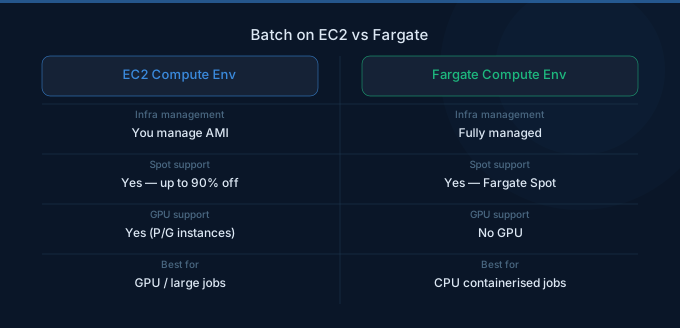
| Best for | Most workloads | Custom AMIs, GPU scheduling |
Managed compute environments let AWS Batch handle instance type selection, scaling, and Spot integration automatically. Unmanaged environments give you full control over the EC2 instances but require manual scaling configuration.
For most batch processing workloads, managed environments with Spot instances provide the best cost-to-performance ratio.
Multi-Node Parallel Job Costs
Multi-node parallel jobs run across multiple EC2 instances simultaneously for tightly coupled HPC workloads. Pricing is based on the total EC2 instance hours consumed across all nodes.
| Job Configuration | Instances | Duration | Approximate Cost (On-Demand) |
|---|---|---|---|
| 4 nodes, c5.2xlarge | 4 | 2 hours | $2.72 |
| 16 nodes, c5.4xlarge | 16 | 1 hour | $10.88 |
| 64 nodes, c5.18xlarge | 64 | 4 hours | $784.64 |
Multi-node jobs require EC2 instances (not Fargate) and benefit from placement groups for low-latency networking. EFA (Elastic Fabric Adapter) is available at no extra charge on supported instance types.
Real-World Cost Examples
| Use Case | Compute Type | Monthly Volume | Monthly Cost |
|---|---|---|---|
| Nightly data ETL | Fargate (2 vCPU, 4 GB) | 30 jobs, 1 hr each | $2.94 |
| Video transcoding | EC2 Spot (c5.2xlarge) | 500 hours | $50-$70 |
| Machine learning training | EC2 On-Demand (p3.2xlarge) | 200 hours | $612 |
| Genomics pipeline | EC2 Spot (r5.4xlarge) | 2,000 hours | $500-$800 |
| Financial risk simulation | Multi-node (c5.9xlarge x 8) | 100 hours | $1,224 |
Cost Optimization Tips
1. Use Spot Instances for Fault-Tolerant Jobs
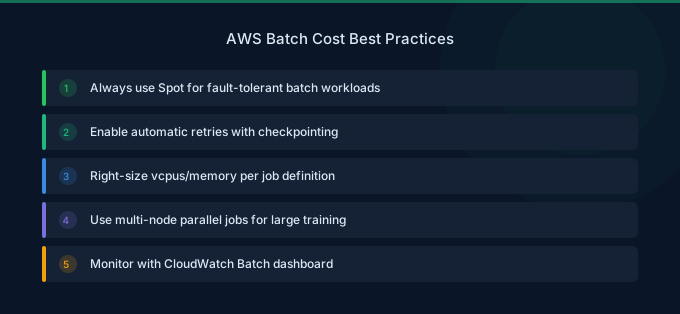
Configure your managed compute environment to use Spot instances with a mix of instance types. AWS Batch will automatically select the most cost-effective instances available. Set retry strategies with 2-3 attempts to handle Spot interruptions gracefully.
2. Right-Size Job Definitions
Specify accurate vCPU and memory requirements in your job definitions. Oversized resource requests waste capacity. Use CloudWatch Container Insights to monitor actual resource utilization and adjust job definitions accordingly.
3. Use Allocation Strategies
Set the allocation strategy to BEST_FIT_PROGRESSIVE for On-Demand or SPOT_CAPACITY_OPTIMIZED for Spot instances. These strategies let AWS Batch select instance types that best match your job requirements while minimizing cost and interruptions.
4. Set Maximum vCPUs on Compute Environments
Always configure a maxvCpus limit on your compute environments to prevent runaway costs from unexpected job submissions. Without a cap, a burst of job submissions could launch hundreds of instances.
5. Schedule Jobs During Off-Peak Hours
Spot instance prices fluctuate based on demand. Running batch jobs during off-peak hours (nights and weekends) often yields lower Spot prices and fewer interruptions, reducing overall costs by an additional 10-20%.
Related Guides
- AWS EC2 Pricing Guide
- AWS Fargate Pricing Guide
- AWS Lambda Pricing Guide
- AWS Step Functions Pricing Guide
FAQ
Is there any charge for AWS Batch itself?
No. AWS Batch is free to use. There is no charge for creating compute environments, job queues, or job definitions. You only pay for the underlying EC2, Fargate, or EKS compute resources that your jobs consume.
Should I use EC2 or Fargate compute environments?
Use Fargate for small, short-running jobs where you want zero infrastructure management. Use EC2 for large-scale processing, GPU workloads, or when Spot savings are critical. EC2 environments offer more flexibility and typically lower per-unit costs at scale.
How does Spot interruption handling work in AWS Batch?
When a Spot instance is reclaimed, AWS Batch automatically terminates the running job and can retry it on a new instance if you have configured retry strategies. Jobs with checkpointing support can resume from the last saved state, minimizing wasted compute.
Lower Your Batch Processing Costs with Wring
Wring helps you access AWS credits and volume discounts to lower your batch compute costs. Through group buying power, Wring negotiates better rates so you pay less per instance hour.


