
EFS is AWS's managed NFS file system — shared storage that multiple EC2 instances, ECS tasks, EKS pods, and Lambda functions can mount simultaneously. It's elastic (grows and shrinks automatically), fully managed, and persistent. But it's also one of the most expensive storage options on AWS when not optimized properly.
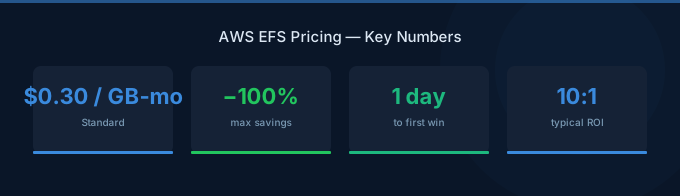
The pricing trap: EFS Standard at $0.30/GB/month looks reasonable until you realize that EBS gp3 costs $0.08/GB/month and S3 costs $0.023/GB/month. You're paying 4-13x more for the convenience of a shared file system. The optimization goal is to keep data in the cheapest EFS storage class possible and avoid throughput charges that can double your bill.
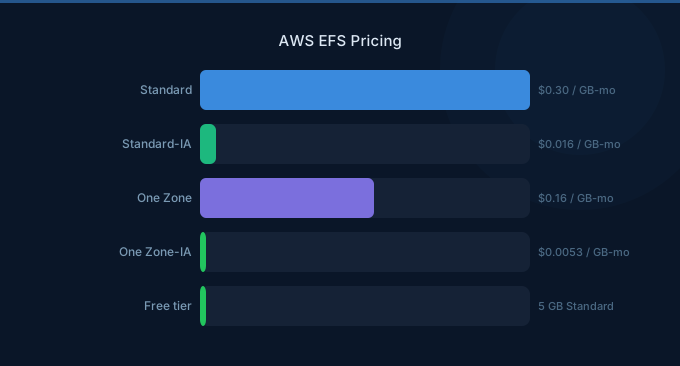
TL;DR: EFS Standard: $0.30/GB/month. EFS Infrequent Access: $0.016/GB/month + $0.01/GB access fee. EFS One Zone: 47% cheaper than Multi-AZ. Enable Intelligent-Tiering to automatically move cold data to IA class. Use Elastic Throughput to avoid paying for provisioned throughput you don't use. For most workloads, enabling lifecycle management and One Zone (for non-critical data) reduces EFS costs 50-70%.
EFS Storage Class Pricing
Storage Pricing Detail
| Storage Class | Storage Cost | Read Access | Write Access | Best For |
|---|---|---|---|---|
| Standard (Multi-AZ) | $0.30/GB/mo | Free | Free | Frequently accessed files |
| Standard (One Zone) | $0.16/GB/mo | Free | Free | Dev/test, non-critical data |
| Infrequent Access (Multi-AZ) | $0.016/GB/mo | $0.01/GB | $0.01/GB | Rarely accessed files |
| Infrequent Access (One Zone) | $0.0133/GB/mo | $0.01/GB | $0.01/GB | Cold data, backups |
| Archive | $0.008/GB/mo | $0.03/GB | $0.03/GB | Compliance, long-term storage |
Throughput Pricing
| Mode | Cost | Best For |
|---|---|---|
| Elastic (default) | $0.04/GB read, $0.08/GB write (over baseline) | Variable throughput needs |
| Bursting | Included with storage (baseline: 50 MiB/s per TB) | Small file systems with burst needs |
| Provisioned | $6.00/MiB/s/month | Consistent high throughput |
Elastic Throughput is the recommended default. You pay only for throughput you actually use above the baseline. Provisioned Throughput makes sense only for workloads that need guaranteed high throughput consistently.
Real-World Cost Examples
Web Application Shared Storage (100GB, mostly static assets)
| Configuration | Monthly Cost |
|---|---|
| Standard Multi-AZ (100GB) | $30.00 |
| With Intelligent-Tiering (70% moves to IA) | $11.28 |
| One Zone + Intelligent-Tiering | $7.08 |
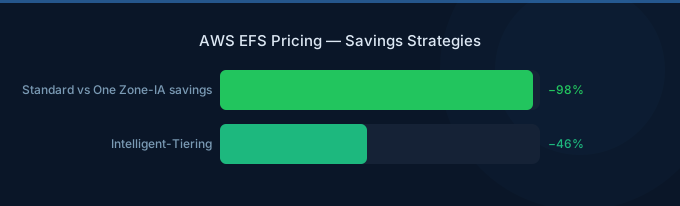
Intelligent-Tiering alone saves 62%. Adding One Zone saves 76%.
Container Shared Volume (500GB, mixed access patterns)
| Configuration | Monthly Cost |
|---|---|
| Standard Multi-AZ (500GB) | $150.00 |
| Intelligent-Tiering (50% to IA) | $83.00 |
| One Zone + Intelligent-Tiering | $48.65 |
| With Provisioned Throughput (100 MiB/s) | + $600.00 |
Warning: Provisioned Throughput at $6/MiB/s/month can quadruple your EFS bill. Only provision if you consistently need throughput above the Elastic baseline.
Machine Learning Training Data (2TB, read-heavy)
| Configuration | Monthly Cost |
|---|---|
| Standard Multi-AZ (2TB) | $600.00 |
| Standard One Zone (2TB) | $320.00 |
| Consideration: S3 + FSx for Lustre | ~$150 (S3) + $140/TB (FSx) = $430 |
For ML training data, S3 with FSx for Lustre (mounted as a file system during training) is often cheaper than EFS at scale.
EFS vs EBS vs S3: When to Use Each
| Factor | EFS | EBS | S3 |
|---|---|---|---|
| Price per GB | $0.016-0.30 | $0.08 (gp3) | $0.023 |
| Shared access | Yes (multi-instance) | No (single instance) | Yes (via API) |
| File system interface | NFS (POSIX) | Block (ext4/xfs) | Object (API/SDK) |
| Latency | ~1-5ms | ~0.5-1ms | ~50-100ms |
| Throughput | Up to 10+ GiB/s | Up to 4,000 MiB/s (io2) | Virtually unlimited |
| Auto-scaling | Yes (elastic) | No (fixed provisioned size) | Yes |
| Best for | Shared app files | Single-instance databases | Large data sets, backups |
Use EFS when: Multiple instances need to read/write the same files simultaneously (shared configuration, CMS uploads, container volumes).
Use EBS when: A single instance needs high-performance block storage (databases, application servers, boot volumes).
Use S3 when: You're storing objects accessed via API, data doesn't need a POSIX file system, or you need the lowest cost per GB.
Optimization Strategies
1. Enable Intelligent-Tiering (Biggest Impact)
EFS Intelligent-Tiering automatically moves files not accessed for 14-90 days to the Infrequent Access class. This is the single most impactful optimization:
- Set lifecycle policy to move files to IA after 14 days (aggressive) or 30 days (conservative)
- Files moved to IA cost 95% less per GB
- Files are automatically moved back to Standard on access
- The $0.01/GB access fee is offset by massive storage savings for rarely accessed data
Expected savings: 40-70% depending on access patterns.
2. Use One Zone for Non-Critical Data
One Zone EFS eliminates cross-AZ replication, reducing costs 47%:
| Use Case | Multi-AZ | One Zone |
|---|---|---|
| Production application data | Yes (high availability) | No |
| Dev/test environments | No | Yes |
| Temporary processing data | No | Yes |
| Backups (with separate backup strategy) | No | Yes |
| ML training data | No | Yes |
3. Choose the Right Throughput Mode
- Elastic Throughput (default): Best for most workloads. Pay only for what you use.
- Bursting: Only if your throughput needs are very low and you want no per-operation charges.
- Provisioned: Only if you consistently need throughput above baseline AND Elastic would cost more.
Calculate: if you need 200 MiB/s consistently, Provisioned costs $1,200/month. Check if Elastic Throughput at $0.04/GB-read would cost less based on your actual data transfer volume.
4. Consider Alternatives for Large Data
For data sets over 1TB, evaluate alternatives:
- S3 + application-level caching — 10x cheaper per GB
- FSx for Lustre — Higher throughput for ML/HPC at $0.14/GB
- EBS with NFS server — Manual but can be cheaper for specific workloads
Related Guides
Frequently Asked Questions
How much does EFS cost per month?
EFS costs depend on storage amount and class. 100GB of Standard Multi-AZ storage costs $30/month. With Intelligent-Tiering moving 70% to IA, the same 100GB costs approximately $11/month. One Zone variants reduce costs another 47%.
Is EFS more expensive than EBS?
Yes, significantly. EFS Standard costs $0.30/GB/month versus EBS gp3 at $0.08/GB/month — nearly 4x more expensive. But EFS provides shared access (multiple instances), automatic scaling, and managed infrastructure. Pay the premium only when you need shared file system access.
When should I use EFS Infrequent Access?
Enable EFS lifecycle management to automatically move files to IA after 14-30 days of no access. This works well for: log archives, old uploads, configuration backups, and any data accessed less than monthly. The $0.016/GB storage cost plus $0.01/GB access fee is cheaper than Standard for files accessed less than once every 2 weeks.
Can I use EFS with containers?
Yes. EFS works with ECS (Fargate and EC2), EKS, and Lambda. It's the primary shared storage option for Fargate since Fargate doesn't support EBS volumes directly. Mount EFS as a persistent volume for shared data across containers.
Optimize Your EFS Costs
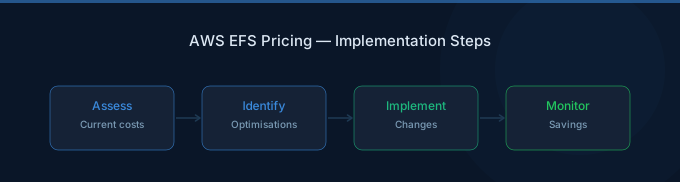
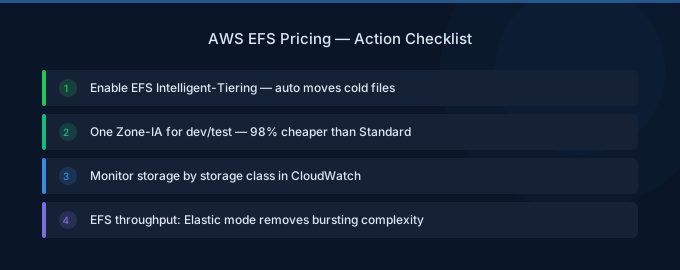
EFS is powerful shared storage but expensive if left on defaults. The optimization path:
- Enable Intelligent-Tiering — Move cold data to IA automatically (40-70% savings)
- Use One Zone — For non-critical data (47% savings)
- Use Elastic Throughput — Avoid paying for provisioned throughput you don't need
- Evaluate alternatives — S3 or FSx for large datasets where EFS isn't required
- Monitor access patterns — CloudWatch metrics show how much data is in each tier
Lower Your EFS Costs with Wring
Wring helps you access AWS credits and volume discounts to lower your EFS costs. Through group buying power, Wring negotiates better rates so you pay less per GB.


